
If your ChatGPT payment keeps failing in Turkey, you’re not alone. Many users have valid bank cards, yet checkout still fails. This guide shows you how to pay for ChatGPT subscription in Turkey, why payments often fail, and the easiest fix.
Quick Answer
How do you pay for a ChatGPT subscription in Turkey?
You can pay with a Turkish credit or debit card, through the Apple App Store, through Google Play, or with a virtual dollar card like EverTry. If your Turkish bank card keeps getting declined, a virtual USD card is often the simplest fix. It’s built for international, recurring charges; the exact kind of payment that trips up many local cards.
Can You Subscribe to ChatGPT in Turkey?
Is ChatGPT available in Turkey?
Yes. ChatGPT is fully available to users in Turkey. There is no need for a VPN to access the tool itself.
Which plans can you subscribe to?
- Free
- Plus
- Team
- Pro (where available)
What payment methods does OpenAI accept?
OpenAI accepts virtual cards, credit cards, debit cards, and in-app purchases through the Apple App Store or Google Play. Web payments go through OpenAI’s payment processor, Stripe.
Does OpenAI charge every month?
Yes. ChatGPT Plus, Team, and Pro are recurring subscriptions. Your card is charged automatically each month unless you cancel.
ChatGPT Plus Price in Turkey (2026)
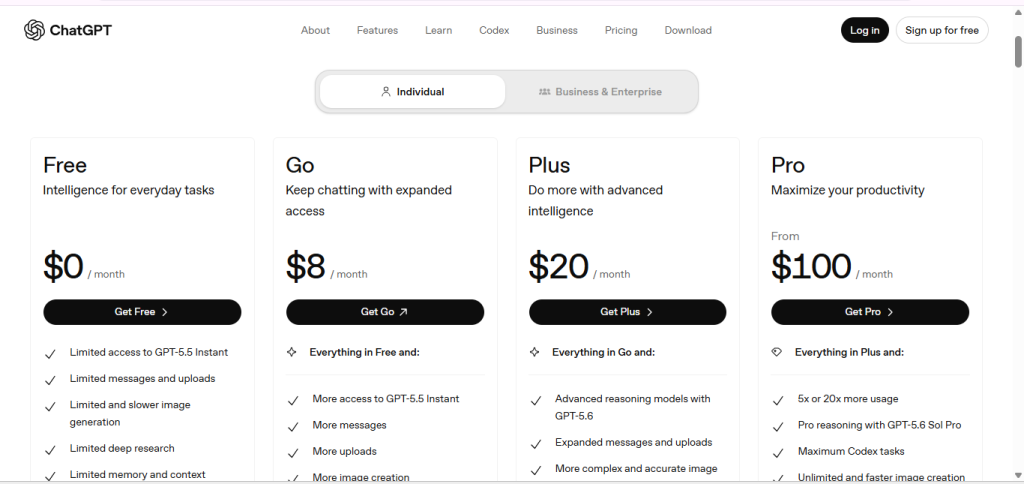
$8 for Go, $20 for Plus and $100 for Pro. However, Turkish pricing for ChatGPT has changed more than once this year, and different sources currently show different numbers. Rather than guess, treat any number you see online as a starting point, not a final figure.
Is the price in TRY or USD?
OpenAI sets the base price in US dollars. On the web, you’re often charged in USD. Through the Turkish App Store or Google Play, the price shows in Turkish lira, and that lira amount can shift when OpenAI updates regional pricing.
Are taxes included?
Turkey applies a digital services tax to purchases like this. Some listed prices already include it. Others add it at checkout. Check the final total before confirming.
Can the price change?
Yes, and it has. Prices in Turkey have moved more than once in 2026 alone, in both directions. Always check the current price on OpenAI’s official pricing page before you subscribe.
Why ChatGPT Payments Fail in Turkey
This is the part most guides skip. If you’re trying to pay for a ChatGPT subscription in Turkey and your card keeps failing, one of these is usually why.
1. Your bank blocks recurring USD charges
ChatGPT bills in US dollars every month. Some Turkish banks flag repeat charges from a foreign biller as suspicious, especially the second or third time it tries to bill you.
2. International transactions are turned off
Many Turkish cards ship with international payments switched off by default. If yours is off, checkout will fail even with a valid card.
3. Your card issuer declines the charge
Banks use fraud filters. A first-time charge from OpenAI or Stripe can get flagged and blocked automatically, with no clear reason given to you or to OpenAI.
4. Debit cards fail more than credit cards
Debit cards are declined for online subscriptions more often than credit cards. If you have both, try the credit card first.
5. Stripe’s own security checks
Stripe, OpenAI’s payment processor, runs its own risk checks. A card that works fine elsewhere can still get flagged here.
6. Currency mismatch
If your card is lira-only and the charge is billed in USD, some banks reject the conversion outright.
7. An expired card
This one’s simple, but it happens more than you’d think, especially on auto-renewals.
8. Not enough balance
Even a small shortfall (enough to cover the fee but not a pending hold) can cause a decline.
9. A failed 3D Secure check
If your bank requires extra verification and that step doesn’t complete properly, the payment fails even if everything else is correct.
How to Pay for ChatGPT Subscription in Turkey Using EverTry
If your local card keeps failing, a virtual dollar card solves the root problem instead of one symptom at a time. EverTry gives you a USD-denominated card built for exactly this kind of payment: international, recurring, billed in dollars.
Here’s what that gets you:
- A real USD card, so there’s no currency mismatch at checkout.
- Fund it your way, with Turkish lira or with USDT.
- Fast setup, most users get a working card in under 15 minutes after verification.
- Built for recurring billing, so your subscription renews without a fresh fight each month.
- No borrowed cards, you don’t need to ask a friend abroad to pay for you.
Step-by-Step: How to Pay for ChatGPT Subscription in Turkey
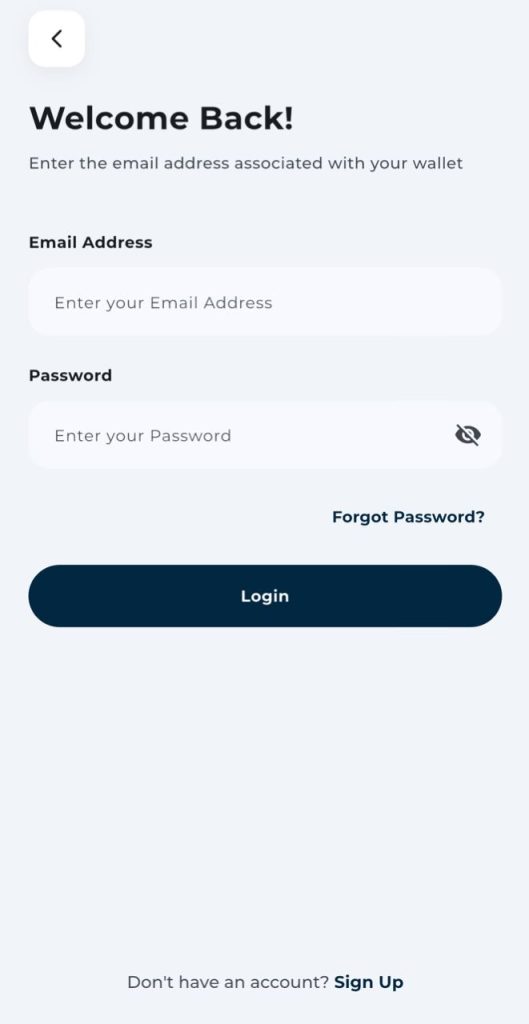
Step 1: Create your EverTry account
Sign up with your email and basic details. This takes a couple of minutes.
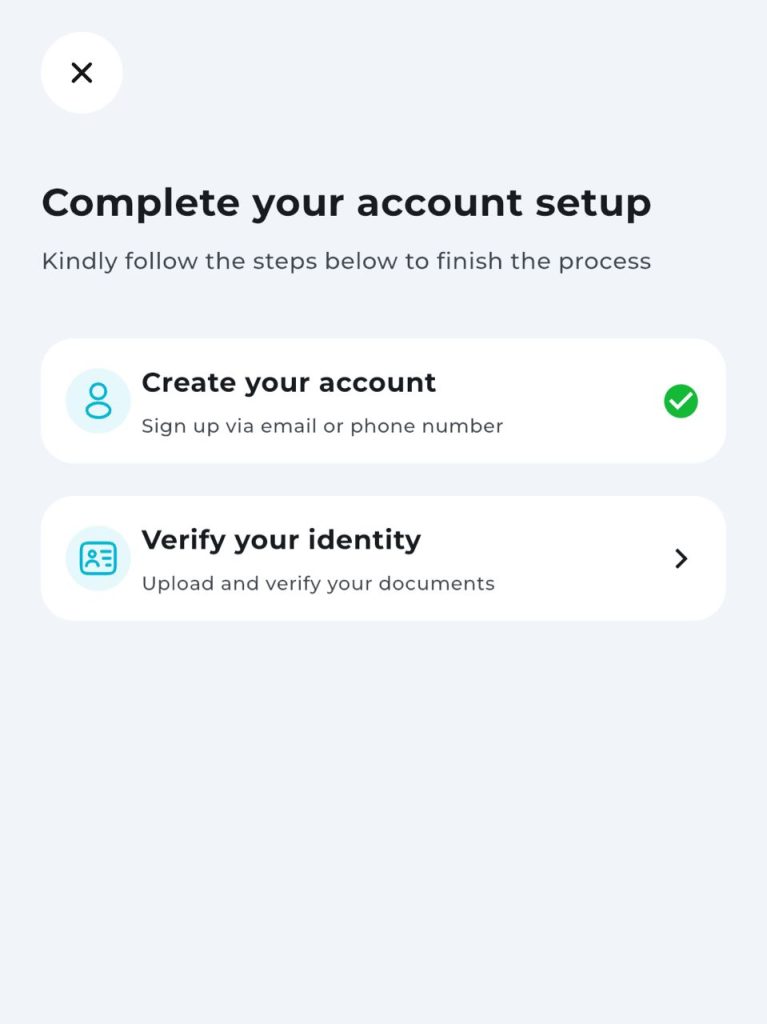
Step 2: Complete KYC verification
Upload a valid ID for identity verification. Approval is typically fast, often within minutes to a few hours depending on volume.
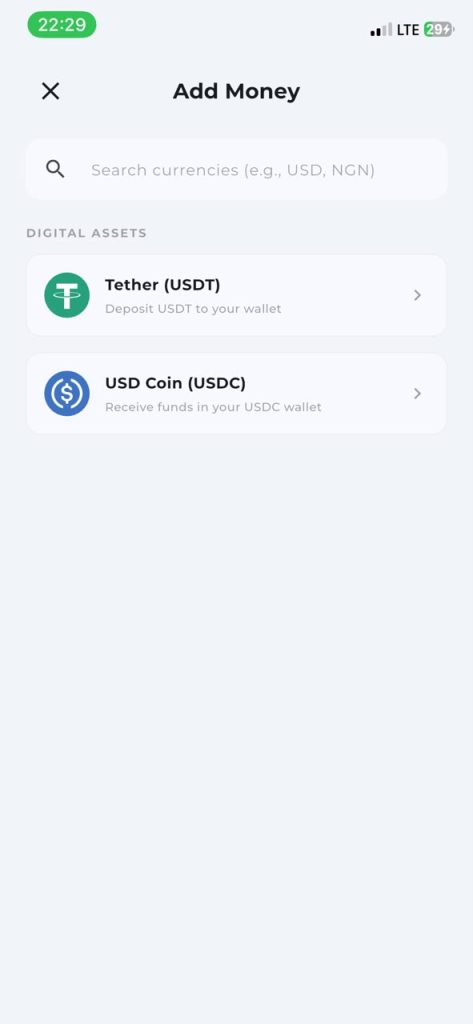
Step 3: Fund your wallet
Add money using:
- Turkish lira, where supported
- USDT
- USDC
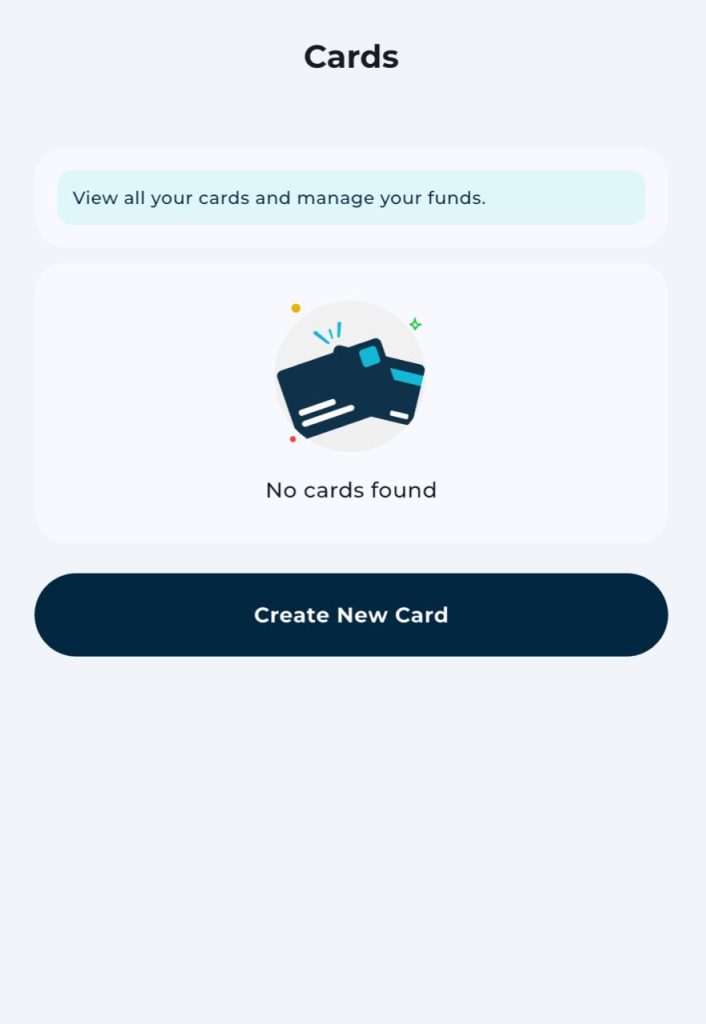
Step 4: Create your virtual dollar card
Once your wallet has a balance, generate a virtual USD card from your dashboard. It’s ready to use right away.
Step 5: Go to ChatGPT’s billing page
Head to chatgpt.com → Settings → Subscription → Upgrade → Payment Method.
Step 6: Enter your EverTry card details
Add the card number, expiry date, and CVV, just like any other card.
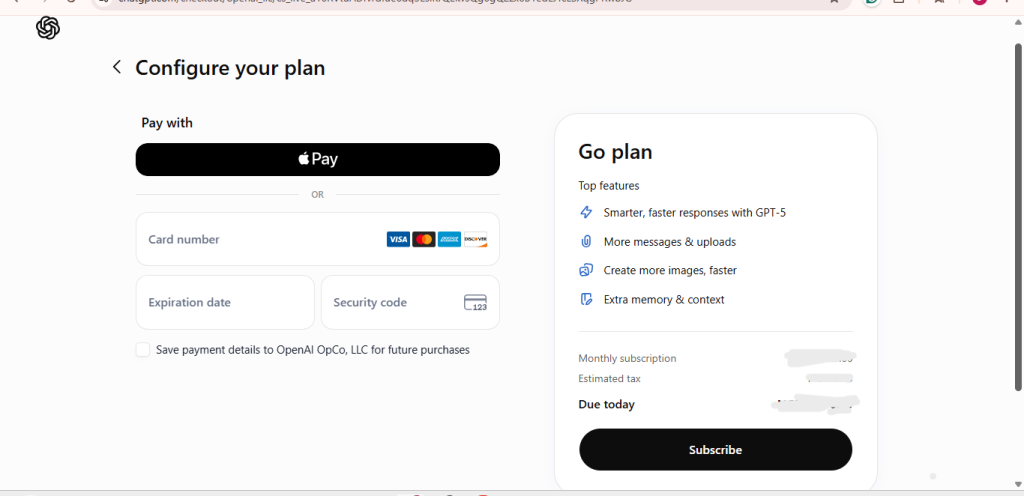
Step 7: Confirm your subscription
Complete checkout. Your ChatGPT plan activates immediately, and future renewals bill automatically to the same card.
Other Ways to Pay for ChatGPT in Turkey
| Payment Method | Works for ChatGPT | Pros | Cons |
|---|---|---|---|
| Turkish Credit Card | Usually | Convenient, no setup | Can fail on recurring charges |
| Turkish Debit Card | Sometimes | Widely held | Higher decline rate |
| Apple App Store | Yes | Simple for iPhone users | May include extra Apple fees |
| Google Play | Yes | Easy for Android users | Only works for in-app purchase |
| EverTry Virtual Dollar Card | Yes | Built for international, recurring billing | Requires a quick one-time setup |
Why EverTry Works Well for ChatGPT Payments
Built for global subscriptions: The card is issued in USD, matching how ChatGPT actually bills you.
Handles recurring charges: Monthly renewals are exactly what this card type is designed for.
Flexible funding: Top up with lira or with USDT, whichever is easier for you.
No bank branch needed: The entire setup happens online.
Useful beyond ChatGPT: The same card also works for services like Canva, Google Workspace, Adobe, Notion, and Midjourney.
Common ChatGPT Payment Errors and Fixes
| Error | Likely Cause | Fix |
|---|---|---|
| Card Declined | Bank restriction | Use an international virtual card |
| Payment Failed | Authorization issue | Confirm card details, then retry |
| Insufficient Funds | Low wallet balance | Top up before retrying |
| Currency Error | Card doesn’t support USD | Use a USD virtual card |
| Renewal Failed | Recurring billing blocked | Switch to a card built for recurring charges |
| Authentication Failed | 3D Secure issue | Verify directly with your bank |
Tips for a Smooth ChatGPT Subscription in Turkey
- Turn on international transactions for your card.
- Confirm recurring payments are allowed on your account.
- Keep a small buffer in your balance, not just the exact fee.
- Double-check your billing details before submitting.
- Skip payment methods that aren’t officially supported.
- Use a virtual dollar card if your local card keeps failing.
Frequently Asked Questions
How do I pay for a ChatGPT subscription in Turkey?
Use a Turkish credit or debit card, the Apple App Store, Google Play, or a virtual dollar card such as EverTry.
Can I use a Turkish debit card for ChatGPT?
Sometimes. Debit cards fail more often than credit cards on this kind of recurring charge.
Why does my ChatGPT payment keep failing in Turkey?
Usually a bank block on recurring USD charges, international payments switched off, or a failed 3D Secure check.
Does ChatGPT accept virtual cards?
Yes, as long as the card supports online, USD-based transactions.
Can I pay for ChatGPT with USDT?
Not directly. But you can fund an EverTry wallet with USDT, then use the resulting virtual dollar card to pay.
Is ChatGPT available in Turkey?
Yes, fully. No VPN is needed to use the product.
How much is ChatGPT Plus in Turkey right now?
$8 for Go, $20 for Plus and $100 for Pro. Check OpenAI’s official pricing page for today’s number before subscribing.
Does OpenAI charge in Turkish lira?
It depends on the channel. Web payments are often USD-based; App Store and Google Play purchases usually show in lira.
Can I subscribe through the Apple App Store?
Yes, using your Turkish Apple ID and a supported payment method.
Can I subscribe through Google Play?
Yes, using the payment method saved to your Turkish Google account.
Do I need a VPN to pay for ChatGPT in Turkey?
No. ChatGPT is already available in Turkey, and using a VPN to fake a different region can violate OpenAI’s terms of service. Skip it.
Which virtual card works best for ChatGPT subscriptions?
Look for a USD-denominated card built for recurring, international billing. EverTry is designed for exactly this use case.
Final Thoughts
ChatGPT is available in Turkey, and most subscription problems come down to one thing: recurring USD charges tripping up local card controls. If your bank card keeps failing, you don’t need to keep retrying the same broken payment. A virtual dollar card like EverTry, funded with lira or USDT, gets you a working USD card in minutes, and it keeps working for your monthly renewal too.
Ready to stop fighting failed payments? Create your EverTry account, fund your wallet, and complete your ChatGPT subscription today.
Prices, payment methods, and OpenAI subscription policies may change over time. The information in this article is accurate to the best of our knowledge at the time of publication but should not be considered financial or legal advice. Always verify the latest ChatGPT pricing and payment options on OpenAI’s official website before subscribing. EverTry is an independent payment solution and is not affiliated with or endorsed by OpenAI.
Deborah Giwa is a Marketing Associate at EverTry, where she works on content and growth initiatives focused on helping users navigate international payments. She is passionate about simplifying access to global financial tools for people in emerging markets through clear, practical, and user-focused content.