Have you tried to pay for a tool or service online, only to see your card declined? It can happen even when you have money in your account. The shop may not take your card type. Your card may have a limit. Or the card firm may not serve people in your country. A virtual card for international payments can help with some of these issues.
It gives you card details for online payments, without a plastic card. But cards are not all the same. Some are made for spending in many currencies. Some suit one-time buys. Others are built for firms and staff costs.
This guide helps you compare your options. It covers card types, fees, funding, common payment errors and how to choose.
Quick answer: Which virtual card should you choose?
The best card depends on where you live, what you need to pay for and how you add money.
- For software and monthly plans: Pick a card that you can use again and that can handle repeat bills.
- Many currencies: Look at a multi-currency card, such as Wise, if it serves your country.
- For one-time buys: A single-use card may suit you, if the shop accepts it.
- Team costs: Airwallex may suit firms that need cards for staff and ways to track spend.
- For local funds or stablecoins: EverTry is worth a look in the places it serves.
- For work income and global pay: Check what Payoneer offers in your country.
Before you sign up, check the rules, fees and ways to add funds. Also check if the card works for the shop or service you need. For a more detailed checklist, read our guide to choosing a virtual dollar card before you sign up.
Compare the top virtual card options
Each firm serves a different need. This table is a guide, not a claim that one card is best for all.
| Provider | May suit you if you need | Check before you choose |
|---|---|---|
| EverTry | A USD virtual card for online spend, with local funds or coin options in some markets | Country access, card type, fees and funding options |
| Wise | A card linked to an account that holds many currencies | Card access in your country and exchange fees |
| Revolut | Cards for repeat use or some one-time buys | Country access, plan rules and card limits |
| Payoneer | A card linked to a work or business account | Card access, account rules and fees |
| Airwallex | Firms that need cards for staff and team costs | Business rules, local access and plan fees |
| Your bank | A card linked to your current account | Foreign spend limits, exchange rates and repeat bill support |
Read each firm’s own rules before committing.
Where EverTry fits
EverTry offers USD virtual cards on Visa and Mastercard. It is built for people who need to pay for online tools, plans, courses and other services across borders.
It also offers local-currency and digital-asset funding options in the markets it serves. This can help if you want to fund a card from local funds or supported coins.
No card works for every person or every shop. The right choice is the one that fits your needs, costs and location.
What is a virtual card?
A virtual card is a card you use online. It has a card number, an end date and a security code. You can enter these details at checkout, just as you would with a plastic card.
Some cards can also be added to Apple Pay or Google Pay. This depends on the card, phone, country and rules of the firm that made it.
A virtual card can help you pay for:
- Apps, software and online tools.
- Monthly plans and video or music services.
- Web shops in other countries.
- Online courses.
- Some work and ad costs.
A virtual card does not promise that every payment will go through. The shop, card firm and type of payment can all affect the result.
Virtual credit card, debit card or dollar card?
These terms can sound alike, but they do not mean the same thing.
Credit card lets you borrow money under a credit deal and pay it back later.
A debit card draws on money you already have in an account.
A virtual dollar card is a digital card made for USD payments. The way you add money depends on the card firm. Some let you add local funds or use other supported assets.
Multi-currency card lets you hold, swap or spend more than one type of money. The exact options vary by firm.
The word virtual tells you how you use the card. It does not tell you if it offers credit. Check the card terms before you choose. The distinction can get confusing, so we explain how virtual cards differ from debit cards in more detail here.
What should you check before you choose?
1. Can people in your country get it?
This is the first check. A card may work in many places but may not be open to people who live in your country.
Check if you can sign up, pass ID checks, add funds and get the card you need.
2. How can you add money?
Some cards take bank transfers or local funds. Others link to a multi-currency account. A few let you add funds with coins such as USDT or USDC.
Pick a way that fits your needs. If you have to swap money first, add that cost to your total.
3. What is the full cost?
Do not look at the card fee alone. Check all costs that may apply:
- Card set-up.
- Adding funds.
- Swapping one currency for another.
- Buying in a foreign currency.
- Sending coins on a network.
- Monthly fees or other charges.
4. Can you use it again?
If you pay each month, you need a card that can be used again. A one-time card may not work for a plan that renews each month.
5. What are the limits?
Check how much you can add, hold and spend. Limits may change by country, card type or level of ID check.
6. Will the shop take it?
Check the shop’s payment rules. A Visa or Mastercard logo does not mean every card will work. Some shops block some card types, places or types of spend.
7. Can you get help?
Check how to reach the card firm. Find out how to report a failed payment or a charge you do not know. It is best to know this before a problem starts.
What does a virtual card really cost?
The full cost may include a card fee, a funding fee and a swap fee. There may also be fees when you spend in a currency you do not hold.
Here is a made-up example. These are not real card prices.
- Card A: $3 to set up, plus a 1% funding fee.
- Card B: $2 to set up, plus a 3% funding fee.
| Amount added | Card A: set-up + funding fee | Card B: set-up + funding fee |
|---|---|---|
| $20 | $3.20 | $2.60 |
| $200 | $5.00 | $8.00 |
Card B costs less for a small top-up. Card A costs less for a large one.
The best deal depends on how much you add and how often you pay. Before you choose, work out the cost for your own use. Add the set-up fee to the fees you may pay each month. Check the rate in the app, too.
Why use a virtual card for international payments?
A virtual card can make online spend easier to manage. It can also help you keep your main card details away from some shops.
You may use one for software, study tools, ad costs, web shops or other online buys. Some firms let you freeze a card, set a limit or make more than one card. These tools vary by firm.
A separate card can help you track spend. It does not stop all fraud or make every payment safe. Use trusted sites, keep your sign-in details safe and check your spend.
Can you add USDT or USDC to a virtual card?
Some card apps let you add funds with stablecoins such as USDT or USDC. Others do not. Check the app before you send any coins.
The network also matters. A coin with the same name may work on more than one network. If you send it on a network the app does not support, the funds may not arrive as planned.
EverTry supports USDT and USDC on certain networks. For example, its current list shows USDT on Tron and USDC on Base as supported. It also supports other routes.
The list can change, so check the app for the right coin and network first. Never send coins based only on the name. Match both the coin and the network shown by the app. Check any network fee before you send.
Why do virtual card payments fail?
A card can be declined for many reasons. Here are some common ones.
You do not have enough funds. The price and fees may cost more than the money you have.
The details do not match. Check the card number, end date, security code and any billing details the shop asks for.
The shop blocks the card. Some shops limit cards by country, type or payment use.
The card does not fit the payment. A one-time card may not work for a monthly plan, a hotel hold or another payment that needs a card to stay active.
You need to check the card. The card firm may ask for more proof or block a payment for safety.
What to do if a payment fails
- Check your funds and any fee.
- Check the card details.
- Also, check the shop’s payment rules.
- Look for a message or ID check in the app.
- If it still fails, contact the card firm. Give the shop name, date and payment ID.
Do not keep trying the same payment without finding the cause. Fixing the cause is more likely to help.
Common mistakes to avoid
- Using a one-time card for a monthly plan. The card may not work for the next bill.
- Adding the exact price and no more. Fees may leave you short.
- Sending a coin on the wrong network. Check the coin and network in the app.
- Ignoring the bill currency. A shop may charge in a different currency from the one shown.
- Thinking all cards work in all shops. They do not.
- Picking the card with the lowest set-up fee. Other fees may cost more.
- Trusting strangers who offer to get lost funds back. Use the firm’s own support. Never share your password, PIN or sign-in code.
Why consider EverTry?
EverTry is a fintech app for cross-border money use. Its virtual cards are made for online payments, such as software, plans, courses and other web buys.
A $3 card set-up fee
Creating a standard EverTry virtual card costs $3 once. There is no monthly card maintenance fee.
Other costs may apply when you add funds, swap money, send funds or make some card payments. The app shows fees before you confirm.
Local funds and supported coins
EverTry can take local funds and some digital assets, based on where you live. These options may include USDT, USDC and Bitcoin. The options you see depend on your country and the product you choose.
This can help if you already hold a supported asset or prefer to fund from a local payment method.
Choose the card that fits the task
EverTry has a standard card and a one-time card.
The standard card can be funded again and is the better fit for many repeat bills. It needs ID checks.
The one-time card is for a limited use. Its total spend cap is up to $250, and it cannot be reloaded. Check its rules in the app before you choose it. For a specific payment where you know roughly how much you need, explore EverTry One, the fixed-balance virtual card
Where EverTry may fit best
EverTry is worth a look if you live in a place it serves and need a USD card for online spend. It may also fit if you want to use a local funding method or a supported coin.
It may not fit if you need bank account details in USD, EUR or GBP, or if you need a service in a country it does not currently serve. A card from a multi-currency account or a business card firm may suit those needs better.
How to get an EverTry virtual card
The steps may vary by country and card type. In general:
- Download the app from the official app store.
- Open an account and follow the sign-up steps.
- Complete KYC verification for the card you choose.
- Add funds using a method shown in your app.
- Create your card and check the fees.
- Input the card details on the platform or tool you’re paying for, and pay online .
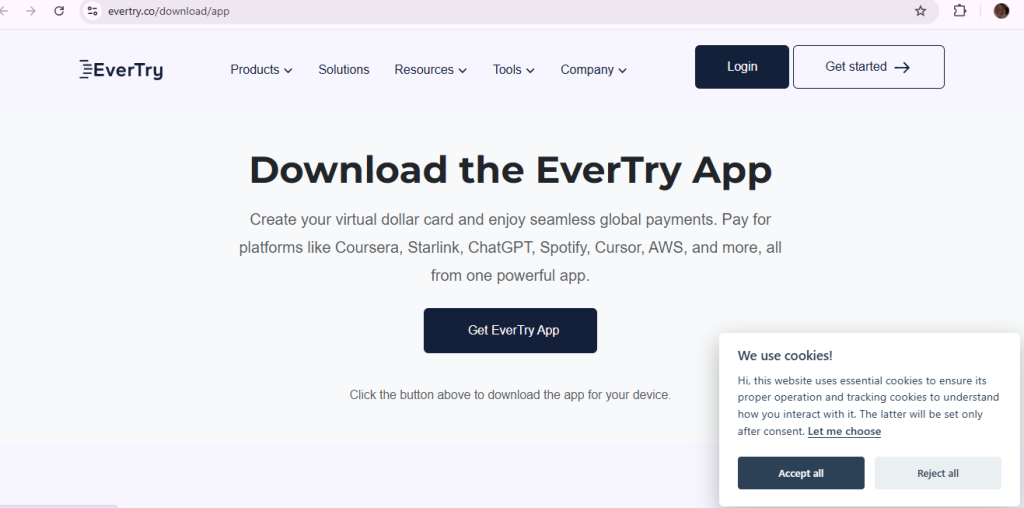
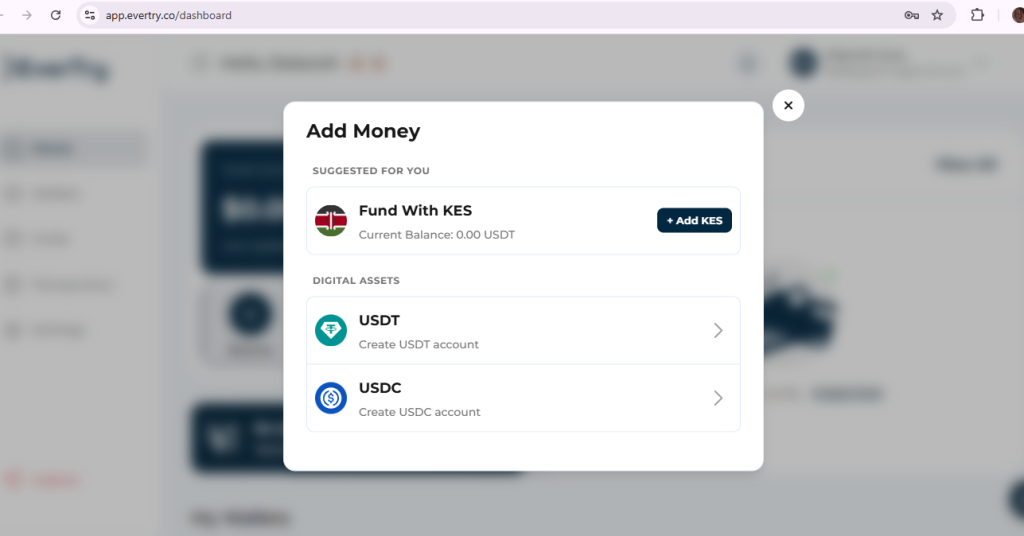
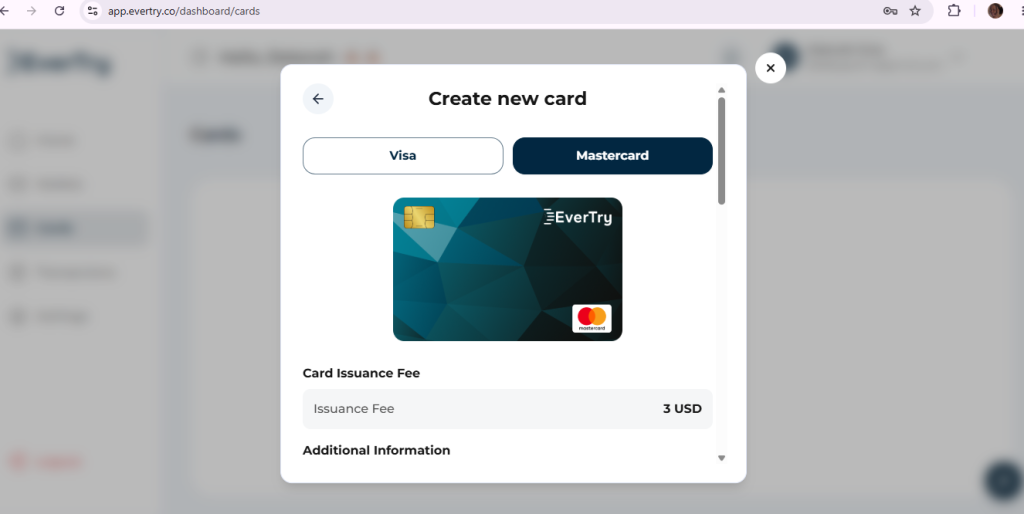
Check the fee screen before you confirm. Keep enough funds for any bill that will renew.
Visit EverTry’s virtual card page to check the current card options.
Frequently asked questions
What is the best virtual card for international payments?
The best card depends on your country, how you add funds, what you need to pay for and the full cost. Compare these points before you choose. EverTry may suit people who need its USD card and can use its funding options in their market.
Are virtual cards free?
Some are free to set up. Others have a card fee or charges for adding funds, swaps or spend. Check all costs, not just the set-up fee.
Can I use a virtual card for monthly plans?
Yes, if it is a card that can be used again and the shop takes it. Keep enough funds for each bill. A one-time card may not work.
Can I use USDT or USDC to fund a card?
Some apps allow it. Others do not. EverTry supports both on some networks. Check the coin and network in your app before you send funds.
Why was my card declined when I had enough money?
Fees, card details, shop rules, card type or safety checks may cause a decline. Check the app and the shop rules. Contact your card firm if you still need help.
Does EverTry work in every country?
Not yet. Card access and funding options vary by country. Check the current terms to see if it serves your location.
Is a virtual card the same as a credit card?
No. “Virtual” means the card is digital. “Credit” means you can borrow under a credit deal. A virtual card may be linked to funds you already have.
Can a virtual card be used at an ATM?
A virtual-only card is usually made for online payments. ATM access depends on the provider and the card type. Check the terms before you rely on cash access.
Final Thoughts
A good virtual card should fit the way you pay. Check the card type, country rules, funding methods, full cost and shop rules before you sign up.
Do not choose by set-up fee alone. Think about the payments you make each month and what they will cost over time.
If EverTry serves your country and fits your needs, check its current fees and card rules, then get started with EverTry.
This article is for information and education. EverTry is a fintech platform, not a bank. Card access, fees and features vary by country; check the current terms before use.
Deborah Giwa is a Marketing Associate at EverTry, where she works on content and growth initiatives focused on helping users navigate international payments. She is passionate about simplifying access to global financial tools for people in emerging markets through clear, practical, and user-focused content.