Most articles about Canva alternatives assume your biggest problem is choosing the right design tool.
For freelancers, virtual assistants, social media managers, and founders across Nigeria, Ghana, Kenya, and South Africa, that’s rarely the real problem. The tool comparison is the easy part. The harder questions sound more like this:
- Canva no longer fits my workflow. What should I switch to?
- Will my card actually work when I try to pay for the premium version?
- Which alternative gives me the best value if I’m billed in USD?
- How do I avoid switching tools again in three months because of a payment issue?
This guide answers both questions: which Canva alternative fits your work, and what happens when you try to pay for it from a country where local cards routinely fail on international checkouts.
Why People Are Looking for Canva Alternatives in 2026
Canva isn’t bad. It just isn’t the only answer anymore.
Canva made design accessible to people who never trained as designers, and it still does that well. But three things have pushed longtime users toward alternatives this year.
Pricing has climbed. Canva’s Teams plan moved from a flat annual rate to per-seat billing in 2024, and some five-person teams saw their bill jump from roughly $120 a year to $500 a year. A 40% first-year discount softened the blow, but the increase stuck for many accounts once that discount expired.
Feature limits show up the deeper you go. Users who need custom shapes, layered shadow effects, or precise print-ready exports run into a ceiling that Canva’s template-first design wasn’t built to clear.
AI additions changed the workflow for some users without asking. Canva’s newer video editor and Magic Studio AI tools reshaped parts of the interface that longtime users had already built habits around, and not every change was welcome.
None of this makes Canva a bad tool. It means the “one tool for everything” pitch stopped holding for a growing number of people, and they started looking elsewhere.
The four reasons people actually switch
Strip away the marketing language and the real reasons cluster around four things: better presentation and infographic tools for business use, better raw image editing for detailed retouching work, better AI generation that goes beyond backgrounds and captions, and better pricing for teams that outgrew a single-seat plan. A smaller group switches purely because Canva’s free tier no longer covers what they need and Canva Pro is out of reach.
The challenge most review sites skip: paying for the alternative
Here’s the part almost no comparison article mentions. Switching from Canva to Adobe Express, Visme, or Gamma doesn’t automatically fix a payment problem. Most of these tools bill in USD or EUR through the same international card networks that declined the original Canva Pro subscription. If a local bank card couldn’t clear Canva’s checkout, there’s a good chance it can’t clear Adobe’s either. The tool changes. The payment problem often doesn’t.
We’ll come back to that. First, the tools themselves.
The Best Canva Alternatives, Ranked by Use Case
Best Canva alternative for social media graphics: Adobe Express
Adobe Express is the closest thing to a like-for-like Canva replacement, built by a company with decades of design software behind it. It connects directly to Adobe Stock and, if your team already uses Photoshop or Illustrator, pulls those assets straight into your Express projects.
The free plan covers most everyday social graphics. The paid plan runs close to Canva Pro pricing and unlocks premium templates, more storage, and deeper Adobe integration. It bills internationally, so the same card considerations that apply to Canva apply here.
Best for: social media managers and marketers who want a familiar editor with stronger asset quality than Canva’s free stock library.
Best free Canva alternative: VistaCreate
VistaCreate (formerly Crello) is the closest thing to a Canva clone that doesn’t ask for a card at all in most cases. The free tier includes hundreds of thousands of templates and built-in printing support, which is more generous than Canva’s own free plan in several categories.
The tradeoff is depth. VistaCreate’s advanced editing tools and brand kit features lag behind Canva’s paid tier, so heavy users will eventually hit a ceiling.
Best for: anyone who wants Canva’s ease of use without Canva’s payment gate.
Best Canva alternative for presentations: Visme
Visme is built for people who present data, not just post it. Its charting tools, infographic templates, and interactive data widgets go well beyond what Canva offers even on its paid tier. The Brand Wizard feature pulls your brand colors, fonts, and logo straight from your website URL and applies them across templates automatically.
The learning curve is real. Visme’s data visualization tools take longer to master than Canva’s drag-and-drop templates, and new users should expect a slower first week.
Best for: consultants, analysts, and business owners who need charts and infographics that hold up in a boardroom.
Best AI-powered Canva alternative: Gamma
Gamma takes a block of text and turns it into a structured deck, document, or simple website without manual layout work. For a founder writing a pitch deck at midnight, that’s a real time saver.
Gamma is not the right tool for anyone who needs precise, pixel-level control. Long decks occasionally drift out of alignment as Gamma auto-adjusts layouts, and fixing that manually eats into the time the tool was supposed to save.
Best for: people who need a deck fast and don’t mind light manual cleanup afterward.
Best Canva alternative for quick image editing: Pixlr
Pixlr splits its features across separate apps rather than one unified editor, which sounds inconvenient until you realize each app loads faster and does its one job well. It includes AI-powered background removal and generative fill, all running in the browser with no install.
Best for: budget-conscious users who need photo editing more than template design.
Best Canva alternative for teams: Desygner
Desygner offers shared brand assets, team folders, and collaborative editing at a price point noticeably lower than Canva’s per-seat Teams plan. It won’t out-design Canva feature for feature, but for small teams that just need consistent branding across multiple people, it does the job at a fraction of the cost.
Best for: small teams priced out of Canva’s 2024 Teams pricing overhaul.
Best Canva alternative for flyers and marketing materials: PosterMyWall
PosterMyWall stands out for one thing almost no other tool on this list offers: built-in scheduling. You can design a flyer or social post and queue it for publishing without leaving the platform. AI-generated captions and a deep flyer template library round out the package.
Best for: people managing multiple social accounts who want design and scheduling in one place.
Best Canva alternative for UI and product design: Figma
Figma is not really a Canva competitor, and any article that treats it as a straight swap is giving bad advice. Figma is built for interface design, prototyping, and developer handoff. Canva is built for content creation. Someone designing an app screen needs Figma. Someone designing an Instagram post does not.
Best for: product designers and teams shipping software, not social content.
Best Canva alternative for advanced designers: Photopea
Photopea is a free, browser-based editor that reads and edits Photoshop files (.psd) directly, along with Illustrator and other formats Canva can’t touch. It’s closer to a Photoshop alternative than a Canva one, but for users doing detailed retouching or layered compositing, it belongs on this list.
Best for: anyone who’s outgrown template-based design entirely.
Quick honorable mentions
Snappa is worth a look for simple ad graphics and social posts, though it has fewer templates for long documents. Kittl leans into artistic typography and vector work for designers who want to escape the template look. BeFunky remains a strong pick for photo collages and quick personal edits. Easil suits creative entrepreneurs and bloggers who want trendy, non-corporate templates. Venngage and Infogram both specialize in infographics for readers who need Visme’s strengths at a smaller scale.
Canva Alternatives Compared at a Glance
| Tool | Best For | Free Plan | AI Features | Premium Required? | International Card Needed? |
| Adobe Express | Social graphics, Adobe users | Yes | Yes | For premium templates | Yes |
| VistaCreate | Free Canva-style design | Generous | Limited | Rarely | Only for advanced tiers |
| Visme | Presentations, data viz | Limited | Yes | For full feature set | Yes |
| Gamma | AI-generated decks | Yes, capped | Core feature | For unlimited use | Yes |
| Pixlr | Quick image editing | Yes | Yes | For advanced editing | Yes |
| Desygner | Small team collaboration | Yes | Limited | For team features | Yes |
| PosterMyWall | Flyers, scheduling | Yes | Yes (captions) | For premium templates | Yes |
| Figma | UI and product design | Generous | Limited | For team plans | Yes |
| Photopea | Advanced photo editing | Fully free | No | No | Not applicable |
The Payment Reality Nobody Talks About When Choosing Canva Alternatives
Why switching tools doesn’t always solve payment problems
Adobe Express, Visme, and Gamma all bill in USD or EUR by default, the same currencies Canva Pro bills in. A local card that gets flagged, restricted, or declined on Canva’s checkout page is likely to run into the same wall on these platforms, because the underlying issue usually isn’t the tool. It’s whether the card supports recurring international billing at all.
Which Canva alternatives have generous free plans?
If a working international card isn’t available yet, VistaCreate, Pixlr, Photopea, and BeFunky all offer free tiers strong enough to cover real work without a subscription. That buys time to sort out a payment method before a premium plan becomes necessary.
When you do need premium, here’s what actually matters
Two details decide whether a payment goes through: whether the card is accepted on both Visa and Mastercard rails, since most of these platforms only support one or both networks, and whether the card can clear recurring billing, not just a one-time charge. A card that works for the first payment can still get declined 30 days later when the platform runs its automatic renewal, because renewal checks are often stricter than the initial purchase check. This is the failure point most “how to pay” guides never test, because they only document the first transaction.
Paying for a Canva Alternative From Nigeria: What the Process Actually Involves
The setup
Tool tested: Adobe Express Premium (billed in USD, requires a recurring international card). Card used: EverTry virtual USD card. Starting point: no existing EverTry account.
Step-by-step walkthrough
Sign-up starts with basic details: name, email, and phone number. The next step is KYC verification, which requires a valid government ID and a selfie for identity matching. Once submitted, verification typically clears within minutes rather than days, though approval times can vary based on ID quality and network conditions.
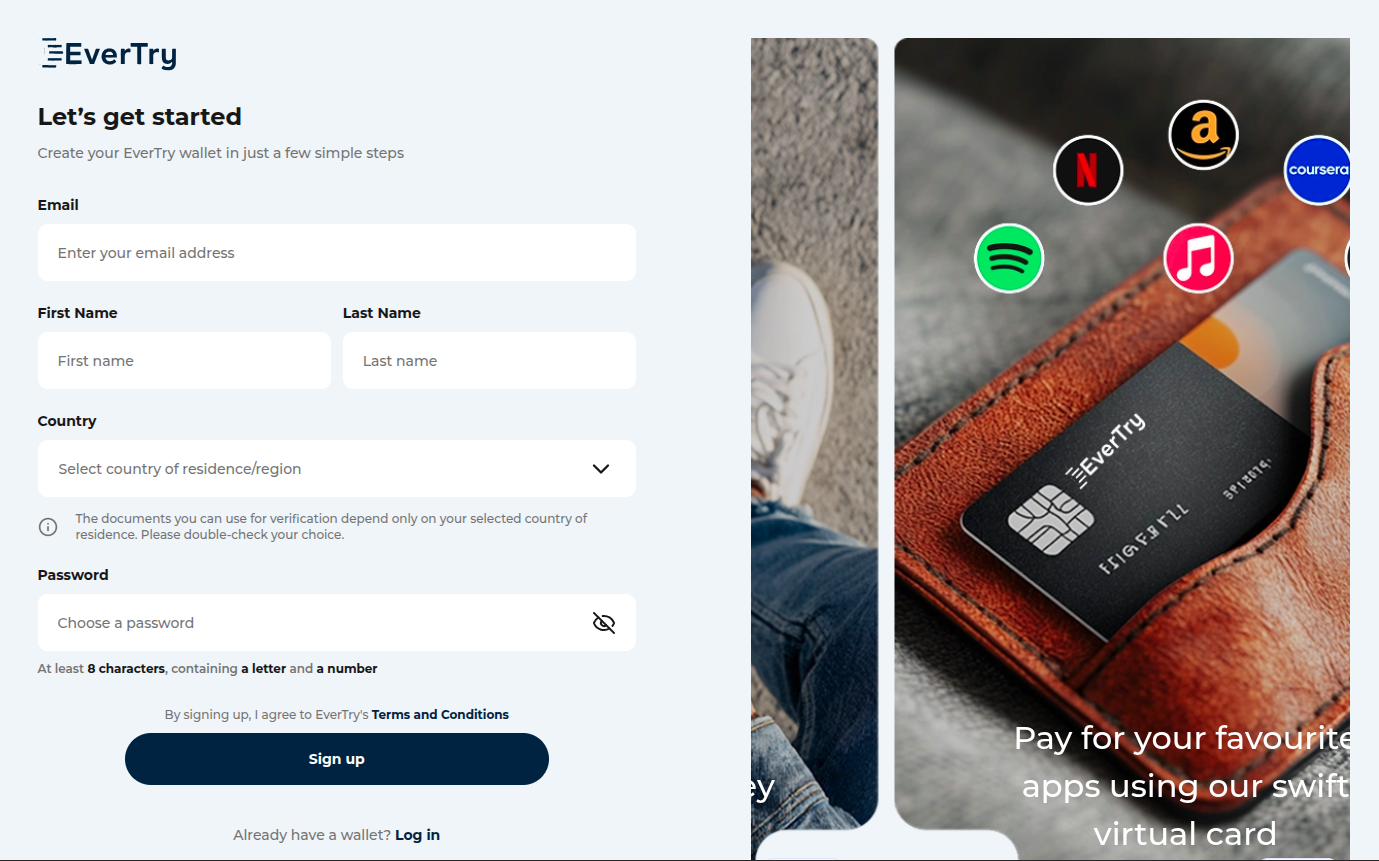
After verification, the account is funded. EverTry accepts local currency, USDT, or USDC, so funding doesn’t require a working international card in the first place, which matters for anyone whose local card was the original problem.
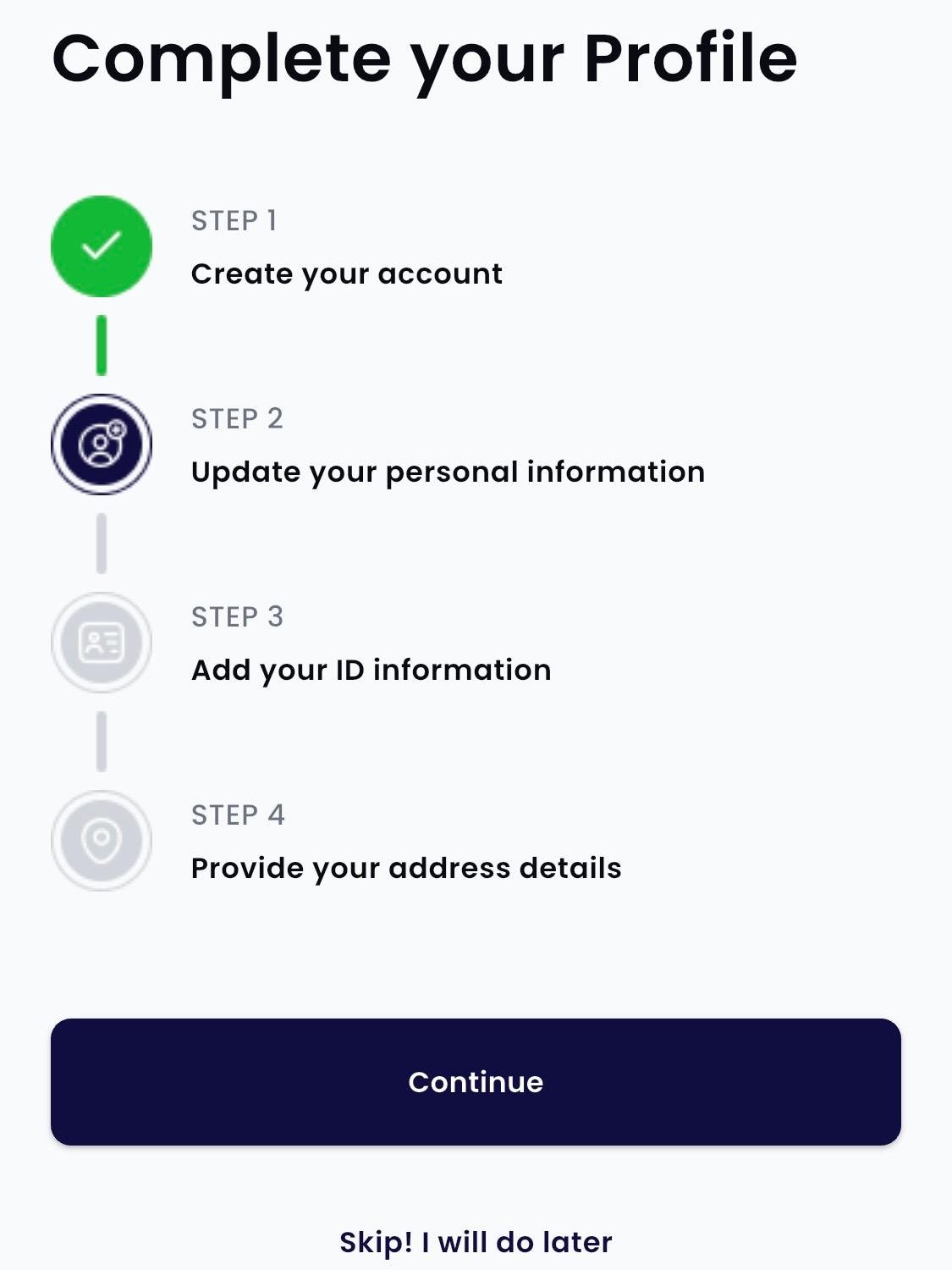
Next, the virtual USD card is generated inside the app. This produces a 16-digit card number, expiry date, and CVV, ready to use immediately, with no physical card and no bank branch visit.
The final step happens on Adobe’s side: enter the card details at Adobe Express’s checkout, confirm the billing amount, and complete the payment.
What should happen when it works
A successful payment typically triggers three confirmations: an in-app notification from EverTry showing the transaction, an email receipt from Adobe confirming the subscription, and an updated balance reflecting the deduction. If any of these three is missing, that’s usually the first sign something needs troubleshooting before assuming the payment went through.
Common failure points and how to resolve them
- Insufficient funds is the most common decline reason, and it happens even when a small balance remains, because most platforms hold or check the full billing amount before authorizing. Fund slightly above the subscription price rather than the exact amount.
- KYC delays happen occasionally when an uploaded ID photo is blurry or the selfie doesn’t match the ID clearly enough for automated matching. Re-uploading a clearer photo usually resolves this faster than waiting for manual review.
- Billing address mismatches can trigger a decline on some checkout pages if the address entered doesn’t match what the card issuer has on file. Using the address associated with the EverTry account, rather than a home address that was never registered, usually clears this.
- Recurring payment declines are the failure point most other guides skip entirely. A card that clears the first payment can still fail 30 days later on auto-renewal if the balance wasn’t topped up in time. Setting a calendar reminder a few days before the renewal date, rather than relying on the platform’s low-balance notification, avoids most of these.
How to Pay for Premium Canva Alternatives Without Local Card Issues
This section works as a general checklist for any USD- or EUR-billed design tool, not just Adobe Express.
Step 1: Choose your design tool first. Confirm its billing currency and whether it charges monthly or annually, since annual billing usually means one successful transaction instead of twelve.
Step 2: Set up a virtual card account. EverTry is one option built specifically for this: it funds from local currency, USDT, or USDC rather than requiring an existing international card, which solves the exact loop described earlier in this article. Verification requires a valid ID and a short KYC check.
Step 3: Fund the account with local currency or a stablecoin, whichever is easier to access at that moment.
Step 4: Generate the virtual USD card inside the app. It’s ready to use as soon as it’s created.
Step 5: Enter the card details at checkout on the design tool’s billing page and confirm the subscription.
Expect a confirmation email from the design tool and a transaction notification from the card provider within a few minutes of a successful payment. If neither arrives, check the card balance before assuming the payment failed outright.
Frequently Asked Questions
1. Is there anything better than Canva?
It depends on the job, not a single winner. Adobe Express suits polished social graphics and Adobe-ecosystem users. Visme suits data-heavy business presentations. Gamma suits fast AI-generated decks. VistaCreate suits anyone who wants Canva’s simplicity without Canva’s price.
2. Why is Canva shutting down?
Canva is not shutting down. This question likely comes from coverage of Canva’s company-wide “Discovery Week,” an internal shutdown where the entire company pauses regular work for a week of AI training and experimentation. Canva ran this in both 2025 and 2026. It’s a staff initiative, not a business closure.
3. Which app is like Canva but free?
VistaCreate, Pixlr, Photopea, BeFunky, and Easil all offer free tiers close to Canva’s own free plan, with VistaCreate the closest match in template style and editing feel.
4. Is Figma better than Canva?
Neither is better; they solve different problems. Figma is built for UI design and product prototyping with developer handoff. Canva is built for content creation for non-designers. Someone choosing between them is usually asking the wrong question, since most people need one or the other, not both.
5. Which Canva alternative is best for beginners?
VistaCreate, because its interface and template structure mirror Canva’s closely enough that the learning curve is nearly zero.
6. Which Canva alternative is best for freelancers?
Visme for presentation-heavy client work, or Adobe Express for freelancers who already use other Adobe tools and want assets to carry across platforms.
7. Can I use Canva alternatives without paying?
Yes. VistaCreate, Pixlr, Photopea, and BeFunky all offer free tiers capable of handling real work, not just trial access.
8. Which Canva alternative works best in Nigeria and other Global South countries?
Usability-wise, VistaCreate and Pixlr work well on slower connections and don’t require premium billing to get real use out of them. For tools that do require a paid plan, the deciding factor isn’t the design software at all. It’s whether the payment method funding the subscription can clear international billing without local card restrictions getting in the way.
The Real Test for Any Canva Alternative
Most comparison articles stop at templates, AI features, and pricing tiers. That’s half the decision.
The other half is whether the tool you pick is one you can actually pay for, keep paying for every renewal cycle, and use without switching again in three months over a declined card. A tool with worse features but a payment method that works beats a tool with better features and a subscription that keeps failing.
Start with the free option that matches your workflow. Upgrade only when you outgrow it. And before you subscribe to anything billed internationally, make sure the card behind it can actually clear a recurring charge, not just a first one. That’s where EverTry comes in.
The information in this article is provided for general informational and educational purposes only. Pricing, features, payment methods, and platform availability for Canva and the tools mentioned may change without notice. EverTry is not affiliated with or endorsed by Canva or any of the third-party platforms referenced in this article. Any mention of EverTry is intended solely as one possible payment solution for eligible users.
Deborah Giwa is a Marketing Associate at EverTry, where she works on content and growth initiatives focused on helping users navigate international payments. She is passionate about simplifying access to global financial tools for people in emerging markets through clear, practical, and user-focused content.