To pay for Grammarly Premium in Nigeria, you can use a virtual dollar card, PayPal, or a Nigerian bank card that supports international subscriptions. The most reliable option is a virtual dollar card because Grammarly charges recurring fees in USD, which naira cards handle worse. Grammarly Premium is now called Grammarly Pro and costs from $12/month when billed annually.
Two things in that paragraph trip people up constantly: the name change and what “$12/month billed annually” actually means for your card. This guide covers both, plus every payment method that works from Nigeria, before you spend a naira.
Grammarly Premium Is Now Grammarly Pro
Grammarly retired the “Premium” name; the paid individual plan is now called Grammarly Pro: same product, new label, and a few additions.
When did Premium become Pro?
Grammarly rolled out the rebrand alongside a broader restructuring, and in late 2025 Grammarly itself became part of the Superhuman product family, the suite that now includes Grammarly, Superhuman Mail, and Coda. Existing Premium subscribers were migrated to Pro automatically; nobody lost features or had to act.
What changed?
The branding, an expanded set of AI tools (full-sentence rewrites and a monthly allowance of AI prompts), and a simplified plan structure built around Free, Pro, and Enterprise.
What stayed the same?
Everything Premium users paid for: advanced grammar and clarity correction, writing suggestions, plagiarism detection, and tone improvements.
Why do people still search for “Grammarly Premium”?
A decade of habit. “Premium” was the name from 2009 until recently, so tutorials, reviews, and word-of-mouth still use it. If you see “Premium” in an older guide and “Pro” at checkout, it’s the same plan. This article uses both names so nothing gets confusing.
Grammarly Plans and Pricing in 2026
| Plan | Price | Best for |
|---|---|---|
| Free | $0 | Casual users, basic correction |
| Pro | $12/month billed annually · $20/month billed quarterly · $30 month-to-month | Students, writers, professionals, small teams |
| Enterprise | Custom quote | Large organizations |
Grammarly Free features
Basic grammar, spelling, and punctuation correction, tone detection, and a small monthly allowance of AI prompts. It works in the browser extension, desktop app, and inside Google Docs, Word, Gmail, and most places you write. For occasional writing, it’s genuinely enough.
Grammarly Pro features
Everything in Free, plus the tools that justify paying: full-sentence rewrites for clarity and flow, advanced tone adjustments, plagiarism detection, AI text detection, vocabulary suggestions, and roughly 2,000 AI prompts per month for generation and rewriting tasks. Pro also supports team use with shared seats.
Grammarly for teams and Enterprise
Grammarly folded its old standalone Business plan into the current structure: small teams run on Pro seats, while larger organizations go to Enterprise, which is custom-priced and adds centralized admin, style guides for organization-wide writing rules, brand-consistency controls, and enterprise security (SSO and data controls). There’s also a broader Superhuman suite tier that bundles email tools on top, a different purchase from “better Grammarly.” If you’re a team of three to ten, price out Pro seats first.
Which plan should you choose?
Write occasionally → stay Free. Write daily for work, school, or clients → Pro on annual billing (60% cheaper than monthly). Need admin controls, style guides, or security compliance → talk to Enterprise sales. But before you pick annual billing, read the next two sections; they’ll save you an unpleasant surprise.
How Much Does Grammarly Cost in Nigeria?
Grammarly bills in USD, so your naira cost depends on the exchange rate on the day you’re charged.
Grammarly Pro monthly cost
$30/month, billed every month. The most flexible option and by far the most expensive, 2.5× the annual rate. Only sensible if you need Grammarly for a month or two.
Grammarly Pro quarterly cost
$60 every three months ($20/month effective). The middle path: cheaper than monthly, without a 12-month commitment. Good for testing whether Pro earns its keep in your workflow.
Grammarly Pro annual cost
$144 is charged once per year, which works out to the advertised $12/month and saves about 60% versus monthly billing. This is the plan most people should choose, with their eyes open about how it bills (next section).
Grammarly cost in naira
At recent exchange rates of roughly ₦1,400–₦1,600 to the dollar, that translates to approximately:
- Annual Pro: ₦200,000–₦230,000 once per year (≈ ₦17,000–₦19,000/month effective)
- Quarterly: ₦84,000–₦96,000 per quarter
- Monthly: ₦42,000–₦48,000 per month
Rates move, so treat these as estimates — your card provider’s rate on the billing day is what counts. Fund a small buffer above the dollar amount to absorb rate movement between funding and charging.
Why Did Grammarly Charge Me $144?
Because the “$12/month” annual plan bills the entire year for $144, in one upfront charge. This is the single most common Grammarly billing complaint worldwide, and it’s entirely avoidable once you understand it.
Grammarly’s annual billing explained
When checkout says “$12/month, billed annually,” the operative words are billed annually. Your card is charged $144 today, covering 12 months. You are never charged $12 in any month.
$12 per month does not mean monthly billing
If you want to actually pay month by month, that’s the $30/month plan. The $12 figure is marketing math on the annual plan, accurate, but only if you read it as “the annual price divided by twelve.”
Understanding auto-renewal
Grammarly subscriptions renew automatically. Twelve months after you subscribe, another $144 hits whatever payment method is on file, unless you’ve cancelled before the renewal date. Put the renewal date in your calendar the day you subscribe.
Grammarly’s refund policy
Strict: Grammarly generally refunds only where the law requires it. If a renewal you forgot about goes through, getting that $144 back is unlikely. Plan around the policy rather than testing it.
How to avoid unexpected charges
Know your renewal date (it’s in your account settings), cancel ahead of it if you’re not continuing, and consider this structural advantage of a virtual dollar card: the card can only be charged what you’ve loaded onto it. If the card holds $5 on renewal day, a surprise $144 charge simply can’t happen. The flip side is equally true: if you want to renew, you must fund the card before the billing date, which we cover in Method 1.
Why Nigerian Cards Sometimes Fail on Grammarly
Most Grammarly payment failures from Nigeria are bank-side, not Grammarly-side, and renewals fail far more often than first payments.
International payment restrictions
The picture improved in July 2025, when Nigerian banks resumed international transactions on naira cards after a roughly three-year suspension. So your naira card might now work on Grammarly; this is genuinely new. But “resumed” came with conditions.
FX spending limits
The resumed access carries low monthly dollar caps that vary by bank and change without notice. A $144 annual charge can exceed some banks’ monthly cap on its own, and a card that handled $30 last month may decline $144 this month.
Recurring subscription payments
Here’s the structural problem: Grammarly isn’t a one-off charge; it places a recurring billing mandate on your card. Some banks approve a single international payment but reject the standing mandate, or approve it now and reject it at renewal. Recurring USD subscriptions remain the weakest case for naira cards even after the 2025 resumption.
Bank security checks
First-time charges to a foreign merchant can trip your bank’s fraud controls. Sometimes one call clears it; if declines persist, the system is telling you to change methods, not to keep calling.
Why renewals fail more often than first payments
At first payment, you’re watching: card funded, OTP ready, limits fresh. At renewal, a year later, the charge arrives unannounced against whatever state your card happens to be in: a new monthly cap consumed, a changed bank policy, a forgotten balance. The renewal is where naira-card Grammarly subscriptions go to die, usually mid-deadline. This is the strongest argument for a payment method whose rules don’t drift.
Method 1: Pay with a Virtual Dollar Card (Most Reliable)
Why virtual dollar cards work better
A virtual dollar card is a USD-denominated card issued by a fintech app and funded in naira. Because it’s a dollar card built for international payments, the three failure points above FX caps, foreign-payment approval, and recurring mandates don’t apply. Grammarly sees an ordinary USD card; your bank’s policies never enter the transaction.
Create an EverTry virtual dollar card
The card is built for international payments by default; there’s nothing to enable and no configuration. From a fresh signup to a settled Grammarly subscription takes under 15 minutes.
Step 1: Create an account. Download the EverTry app or sign up on the web.
Step 2: Verify your identity. Complete the quick KYC check; this secures your account and unlocks the card.
Step 3: Fund your wallet. Load it with NGN, USDT, or USDC, whichever you hold. The balance converts to dollars at the displayed rate.
Step 4: Create your card. Generate the card with the amount you plan to pay Grammarly, plus a small buffer to keep the card active and absorb the verification hold. For the annual plan, that means loading slightly over $144.
Add your card to Grammarly
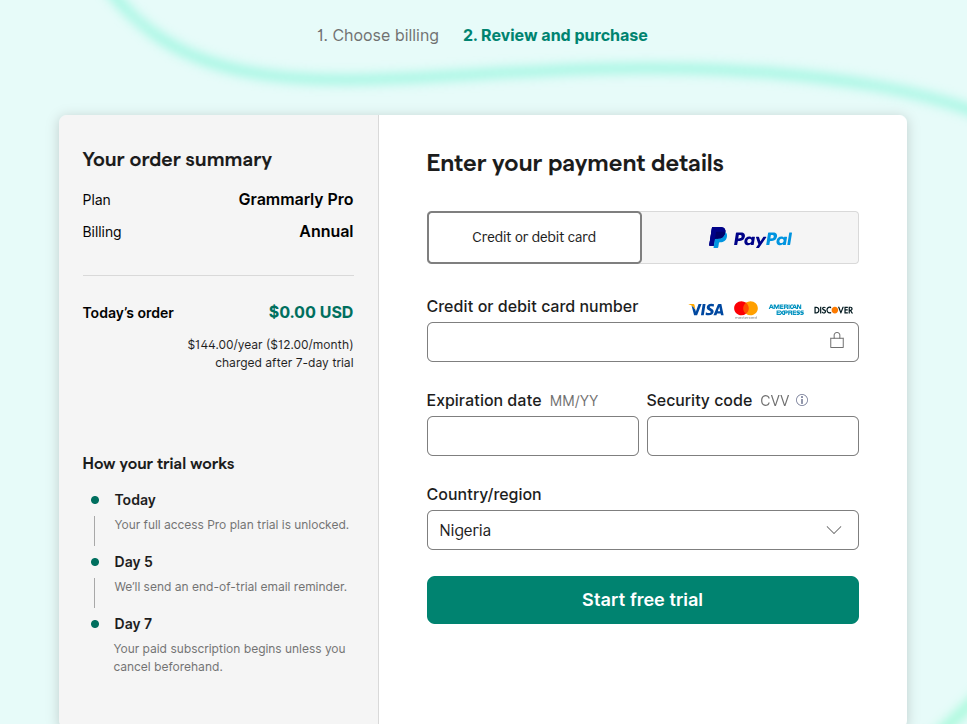
Step 1: Go to grammarly.com/plans and log in to your Grammarly account.
Step 2: Select your plan: annual ($144 once), quarterly ($60), or monthly ($30).
Step 3: Choose Credit/Debit Card as the payment method.
Step 4: Enter the card number, expiry date, and CVV from your EverTry app.
Step 5: Confirm the payment, then verify the charge appears in your card’s transaction history. Pro activates immediately.
Monitor your subscription
The discipline that keeps a dollar-card subscription healthy:
- Find your renewal date in Grammarly account settings on the day you subscribe, and calendar it
- Fund the card a few days before each billing cycle, renewals fail silently against an empty card, and you’ll discover it when Pro features vanish mid-document
- If a renewal does fail, fund the card and update/re-confirm the payment method in your account before the grace window closes
Why writers and freelancers prefer this approach
One detail worth knowing if you write for a living: an EverTry account isn’t just the card; it includes USD and EUR accounts for receiving payments, as an individual or a business. If foreign clients pay you in dollars or euros, the money that comes in can fund the tools you work with, Grammarly included, without a conversion detour. One app to pay and be paid.
Method 2: Pay with PayPal
Does Grammarly accept PayPal?
Yes, PayPal appears as a checkout option on Grammarly’s payment page in supported flows.
How to pay Grammarly with PayPal
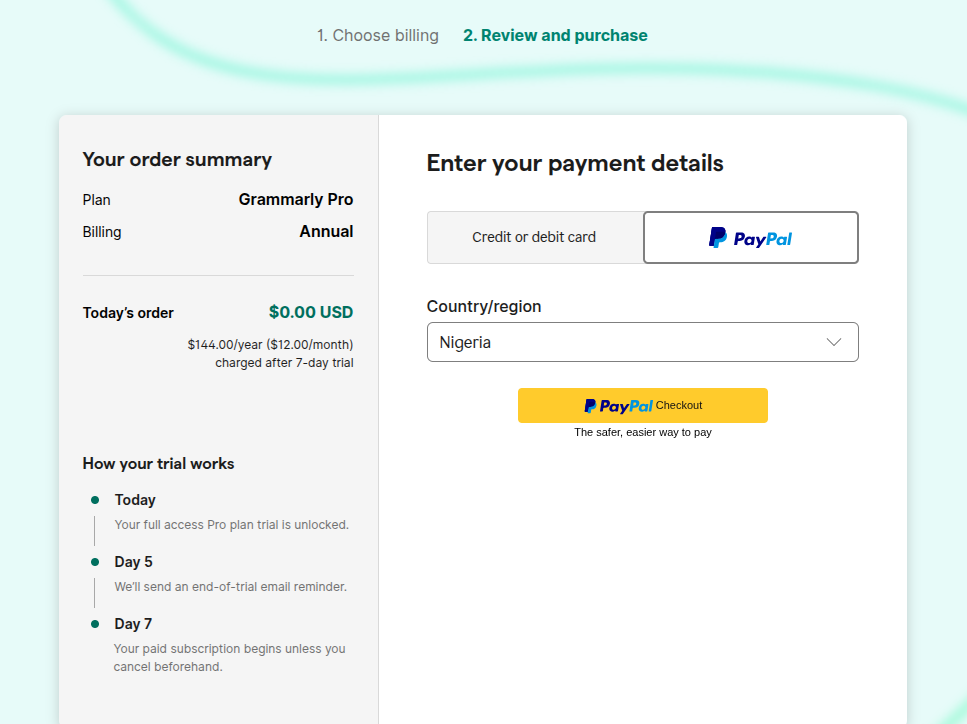
Log in at checkout, choose PayPal, and authorize the payment from your PayPal account. The subscription then renews through PayPal rather than a card stored at Grammarly.
Linking a virtual card to PayPal
Here’s the practical Nigerian setup: Nigerian PayPal accounts have historically been send-only — you can pay but not receive. To make payments work, add a virtual dollar card as the funding source inside your PayPal wallet, then pay Grammarly through PayPal. Functionally, you’re still spending from the dollar card; PayPal is just the wrapper.
PayPal limitations Nigerians should know
The send-only restriction, occasional verification friction on Nigerian accounts, and an extra layer where payments can snag. Honest assessment: if you’re creating a virtual dollar card anyway, paying Grammarly with the card directly is one step shorter and one failure point fewer. PayPal earns its place mainly if you already have a working PayPal setup.
Method 3: Pay with a Nigerian Bank Card
Can Naira cards work on Grammarly?
Since July 2025, sometimes, yes. With international payments enabled and a monthly FX cap that covers your chosen plan, a naira Visa or Mastercard can pass Grammarly’s checkout.
Why some payments succeed
One-off-style first charges within your bank’s limit are the easy case: you’re present, funded, and inside the cap.
Why renewals often fail
Everything from the renewals section above: caps consumed by other spending, silent policy changes, recurring-mandate rejection. The first payment proves your card works today; it says nothing about the billing day next year.
When to switch to a virtual dollar card
After the first unexplained decline or before it, if losing Grammarly mid-deadline would hurt. Don’t spend a week debugging your bank for a subscription. A dollar card settles in 15 minutes. If you try the naira card route: pick the quarterly plan for the first cycle (smaller charge, faster feedback on whether renewals survive), and set a reminder for a week before the renewal date.
The Truth About Cheap “Grammarly Premium” Accounts
Search this topic, and you’ll meet the offers: Grammarly Pro for ₦3,000 on Nairaland, “3 months access” listings on Jiji. Here’s what those actually are.
Why are some sellers offering Grammarly for ₦3,000?
Because they’re not selling you a subscription, they’re selling a seat on a shared account. One Pro (or team) account, one password, dozens of strangers using it.
The shared account model explained
The seller subscribes once (or compromises an account), then resells access at a price no legitimate subscription could match. It’s cheap because what’s being sold isn’t theirs to sell; sharing credentials this way violates Grammarly’s terms of service.
Risks of shared Grammarly accounts
- Sudden suspension: Grammarly detects multi-user abuse; accounts die without warning, and your ₦3,000 dies with them
- Data privacy: everything you run through Grammarly, client work, application essays, your thesis — passes through an account a stranger controls. They can see, keep, or leak your documents. For anyone writing professionally or academically, this alone should end the conversation
- No ownership: the password changes, the seller vanishes, there’s no recourse
- No support: Grammarly’s help desk can’t assist a user who isn’t the account owner
Is it worth the risk?
Run the honest math: legitimate annual Pro works out to roughly ₦17,000–₦19,000/month, more than ₦3,000, no argument. But the shared seat costs ₦3,000 plus your document privacy plus the certainty that it dies eventually. If ₦17,000/month is genuinely out of reach, the better answer is Grammarly Free. It’s a real product, it’s yours, and your documents stay yours.
Is Grammarly Pro Worth Paying For?
Worth it if writing affects your income or grades and you write most days. Skip it if you write occasionally. Free covers the basics.
- Students: strong fit if you write essays weekly, clarity rewrites, and the plagiarism checker earn their keep at submission time. Check first whether your institution provides Grammarly for Education free.
- Content writers: the clearest yes. Tone rewrites, consistency, and speed compound across daily output; Pro typically pays for itself in editing time.
- Freelancers: yes, if clients judge your polished proposals, deliverables, and emails. Pair it with the receiving-accounts setup above, and the tool funds itself from client payments.
- Researchers: useful for clarity in papers; the plagiarism checker helps pre-submission. Note that field-specific conventions still need your judgment over Grammarly’s defaults.
- Businesses: Pro seats for small teams; Enterprise when you need style guides and admin control.
- When Free is enough: occasional emails, social posts, personal writing, or any budget where $144 hurts. Free catches the embarrassing errors; Pro makes good writing better.
Grammarly vs ChatGPT vs Other Writing Tools
| Feature | Grammarly | ChatGPT | LanguageTool | ProWritingAid | editGPT |
|---|---|---|---|---|---|
| Core job | Correction & polish in your flow | Generation & rewriting on request | Correction (strong multilingual) | Deep style & structure reports | AI editing with tracked changes |
| Works inside your apps | Yes, everywhere you type | Limited | Browser/extensions | Editor + integrations | Browser-based |
| Plagiarism check | Yes (Pro) | No | Premium tiers | Yes (paid) | No |
| Best for | Daily writers | Drafting & ideation | Budget/multilingual users | Fiction & long-form authors | Editors reviewing AI output |
Grammarly vs ChatGPT
Different tools doing different jobs. ChatGPT generates and rewrites when you ask; Grammarly corrects continuously inside whatever you’re already writing, email, docs, browser. ChatGPT won’t sit in your Gmail flagging a missing comma; Grammarly won’t draft your proposal from a prompt. Many serious writers run both: draft with ChatGPT, polish with Grammarly.
Grammarly vs LanguageTool
LanguageTool is the budget pick with excellent multilingual support, relevant if you write in more than English. Grammarly’s English suggestions, tone tools, and app integrations are deeper.
Grammarly vs ProWritingAid
ProWritingAid offers heavier analytical reports (structure, pacing, repetition) loved by fiction and long-form writers, often at a lower lifetime cost. Grammarly is faster, lighter, and better inside everyday apps.
Grammarly vs editGPT
editGPT focuses on AI-assisted editing with visible tracked changes, useful for editors reviewing or refining AI-generated drafts. It’s a complement to, not a replacement for, an always-on checker.
Which should you choose?
Daily professional/academic writing in English across many apps → Grammarly. Drafting from scratch → ChatGPT alongside it. Multilingual on a budget → LanguageTool. Long-form manuscripts → ProWritingAid. Editing AI drafts with track changes → editGPT.
How to Manage, Cancel, or Renew Your Grammarly Subscription
How to find your renewal date
Log in → Account → Subscription. The next billing date is displayed. Calendar it minus one week.
How to change your payment method
Same Subscription page → update payment details. Do this before a renewal, not after a failure — and any time you create a fresh virtual card.
How to cancel Grammarly Pro
Account → Subscription → Cancel subscription, then follow the confirmation prompts until you receive a cancellation email. Given the refund policy, cancel before the renewal date, you keep Pro access until the period you’ve paid for ends.
What happens after cancellation?
Your account downgrades to Free at the end of the paid period. Documents and history remain; the Pro features (rewrites, plagiarism checks, the prompt allowance) switch off.
How to reactivate
Log in and resubscribe from the same Subscription page. Your data is intact, so reactivation is instant once payment clears.
Troubleshooting Grammarly Payment Problems
| Problem | Possible cause | Solution |
|---|---|---|
| Card declined at checkout | International payments disabled or FX cap | Enable with bank and retry once; else use a virtual dollar card |
| Renewal failed | Card not funded on billing day | Fund the card, update the payment method, re-confirm before the grace window closes |
| Payment failed mid-flow | Bank security block | One call to the bank; persistent blocks → switch method |
| Account downgraded unexpectedly | A renewal quietly failed | Check Subscription page, fix payment method, resubscribe |
| PayPal error | Verification issue or funding source rejected | Re-link the virtual card inside PayPal, or pay with the card directly |
Conclusion
Grammarly Premium is now Grammarly Pro: same tool, sharper AI features, and pricing that rewards annual billing as long as you understand it: $144 charged once, auto-renewing, with refunds only where law requires. Know your renewal date before you know anything else. From Nigeria, a naira card is now worth one try; PayPal works as a wrapper, but a virtual dollar card remains the dependable method for recurring USD subscriptions, and with EverTry, signup to a settled subscription takes under 15 minutes, funded in NGN, USDT, or USDC. Whatever method you choose, keep it funded ahead of the billing date, pick the plan that matches how much you actually write, and let the tool do what you’re paying it for: make every document you ship a little harder to argue with.
Frequently Asked Questions
How do I pay Grammarly Premium in Nigeria?
Use a virtual dollar card (most reliable for recurring USD billing), PayPal with a virtual card as its funding source, or a naira card with international payments enabled. At grammarly.com/plans, choose your plan, select card or PayPal, and complete checkout. The plan is now branded Grammarly Pro.
What payment methods does Grammarly accept?
Major credit and debit cards (Visa, Mastercard, American Express) and PayPal are supported in checkout flows. From Nigeria, virtual dollar cards work as standard Visa/Mastercard payments; naira cards work where banks permit international recurring transactions.
How much is a 12-month Grammarly subscription?
$144, billed as one upfront charge, the “$12/month” annual price. Quarterly costs $60 per quarter ($20/month effective), and month-to-month costs $30. At recent exchange rates, the annual plan is roughly ₦200,000–₦230,000 depending on the day’s rate.
Why did Grammarly charge me $144?
Because the annual plan bills the full year upfront: $12/month × 12 = $144 in a single charge, and subscriptions auto-renew each year. To pay truly month by month, choose the $30 monthly plan. Note Grammarly’s refund policy is strict; refunds are generally only where legally required.
How do I renew my Grammarly subscription?
Renewal is automatic on your billing date against the payment method on file. If you pay with a virtual dollar card, fund it a few days before the date; if a renewal fails, fund the card and update the payment method on your Subscription page to restore Pro.
How can I get Grammarly Premium without paying?
Legitimately: use the Free plan (real and genuinely useful), check whether your school provides Grammarly for Education, and watch for official discounts and seasonal sales. Avoid ₦3,000 shared accounts; they violate Grammarly’s terms, can vanish overnight, and expose your documents to a stranger.
Is Grammarly Premium worth paying for?
Yes, if writing affects your income or grades and you write most days, the rewrites, tone tools, and plagiarism/AI checks pay for themselves in editing time. If you write occasionally, the Free plan covers the basics and costs nothing.
Is ChatGPT better than Grammarly?
They do different jobs. ChatGPT generates and rewrites text on request; Grammarly continuously corrects and polishes inside the apps where you already write, and adds plagiarism and AI-text detection. Many writers use both a draft with ChatGPT and a refinement with Grammarly.
Can universities tell if you use Grammarly?
Using Grammarly’s grammar and clarity suggestions isn’t detectable or prohibited in itself; it’s comparable to careful proofreading. What can trigger AI detectors is submitting AI-generated text. For graded work, use Grammarly to correct and refine your own writing rather than to generate it, and follow your institution’s stated policy.
Is there a better tool than Grammarly?
Depends on the job: LanguageTool for multilingual writing on a budget, ProWritingAid for deep long-form and fiction reports, editGPT for tracked-changes editing of AI drafts, ChatGPT for generation. For always-on correction inside everyday apps in English, Grammarly remains the benchmark.
This article is for informational purposes only and does not constitute financial, legal, or professional advice. Grammarly’s prices, plans, features, and payment policies are set by Grammarly and may change at any time. Always confirm current details on grammarly.com before subscribing. EverTry is not affiliated with, endorsed by, or partnered with Grammarly. All trademarks and product names mentioned belong to their respective owners. Exchange rates and naira estimates are illustrative and fluctuate; the rate applied at the time of your transaction may differ. EverTry is not responsible for the billing practices, renewals, refunds, or service decisions of third-party platforms, including subscription charges, declined transactions on their systems, or account actions they take. Users are responsible for managing their own subscriptions, renewal dates, and card balances, and for complying with the terms of service of any platform they pay for. Information is accurate as of the publication date but is not guaranteed thereafter.
Matt Aluya is the founder of EverTry. A software engineer focused on virtual card issuance and stablecoin settlement for cross-border payments in emerging markets. LinkedIn · matt.aluya@evertry.co