APPLE.COM/BILL is the name Apple uses on your card statement for anything billed to your Apple Account. That covers apps, in-app purchases, subscriptions like iCloud+, Apple Music or Apple TV, and movies or books. One charge can cover several purchases, and it can show up a few days after you bought something.
To see what it was for, sign in at reportaproblem.apple.com and search for the amount. If nothing matches in any Apple Account you or your family use, contact your card provider.
Quick answer
- What it is: Apple’s billing name for digital purchases and subscriptions on an Apple Account.
- How to find it: Search the exact amount at reportaproblem.apple.com.
- If it isn’t yours: Secure your Apple Account, then freeze your card and dispute the charge with your card provider.
What Is APPLE.COM/BILL on My Statement?
It’s a real Apple charge, and it’s how Apple labels payments for its digital services. Apple says these charges can show up as apple.com/bill or itunes.com/bill.
Things that commonly appear under it:
- Apps from the App Store, and purchases made inside apps
- Subscriptions, including subscriptions to other companies’ apps that you pay for through Apple
- iCloud+ storage
- Apple Music, Apple TV, Apple Arcade and Apple One
- Movies, books and pre-orders
That last point about other companies’ apps catches a lot of people out. If you subscribed to a fitness, dating or photo-editing app on your iPhone, Apple usually bills you, so the charge says “Apple” even though you never think of it as an Apple product.
What doesn’t show up as APPLE.COM/BILL: a phone, laptop, or accessory bought from Apple. Those usually appear as “APPLE ONLINE” or “APPLE R” followed by a store number.
How to Read Your APPLE.COM/BILL Statement Line
Banks and card networks often add extra text to the charge name, so the same Apple charge can look different from one statement to the next. Here’s how to decode the common versions:
| What you see | What it usually means |
|---|---|
| APPLE.COM/BILL | An App Store, subscription, iCloud+ or media purchase |
| ITUNES.COM/BILL or APL*ITUNES.COM/BILL | The same thing, under an older name |
| APPLE.COM/BILL 866-712-7753 CA US | An Apple charge processed in California, USA. The number is part of the charge record |
| APPLE.COM/BILL CORK IRL or ITUNES.COM IE | An Apple charge processed through Ireland. Common for accounts outside the US |
| APPLE.COM/BILL SYDNEY AU | An Apple charge processed through Australia |
| PAYPAL *APPLE.COM/BILL | An Apple purchase paid with PayPal |
| APPLE.COM/BI | The same charge, cut short by your bank’s character limit |
Two things to keep in mind:
- Don’t call the phone number on your statement. Scammers set up fake “Apple billing” lines, and their numbers show up in search results. Always reach Apple through support.apple.com or the Apple Support app.
- The location isn’t where you are. “CA US”, “Cork,” or “Sydney” shows where the charge was processed, not where the purchase happened.
Why You’re Seeing an APPLE.COM/BILL Charge
Most charges people don’t recognize have a simple explanation. These are the usual ones.
A subscription renewed, maybe at a new price
Subscriptions renew automatically until you cancel them, and prices change. Two recent examples, as reported in the US:
- Apple One Premier went up to $39.95 a month in July 2026. If you’re wondering about a “$40 charge from Apple,” this is a common reason.
- Apple TV went up to $14.99 a month in August 2026.
Prices differ by country, so check what you were actually charged.
Several purchases were bundled into one charge
Apple can group purchases and subscriptions made over a few days into one payment. So an amount that doesn’t match any single price is often several small things added together.
Someone in your family bought it
If you use Family Sharing with purchase sharing turned on, purchases by everyone in the group go on the organizer’s card. Kids buying game coins is a classic one.
You have a second Apple Account
An old Apple Account, or one set up on a tablet or a work device, may still have your card on it.
A free trial ended
Free trials turn into paid subscriptions unless you cancel them at least 24 hours before they end.
Currency conversion changed the amount
If your card is in a different currency from your App Store, the amount on your statement won’t match the price you saw. More on this below.
Pending APPLE.COM/BILL Charges and Small Holds
Sometimes you’ll see a small Apple charge marked “pending” that you don’t remember making.
Apple says this can happen when you add or update a card, or add someone to Family Sharing. Apple places a small temporary hold to check the card is valid, and your bank releases it after a short time. You don’t pay it.
A few things worth knowing:
- Pending means not yet final. The amount is reserved on your card but hasn’t been taken yet.
- Posted (or settled) means the money has actually left your account.
- Apple can’t refund a pending charge. Wait for it to post and for your email receipt to arrive, then deal with it.
If you fund a card with exactly the amount you plan to spend, a hold can briefly cut into your available balance. Keeping a small buffer on the card helps.
How to Find What an APPLE.COM/BILL Charge Is For
This takes about two minutes:
- Go to reportaproblem.apple.com and sign in with your Apple Account.
- Search for the exact amount shown on your statement.
- Check every account. If you have more than one Apple Account, sign in to each. If you organize a Family Sharing group, switch to “All” to see everyone’s purchases.
- Or check on your iPhone: open the App Store, tap your profile picture, then tap Purchase History. Change the “Last 90 days” filter if the charge is older.
- Search your email for “receipt from Apple” or “invoice from Apple.”
Tip: tap a purchase to see the full receipt. One receipt can list several items, along with any tax that was added.
How to Cancel the Subscription Behind APPLE.COM/BILL
You don’t cancel “apple.com/bill” itself. You cancel the subscription it’s charging you for.
On iPhone or iPad:
- Open Settings.
- Tap your name.
- Tap Subscriptions.
- Choose the subscription and tap Cancel Subscription.
On the web: sign in at account.apple.com and go to Subscriptions.
A few things to know:
- You can’t cancel a family member’s subscription for them. They have to do it themselves.
- If there’s no Cancel button, the subscription is already cancelled and will end at the end of the billing period.
- Apple has special cancellation rules in a few countries, including South Africa. Check Apple’s support page for your country.
How to Get a Refund From Apple
If you find the purchase and want your money back:
- Go to reportaproblem.apple.com.
- Tap “I’d like to” and choose “Request a refund.”
- Pick the reason and the item, then submit.
Apple usually replies within 24 to 48 hours. Refunds aren’t guaranteed, and the rules vary by country.
Important: getting a refund doesn’t cancel the subscription. If you don’t want it to renew, cancel it as well.
Don’t Recognize an APPLE.COM/BILL Charge? Refund or Dispute
This is where most people get stuck: do you go to Apple, or to your bank? Work through these steps in order.
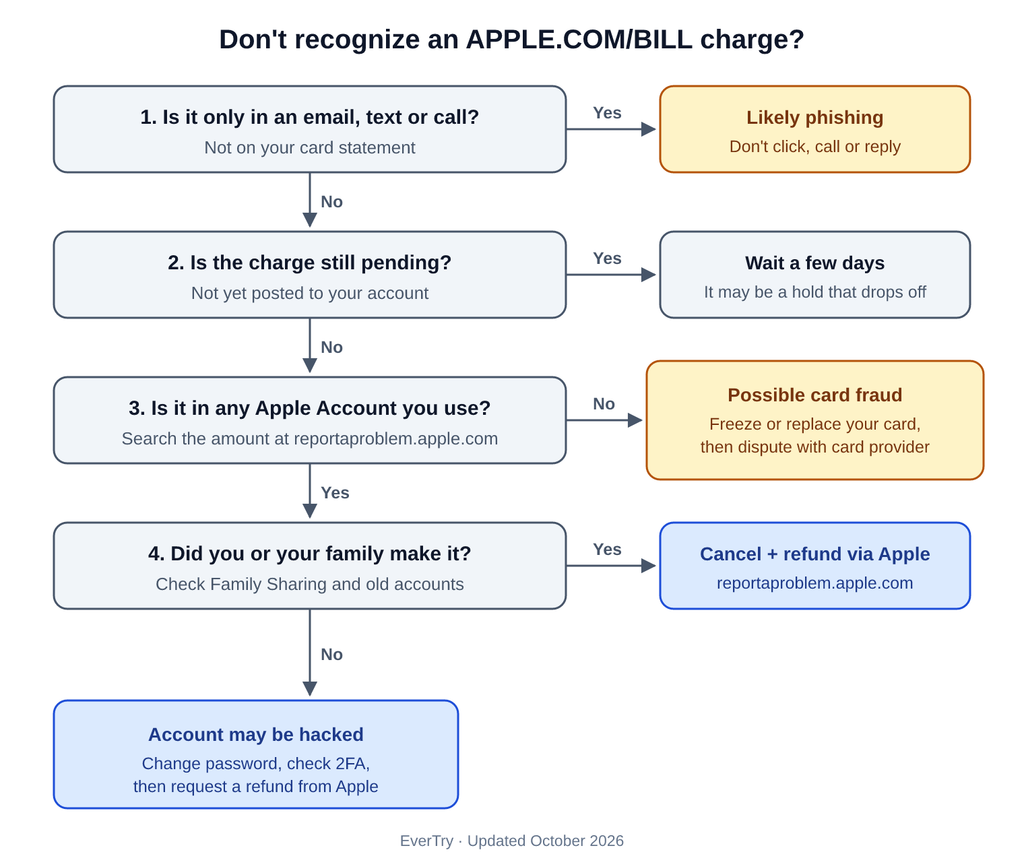
- Is the “charge” only in an email, text or phone call? If it isn’t on your actual statement, it’s almost certainly phishing. Don’t click, call, or reply.
- Is it still pending? Wait a few days. It may be a temporary hold that disappears.
- Search for it at reportaproblem.apple.com. Check every Apple Account you have, plus your family members’.
- Found it, and it’s yours or a family member’s? Cancel the subscription if needed, then request a refund from Apple. Don’t go to your bank for this.
- Found it, but nobody you know made it? Your Apple Account may be compromised. Change your password, check your two-factor authentication settings, then request a refund from Apple.
- Can’t find it in any Apple Account you control? Someone may be using your card number on their own Apple Account. Freeze or replace your card right away, then dispute the charge with your card provider.
A word of caution: some users report that Apple restricted their Apple Account after they disputed a charge with their bank. Keep bank disputes for charges that really aren’t yours.
Is APPLE.COM/BILL a Scam? How to Tell Real From Fake
The APPLE.COM/BILL charge itself is real. Scammers know people are confused by it, so they copy the name.
A common scam in 2026: you get a text or email saying Apple has “approved” a subscription of around $349, with a number to call if it wasn’t you. When you call, the “support agent” asks for codes, card details, or remote access to your device. Some show you a fake refund screen, claim they refunded you too much, and ask you to send the difference back in gift cards or crypto.
Here’s how to tell them apart:
| Probably real | Probably a scam |
|---|---|
| It’s on your card statement or banking app | It’s only in a text, email or call |
| It matches a purchase in your Apple Account | Nothing matches in any account you check |
| The receipt shows your current billing address | Generic greeting, spelling mistakes, an odd sender address |
| You contacted Apple yourself, through its website or app | The message gives you a number or link to “cancel” |
| Nobody asks for codes or passwords | They ask for 2FA codes, your card number, or remote access |
| Refunds go back to your original payment method | They ask you to “send back” money in gift cards or crypto |
Apple never asks for your password or verification codes, and it never asks you to pay with gift cards. Forward suspicious emails to reportphishing@apple.com.
APPLE.COM/BILL on an African or USD Virtual Card
If you pay for Apple services from Africa, a few extra things can affect what you see on your statement.
Local-currency vs dollar App Stores
Apple prices its App Store in local currency in some countries, including Nigeria, Egypt and South Africa. In several others, such as Kenya and Malawi, prices are generally shown in US dollars.
If you pay a naira, pound or rand price with a dollar card, the amount is converted, so your statement won’t show a neat $0.99 or $9.99. That’s normal, and it doesn’t mean you were overcharged. Check the receipt to see the original price.
Why Apple declines some cards
Common reasons your card won’t work with Apple:
- Domestic-only cards. Some local card schemes only work inside their home country, and Apple can’t charge them.
- International payments are switched off on the card.
- Your billing address or region doesn’t match your Apple Account’s country.
- Mobile money isn’t accepted. Apple doesn’t take mobile wallets directly. In a few countries, such as South Africa and Egypt, it accepts payment through some mobile network bills.
Why “CA US” or “CORK IE” can mean a cross-border charge
When a charge comes from a merchant outside the country where your card was issued, card networks may treat it as cross-border, even if no currency was converted. Whether you pay a fee for that depends on your card provider, so check its fee page.
Paying for Apple with a USD virtual card
Many people in Africa pay for Apple services with a USD virtual card to avoid declines and currency headaches. EverTry issues Visa and Mastercard virtual cards you can fund in NGN, KES, GHS, EGP, ZAR, MWK, and other currencies, or with USDT and USDC. The EverTry Visa card works with Apple Pay, and creating a card costs a one-time $3 fee (as of October 2026). Other fees are shown in the app.
A virtual card also makes it easier to deal with a suspicious charge. If something looks wrong, you can freeze the card or set up a new one, without waiting for a plastic replacement.
Related guides:
The Bottom Line on APPLE.COM/BILL
APPLE.COM/BILL is Apple’s name for app, subscription, and media charges, and most of the time it’s something you or your family bought. Search the exact amount at reportaproblem.apple.com, cancel what you don’t need, and ask Apple for a refund if you need one. Go to your card provider only if the charge doesn’t appear in any Apple Account you control. If you pay from Africa, an EverTry USD card gives you one card for your Apple charges that you can freeze if something looks off.
FAQ
Why am I being charged for an Apple.com bill?
Because something was billed to an Apple Account linked to your card. It could be an app, an in-app purchase, a subscription (including other companies’ apps you pay for through Apple), iCloud+, or a media purchase. Common causes are renewals, free trials that ended, family purchases, a second Apple Account, or several purchases grouped into one charge.
How do I cancel my Apple.com bill?
You cancel the subscription behind it, not “apple.com/bill” itself. On iPhone, go to Settings, tap your name, then Subscriptions, and cancel the one you don’t want. You can also do it at account.apple.com. Cancel free trials at least 24 hours before they end.
Why am I getting a $40 charge from Apple?
Most likely a subscription bundle or several purchases grouped. In the US, Apple One Premier costs $39.95 a month (as of July 2026). An annual plan renewing, added tax, or currency conversion can also produce an amount around $40. Search the exact amount at reportaproblem.apple.com to see what it was.
How do I figure out what an Apple.com bill charge is for?
Sign in at reportaproblem.apple.com and search for the exact amount. You can also open the App Store on your iPhone, tap your profile, then Purchase History. Check every Apple Account you have, plus your family members’ purchases, and search your email for “receipt from Apple.”
What to do if I don’t recognize an Apple transaction?
First, make sure it’s on your actual card statement and not just in an email or text. If it’s pending, wait for it to post. Then search for it in every Apple Account you use. If you find it, cancel it and request a refund from Apple. If you can’t find it anywhere, freeze your card and dispute the charge with your card provider.
Is 866-712-7753 really Apple?
The number appears on genuine Apple charges, as part of the charge record. Even so, don’t call any number printed on a statement or sent in a message. Contact Apple only through support.apple.com or the Apple Support app, because scammers run fake “Apple billing” lines.
Why does my statement say CORK IRL or ITUNES.COM IE?
Those are versions of the same Apple charge, processed through Ireland. They’re common on accounts outside the US. The location shows where the payment was processed, not where you made the purchase.
Why was I charged by Apple when I don’t own an iPhone?
Apple services such as Apple TV and iCloud+ also work on the web, Windows, and smart TVs, and they’re billed to an Apple Account. So it could be a subscription started on another device, or a family member’s purchase on your card. If you can’t find it in any Apple Account you or your family use, treat it as possible card fraud and contact your card provider.
Why doesn’t the amount match the App Store price?
Usually for one of three reasons: Apple grouped several purchases into one charge, tax was added, or your card is in a different currency from your App Store. Your Apple receipt shows the original price and any tax.
Disclaimer: EverTry is not affiliated with, endorsed by, or sponsored by Apple Inc. Apple, App Store, iCloud+, Apple Music, Apple TV and Apple One are trademarks of Apple Inc. This article is for general information only and is accurate as of October 2026. Apple’s prices, billing practices, and refund rules can change and may vary by country, so check Apple’s official support pages for the latest details. Refunds are decided by Apple, and charge disputes by your card provider. EverTry cannot guarantee either outcome. Never share your passwords, verification codes, or card details with anyone who contacts you claiming to be from Apple or EverTry.
Matt Aluya is the founder of EverTry. A software engineer focused on virtual card issuance and stablecoin settlement for cross-border payments in emerging markets. LinkedIn · matt.aluya@evertry.co