
If you’re trying to figure out how to pay for Render subscription in Ethiopia, here’s the short answer: use a virtual dollar card, like the one from EverTry. Most Ethiopian bank cards can’t handle Render’s recurring USD payments, since Render bills through Stripe. That mismatch is usually why your payment fails.
A virtual dollar card fixes that. You fund it with USDT or USDC, get a USD card in minutes, and add it straight to your Render Billing page. No bank visit. No waiting days for approval.
Quick Answer
How to pay for Render subscription in Ethiopia
- Create your EverTry account.
- Complete KYC (identity verification).
- Fund your wallet.
- Generate a virtual dollar card.
- Add the card in Render Dashboard → Billing → Payment Method. Render places a small $1 hold first, just to confirm the card works.
That’s it. Everything below just walks you through it in more detail, and helps you fix things if your card still gets declined.
What Exactly is Render?
Render is a cloud hosting platform built for developers who want to deploy apps without managing servers themselves; sometimes called a “Zero DevOps” platform. You can use it to host web services, background workers, cron jobs, and static sites, plus run managed databases like PostgreSQL and Redis-compatible caching. It’s popular for shipping side projects, startups, and production apps quickly, since it handles things like deployments, scaling, and infrastructure setup automatically once you connect your code. Render offers a free Hobby tier for smaller projects, with paid plans starting once you need more compute power, team features, or production-grade reliability; which is where the payment issues in this guide usually come in.
Why Is It So Hard to Pay for Render Subscription in Ethiopia?
Render Bills Through Stripe
Render doesn’t process payments itself. It uses Stripe, which handles billing for thousands of software companies. Before your first real charge, Stripe runs a $1 authorization check. It’s just confirming your card details are real and active. It’s not a fee, and it usually disappears from your statement within a day or two.
The catch: Stripe expects your card to support recurring, cross-border USD charges. Many Ethiopian cards simply aren’t set up for that.
Why Ethiopian Bank Cards Often Get Declined
A few reasons this happens:
- Your bank restricts cross-border payments by default
- Your card isn’t approved for recurring USD billing
- Foreign exchange rules limit international transactions
- The bank blocks certain merchant categories, including cloud hosting
None of this means your card is broken.
“But My Card Works Everywhere Else”
If you’ve ever seen “Your card was declined” on Render, even though the same card works fine on other sites, you’re not alone. Developers post this exact complaint often; card has a balance, bank confirms international payments are enabled, and Render still says no.
Here’s why: recurring authorization is different from a one-time payment. Your bank might approve a single charge but block Stripe from saving your card for automatic monthly billing. That’s an issuer-level restriction, not something wrong with your account or your project.
Why EverTry Makes This Easier
Get a Virtual Dollar Card Online, Fast
You don’t need to visit a bank branch. You don’t need paperwork mailed anywhere. Most people go from sign-up to a working virtual card in under 15 minutes.
Fund It However Works for You
EverTry lets you fund your wallet with:
- USDT or USDC, if you already hold stablecoins
Pick whichever is faster for you.
Built for Subscriptions Like Render
EverTry cards are designed for exactly this use case: USD billing, recurring charges, and cross-border merchants. That’s the gap most local cards can’t cover.
No More Asking Someone Abroad to Pay for You
A lot of Ethiopian developers work around this by asking a friend, client, or relative overseas to pay their Render bill with their own card. It works, until it doesn’t… a forgotten renewal, a person who’s traveling, a card that expires. Having your own virtual dollar card means you’re never depending on someone else to keep your project online.
Step-by-Step: How to Pay for Render Using EverTry
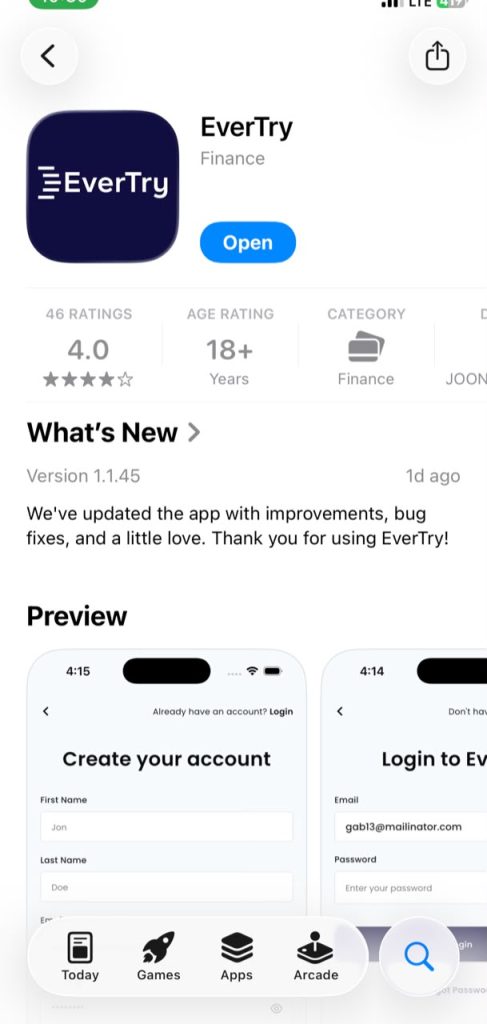
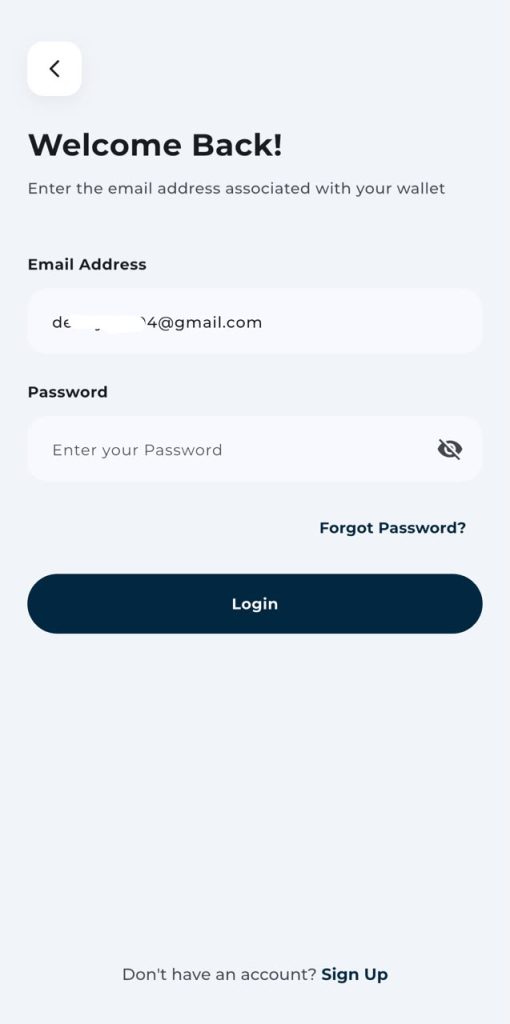
Step 1: Create an EverTry Account
Download the app, sign up with your email, and verify your address. Takes a couple of minutes.
Step 2: Complete KYC Verification
You’ll need to confirm your identity with a valid ID. This is standard for any financial app and usually approves quickly.

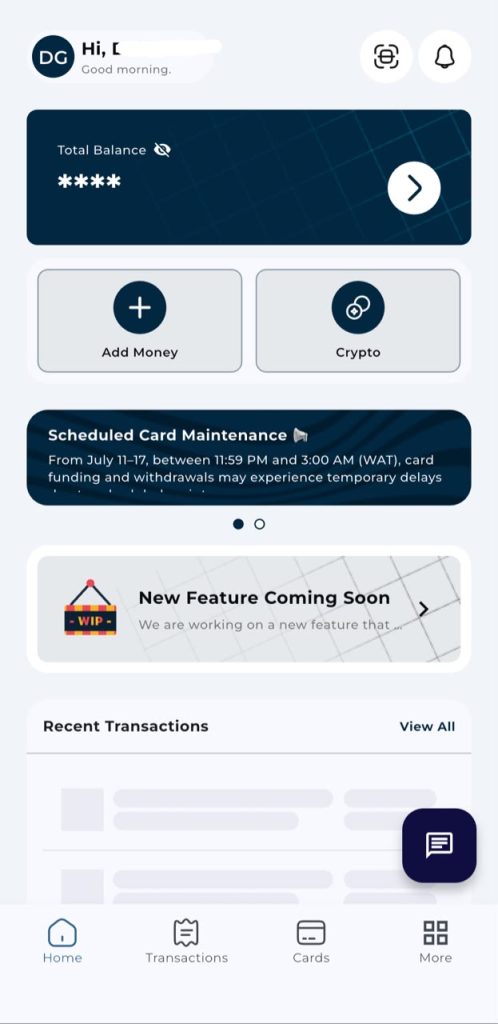
Step 3: Fund Your Wallet
Add money using USDT or USDC. A good rule of thumb: fund enough to cover your Render plan plus any expected compute usage, so you’re not caught short at renewal.

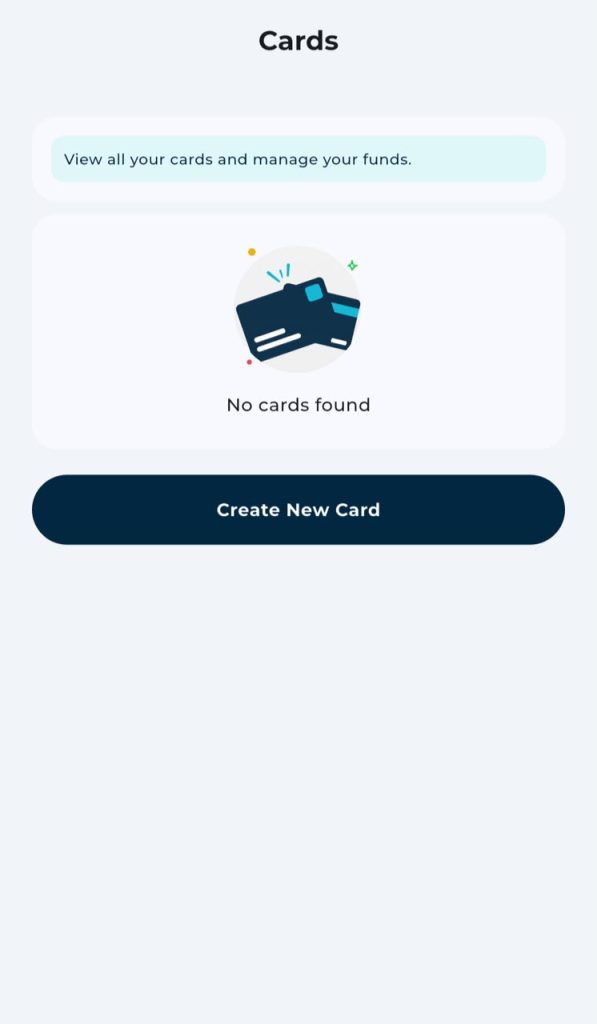
Step 4: Generate a Virtual Dollar Card
Once your wallet’s funded, create your card inside the app. You’ll get a card number, expiry date, and CVV instantly. Keep these private, the same way you’d treat any card.
Step 5: Add the Card to Render
In your Render Dashboard:
Dashboard → Billing → Payment Method → Add Card
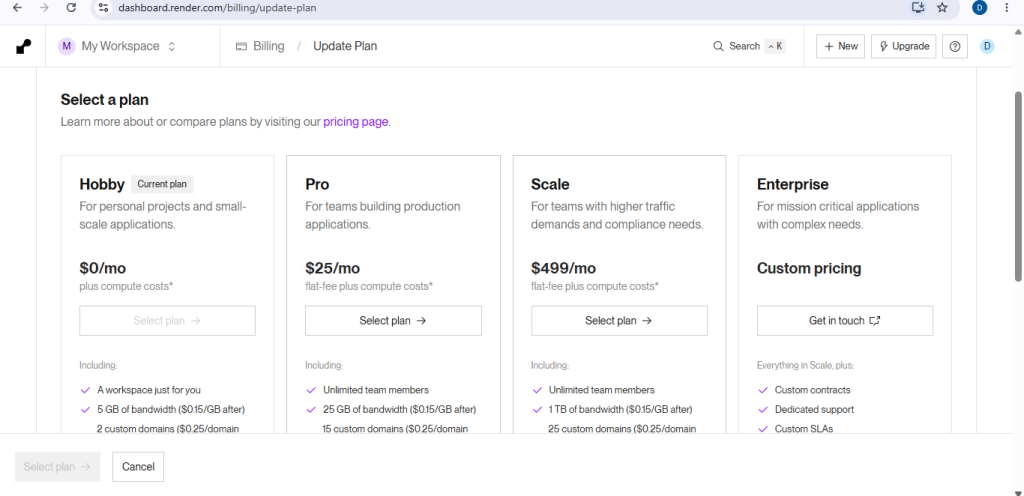
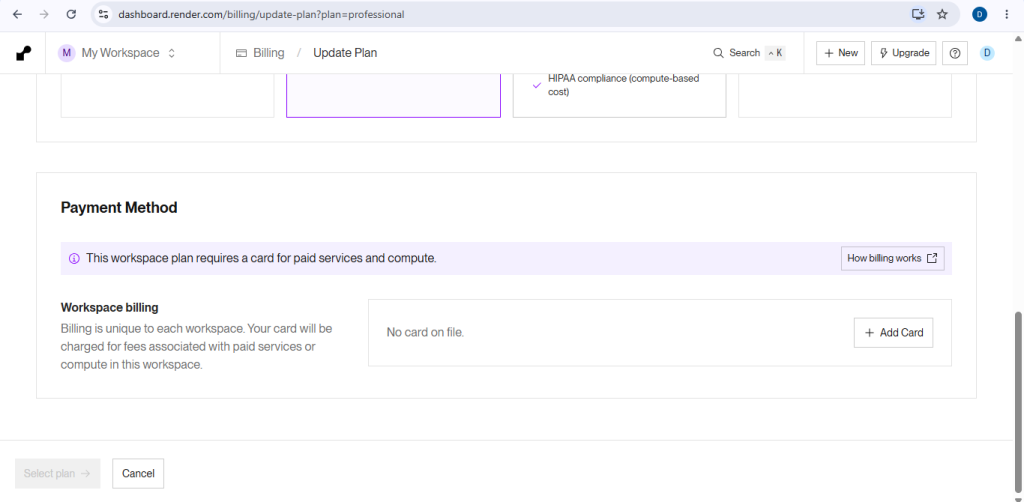
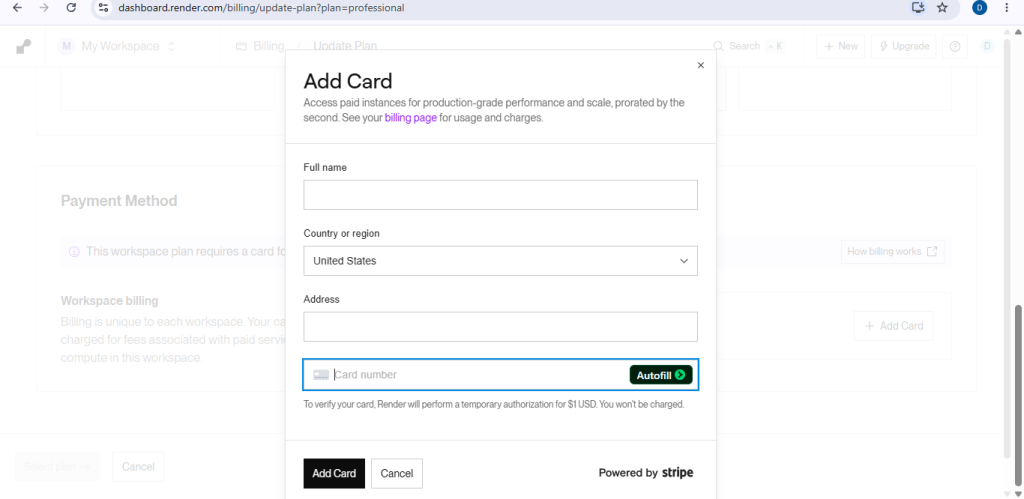
Enter your card number, expiry, CVV, and billing address. Render will run that small $1 authorization check first. If it goes through, your card is saved and ready for billing.
What Happens After You Add Your Card
The $1 Hold, Explained
This charge isn’t your subscription fee. Stripe uses it purely to check the card is valid before storing it for future billing. It typically clears on its own within a day or two and won’t show up as a real transaction on your statement.
Keeping Renewals Smooth
Render bills monthly, and if you’re on a team plan, seat fees renew automatically too. Keep enough balance on your EverTry card ahead of each renewal date so nothing gets interrupted mid-project.
Render Card Declined? Here’s How to Fix It
Check your balance. Make sure it covers your plan, plus any compute overages, plus a small buffer for the authorization hold.
Double-check your billing details. A mismatched name, address, or expiry date is a common, easy-to-miss cause of declines.
Wait a moment and retry. Sometimes a decline is temporary; a busy network, a delayed authorization. Give it a few minutes before trying again.
Generate a new virtual card if needed. If a card seems frozen or isn’t accepting new charges, creating a fresh one in the EverTry app often solves it faster than troubleshooting the old one.
Reach out to support. If none of that works, contact EverTry support to check your card status, or Render support to see what error they’re seeing on their end.
EverTry vs. telebirr Virtual VISA Card for Render
| Feature | EverTry | telebirr Virtual VISA Card |
|---|---|---|
| Fully online setup | Yes | Varies |
| Virtual USD card | Yes | Yes |
| Reliable for recurring subscriptions | Yes | Depends on issuer policies |
| USDT funding | Yes | No |
| Works across international SaaS tools | Yes | Limited, depends on merchant |
Both are legitimate options. telebirr’s card can work well for some merchants. If you specifically need USDT funding or a card built around recurring international subscriptions like Render, EverTry is the more purpose-built option.
Best Practices for Paying for Render in Ethiopia
- Top up before renewal, not after. Avoid last-minute failed payments.
- Watch your compute usage. Render bills usage separately from your plan, so costs can creep up.
- Replace cards before they expire, not when a payment fails.
- Turn on notifications in both Render and EverTry so you always know when a payment goes through, or doesn’t.
Can You Use the Same Card for Other Developer Tools?
Yes, in most cases. The same EverTry virtual dollar card can typically be used for:
- GitHub
- DigitalOcean
- Vercel
- Linear
- Railway
- Fly.io
- Supabase
- OpenAI API
Acceptance always comes down to each platform’s own payment policies, but one funded USD card covering most of your developer stack is one of the biggest reasons people switch to this setup.
Frequently Asked Questions
Can I pay for a Render subscription in Ethiopia?
Yes. Use a virtual dollar card that supports recurring USD payments, fund it, then add it under Render’s Billing page as your payment method.
Why is my Ethiopian debit card declined on Render?
Most Ethiopian cards aren’t approved for recurring, cross-border USD billing through Stripe, even if they work fine for other purchases.
Does Render charge $1 before my first real payment?
Yes. It’s a temporary authorization hold to confirm your card is valid. It’s not your subscription fee, and it’s usually reversed automatically.
Can I pay for Render without an international bank account?
Yes. A virtual dollar card lets you subscribe without ever opening an account overseas.
Can I fund EverTry with USDT?
Yes. EverTry accepts USDT alongside local currency, so you can fund your wallet with whichever you have on hand.
How long does it take to get a virtual dollar card?
Most people finish sign-up, verification, funding, and card creation in under 15 minutes.
Can I use the same card for GitHub, DigitalOcean, or Vercel?
Usually, yes. A virtual dollar card built for international recurring billing tends to work across most developer platforms, subject to each one’s own policies.
Is EverTry safe for recurring subscription payments?
Yes, it’s built specifically for international online payments and recurring billing. Just keep enough balance ahead of each renewal to avoid a failed charge.
The Bottom Line
If Render keeps declining your Ethiopian card, or you’re still a bit lost on how to pay for Render subscription in Ethiopia, it’s almost never something you’re doing wrong. It’s a mismatch between your bank and Render’s billing system. EverTry’s virtual dollar card closes that gap.
The information in this article is provided for general informational and educational purposes only. Subscription prices, payment methods, supported cards, and platform policies may change without notice. Always verify the latest pricing and billing requirements on Render’s official website before making a payment. EverTry is an independent payment platform and is not affiliated with, endorsed by, or sponsored by Render or Stripe. Any trademarks mentioned are the property of their respective owners.
Deborah Giwa is a Marketing Associate at EverTry, where she works on content and growth initiatives focused on helping users navigate international payments. She is passionate about simplifying access to global financial tools for people in emerging markets through clear, practical, and user-focused content.