
To pay for Upwork services, you first add and verify a billing method, a credit or debit card, PayPal, or (for US clients) Venmo or a bank account. How you’re charged depends on the contract type: hourly contracts bill your default method automatically every Monday for the previous week’s work, while fixed-price contracts require you to fund each milestone into escrow upfront, released when you approve the work.
If your payment keeps failing, the cause is almost always your bank or the payment route, not Upwork. This guide explains the whole system first, then how to fix failures, including when your local card can’t pay internationally at all. If you’re mid-failure right now, jump to the troubleshooting section.
How paying on Upwork works
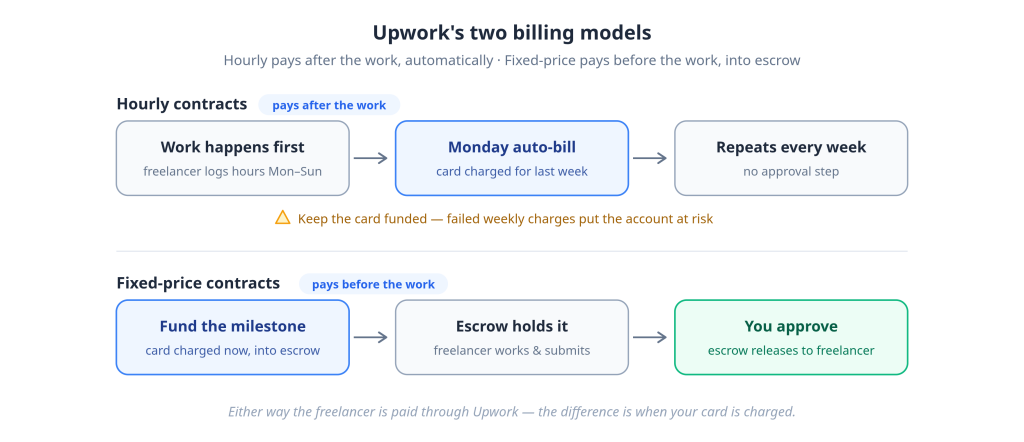
Upwork runs two billing models. Hourly contracts charge you automatically every Monday, in arrears, for the hours your freelancer logged the previous week. Fixed-price contracts work the opposite way: you deposit each milestone into escrow before work starts, and the money is released only when you approve the delivery.
Hourly contracts: automatic weekly billing
Freelancers on hourly contracts log time in Upwork’s work diary. Every Monday, Upwork totals the previous week’s hours and charges your default billing method, no invoice to approve, no button to click. You can also set up an optional weekly retainer (a fixed recurring amount) if you prefer predictable billing.
The convenience has a flip side: your payment method has to succeed unattended, every week. A card that intermittently declines doesn’t just delay one payment; it puts your account at risk. More on that below.
Fixed-price contracts: milestones and escrow
When you hire on a fixed-price contract, you fund the first milestone upfront. The money leaves your payment method immediately and sits in Upwork’s escrow. The freelancer sees the milestone is funded and starts work; when they submit, and you approve, escrow releases the funds. A contract can’t start until the milestone is funded; insufficient funding blocks the hire.
What does escrow mean on Upwork?
Escrow is a neutral holding account: you’ve paid, but the freelancer hasn’t been paid yet. It protects both sides. The freelancer knows the budget is real, and you know the money doesn’t move until you accept the work. If a milestone is disputed, the funds stay in escrow while Upwork’s dispute process runs.
So, when is money actually deducted? Hourly: every Monday, after work. Fixed price: at milestone funding, before the work. That single distinction answers most “do I pay upfront?” confusion.
Upwork billing methods and supported payment options
Upwork accepts credit and debit cards (Visa, Mastercard, and American Express, where supported), PayPal in most regions, and, for US clients only, Venmo and ACH bank transfer. The options you see depend on your country and account history, and bank transfer comes with a reduced marketplace fee for eligible US clients.
| Billing method | Who can use it | Notes |
|---|---|---|
| Credit/debit cards | Most countries | Visa, Mastercard, and Amex were supported; the card must pass verification |
| PayPal | Most countries | Account must be able to send payments |
| Venmo | United States only | — |
| ACH bank transfer | United States only | Qualifies eligible clients for a reduced marketplace fee |
Why your options differ by country
Upwork’s billing methods run on third-party payment providers, and provider coverage varies by market. If a method listed above doesn’t appear in your Billing & Payments settings, it isn’t offered in your country or for your account profile; it’s not an error to fix.
Card type restrictions
Not every card that works elsewhere will pass Upwork’s billing-method verification. Prepaid cards, gift cards, and some virtual and corporate cards can fail at the verification stage even with a valid balance, because Upwork applies stricter card-class rules than one-off checkouts do; a recurring-billing platform needs cards that will still work next Monday.
How to add and verify a billing method
To add a billing method on Upwork: go to Settings → Billing & Payments, select Add a billing method, choose card or PayPal, enter your details exactly as your bank has them, and complete any verification step (3-D Secure prompt or a small temporary authorization). Do this before you hire, not while a freelancer waits.
Step by step
- Log in and open Settings (desktop) or the Settings menu in the app.
- Go to Billing & Payments.
- Select Add a billing method.
- Choose Card or PayPal and enter the details, name, number, expiry, CVV, and billing address, which must match your bank’s records exactly.
- Complete verification if prompted (a 3-D Secure check or a small temporary card authorization).
- Add a second billing method as backup. Upwork recommends it, requires it in some setups, and it’s your safety net for weekly billing.
Verification failures vs payment failures, they’re different problems
Fails to save or verify: the card never becomes usable. Usual causes: billing address mismatch (AVS check), an unsupported card class (prepaid/gift/virtual), or your bank declining the tiny verification authorization. Fix the details or use a different card; retrying the same data won’t help.
Saved, but the charge fails later: the card verified fine, but a real payment was declined. This is the classic cross-border failure chain: funding, FX limits, fraud scoring, or 3-D Secure, covered in depth below.
Knowing which of the two you’re facing tells you where the fix lives. Half the frustrated threads online come from applying charge-failure fixes to verification problems, and vice versa.
Before you hire: three habits
Verify the billing method before sending an offer. Keep a backup method on file. Make sure the billing address on Upwork is character-for-character what your bank has, “St.” vs “Street” has killed real payments.
What Upwork actually costs clients
On top of what you pay your freelancer, Upwork charges clients a marketplace fee, a percentage of every payment, plus a one-time contract initiation fee of $0.99–$14.99 when each new contract starts. US clients paying by bank account qualify for a reduced marketplace fee. The freelancer’s own service fee is separate and doesn’t come from you.
The marketplace fee
The fee depends on your plan (Basic vs Business Plus) and payment method. As of July 2026, Upwork’s pricing materials list Basic-plan rates around 5% (reduced to 3% for eligible US clients paying by bank account), with Business Plus higher, but Upwork has been updating its client fee structure, and different official pages currently show different numbers. The reliable rule: the exact fee is always displayed at checkout before you confirm, so treat that number as the truth for your account.
Contract initiation fee
A one-time $0.99–$14.99 charge per new contract, applied when you fund the first milestone (fixed-price) or make the first payment (hourly). It’s per contract, not per payment, which quietly makes many small contracts more expensive than fewer consolidated ones.
Example cost breakdowns
| Scenario | Freelancer amount | Marketplace fee (5%)* | Initiation fee | Real total |
|---|---|---|---|---|
| $1,000 fixed-price project | $1,000 | $50 | $0.99–$14.99 (once) | $1,050.99–$1,064.99 |
| Hourly: 20 hrs/week at $30/hr, 4 weeks | $2,400 | $120 | $0.99–$14.99 (once) | $2,520.99–$2,534.99, billed as ~$630/week |
*Illustrative rate, confirm your fee at checkout. If your card is in another currency, your bank’s FX rate and foreign transaction fee apply on top.
“Why is Upwork charging me 15%?”
It isn’t, not you. The 0–15% figure is the freelancer’s variable service fee (introduced May 2025), deducted from their earnings on each contract. Clients sometimes spot it in articles or invoices and assume it’s a client charge. Your costs are the marketplace fee and the initiation fee above.
Paying hourly contracts: the Monday billing cycle and its risks
Every Monday, Upwork charges your default billing method for the hours logged in your freelancer’s work diary the previous week. There’s no approval step, which is exactly why hourly contracts demand a payment method that works reliably without you touching it.
What that means in practice:
Your card is charged weekly, automatically. Review the work diary during the week if you want oversight; by Monday, the billing is mechanical.
A failed Monday charge is not a minor event. Upwork flags accounts with failed payments, and repeated failures put the account at risk of suspension, mid-contract, with a freelancer waiting to be paid. This is the single most underappreciated fact about paying for Upwork.
Keep the method funded with headroom. If you use any balance-based method (including prepaid-style cards), keep the balance comfortably above your expected weekly bill, hours fluctuate, and the marketplace fee sits on top.
Keep a backup method on file. Upwork recommends a second billing method precisely for this scenario; if the primary fails, the backup keeps the account clean.
Paying fixed-price contracts: escrow, step by step
- You agree on milestones with the freelancer.
- At hire, you fund the first milestone, charged to your billing method immediately, held in escrow.
- The freelancer works and submits the milestone.
- You review. Approving releases the escrow funds to the freelancer; requesting changes keeps them held.
- Fund the next milestone; repeat.
If you and the freelancer disagree about a submitted milestone, either side can open a dispute, and the escrowed funds stay frozen while Upwork mediates. And note the entry condition: no funded milestone, no started contract, a declined funding payment stalls the hire itself.
Direct Contracts: paying freelancers outside a marketplace job post
Direct Contracts let you pay a freelancer you found outside Upwork’s marketplace while still using Upwork’s payment rails. The freelancer sends you a payment request; you pay it by card or PayPal; the funds sit in escrow until you approve the work, same protection, different entry point.
Businesses typically use Direct Contracts to bring an existing freelance relationship under escrow protection and clean invoicing without running a job post. A client-side fee applies.
Why Upwork payments fail
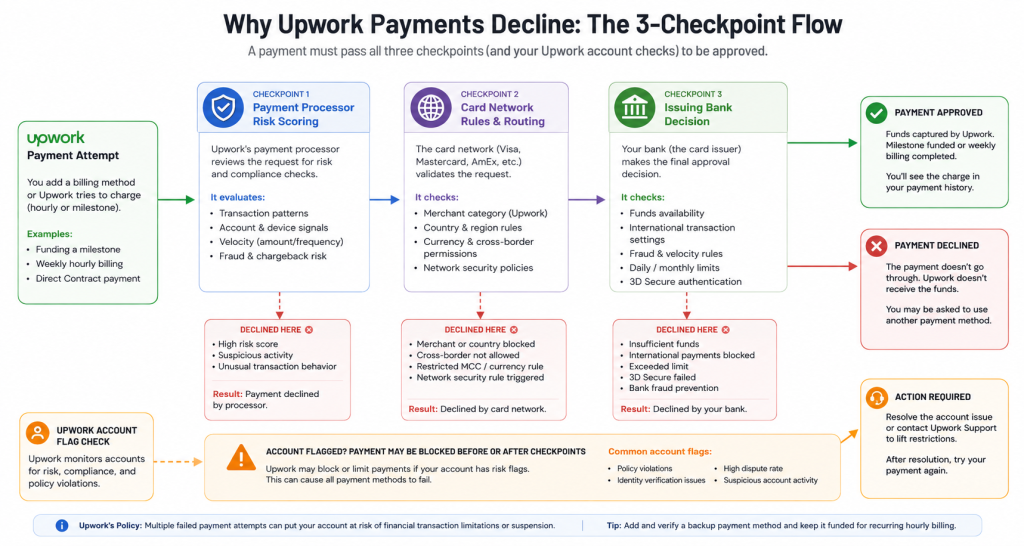
Most Upwork payment failures are declined by the card’s issuing bank or blocked by risk checks along the payment route, not by Upwork. The usual suspects: cards not enabled for international charges, FX limits, fraud scoring triggered by VPNs or mismatched details, and failed 3-D Secure verification. Upwork adds one layer of its own: account-level flags and attempt lockouts.
Issuer bank declines (the most common cause)
Your bank has the final word on every charge. Genuine insufficient funds aside, the frequent culprits are international transactions being disabled on the card, the bank’s fraud system flagging a new foreign merchant, or a monthly foreign-spend limit being quietly exhausted. The error message rarely says which.
FX and cross-border restrictions
In FX-restricted markets, banks cap how much foreign currency a local-currency card can spend. Upwork makes this worse than one-off purchases in two ways: charges are in USD and recur weekly, so a monthly card limit can be consumed by week one or two of an hourly contract; and per-transaction limits can block a single large milestone funding even when the monthly cap has room. Check both limits, not just your balance.
Card network and 3-D Secure failures
Some declines happen in transit, cross-border routing rules between your card’s country and the merchant’s region. Others die at the 3-D Secure step: the OTP never arrives, the verification page times out, or your bank has an old phone number for you. If a payment fails at a bank-verification screen, fix your contact details with the bank before retrying.
Upwork’s own layer: flags and lockouts
Three failure patterns are Upwork-side mechanics rather than bank declines:
- Every method fails at once. If your Visa, Mastercard, and PayPal all return “charge failed,” that’s usually an account-level risk flag, not three coincidental bank declines. Another card won’t fix it; a support ticket will.
- “Too many attempts.” Rapid retry loops trigger a temporary lockout on payment attempts. Each failed retry also raises your fraud score with your own bank. After two failures, stop and change something.
- Method never verified. A card that was saved but shows as inactive/unverified can’t be charged at all — resolve verification first (see the save-vs-charge distinction above).
Decline messages, translated
| What you see | What it usually means | What to do |
|---|---|---|
| “Sorry, we couldn’t charge the billing method you selected” | Charge-stage decline, usually issuer-side | Contact your bank; ask about international e-commerce and recurring charges |
| Card details flagged red / won’t save | Verification failure, AVS mismatch or unsupported card class | Match billing address exactly; try a different card type |
| “Too many attempts” | Upwork retry lockout | Stop retrying; wait 24–48 hours; open a ticket if it persists |
| All methods are failing simultaneously | Account-level flag | Support ticket with details (see recovery section) |
| Pending charge after a failure | Voided authorization hold | Nothing — it releases back in a few days |
Country-by-country payment challenges
Short, factual notes for the markets where Upwork client payments fail most often. The pattern is the same everywhere: the block is at the bank or regulator level, and “my card works everywhere except Upwork” usually means “everywhere domestic, but not on recurring USD charges to a foreign merchant.”
Nigeria. Naira cards carry bank-set monthly dollar limits that a single week of hourly billing can exceed; a $600 weekly bill against a $100/month card cap fails in week one. PayPal accounts in Nigeria are send-only and need a working funding source. A USD-denominated payment method is the practical route for anything beyond micro-contracts.
Pakistan. Outbound foreign-exchange restrictions mean many debit cards decline on foreign merchants regardless of balance. Ask your bank for a forex-enabled card tier, where unavailable, dollar-denominated methods are the fallback.
India. International transactions must be explicitly enabled under RBI rules, and the app toggle alone isn’t always enough, since some cards still don’t support cross-border e-commerce or recurring foreign charges. Confirm both points with your bank; enabled credit cards generally handle Upwork well.
Ghana. Mobile money can’t be added as an Upwork billing method. You need an internationally enabled Visa/Mastercard, or a USD card funded from mobile money or bank transfer.
Kenya. M-Pesa isn’t supported as a billing method. Internationally enabled bank Visa cards work; where they’re blocked, a dollar card fills the gap.
Egypt. FX controls make EGP cards prone to limits and category blocks on foreign merchants, and weekly recurring USD billing hits those limits fast. Cards already denominated in USD avoid the conversion step that triggers the block.
Brazil. Payments generally succeed, but the IOF tax on international card transactions adds a government levy on top of Upwork’s fees; factor it into hourly budgets, especially since it applies every week.
Bangladesh. Cards need a dollar endorsement against your passport before international use; un-endorsed taka cards decline. Once endorsed, spending works within your annual quota; watch it on long hourly engagements.
Sri Lanka. Years of import and FX controls have left banks conservative about foreign card payments. If your card fails even after enabling international use, a USD-denominated method is the dependable alternative.
What to do when your local card fails internationally
Work through these in order, cheapest and fastest first:
1. Fix the card with your bank. Ask three specific questions: Is this card enabled for international online payments? Does it support recurring foreign charges? What are my per-transaction and monthly foreign-spend limits? Many “mystery” declines end here, free.
2. Align your details. Billing address on Upwork is identical to the bank’s records, VPN off at payment time, and the phone number is current for OTPs.
3. Try PayPal. Where your PayPal account can send payments, it’s a well-supported billing method, but it still needs a funding source that works internationally, which loops some users back to the card problem.
4. Use a USD-denominated payment method. A card whose balance is already in dollars removes the FX conversion your bank keeps blocking: the weekly charge processes without touching your local card’s foreign-spend limits. Virtual dollar cards, like the ones EverTry issues, are funded in local currency or stablecoins and denominated in USD from creation, serving this role. One Upwork-specific caveat, stated plainly: Upwork’s billing-method verification is stricter with prepaid and virtual card classes than most checkouts, so if a virtual card won’t verify directly, the working route is funding your PayPal account with it and setting PayPal as the billing method.
5. Domiciliary/foreign-currency account. The long-term infrastructure option — a bank USD account with a linked card. Reliable once open, but slow to set up; wrong tool for a freelancer waiting on a funded milestone today.
Whichever route you take, never move the payment off-platform. Paying a freelancer outside Upwork to dodge a card problem forfeits escrow protection entirely and violates both parties’ terms.
Step-by-step recovery after an Upwork payment failure
- Identify the failure type (2 min). Won’t save/verify → fix details or change card class. Saved but charge failed → bank-side, continue below. Everything failing or “too many attempts” → skip to step 5.
- Call your issuing bank (10 min). Ask whether they declined a charge from Upwork, why, and whether the card supports international recurring payments. Request enablement or a limit raise on the spot.
- Wait, then retry once correctly. After a lockout warning, wait 24–48 hours. Retry from Billing & Payments with re-entered CVV, VPN off, one attempt. Don’t machine-gun the button; every failure raises your risk score on both sides.
- Add a backup billing method (different card, or PayPal) before retrying, it protects the account even if the primary keeps failing. If your local cards can’t work internationally at all, set up a USD route from the previous section; with an EverTry card, the decline-to-working-payment path takes minutes rather than a bank visit.
- Open a support ticket if all methods fail. Include: exact error text, timestamps of attempts, card types tried, confirmation from your bank that no block exists on their side, and whether the failure is at the save or charge stage. That package lets Upwork’s team check the account-flag layer that only they can see.
Troubleshooting checklist
- Billing address on Upwork matches bank records exactly
- International online payments are enabled on the card, and recurring charges are supported
- Balance covers the charge + marketplace fee + FX conversion headroom
- Per-transaction and monthly foreign-spend limits both have room
- VPN off; IP country matches card country
- Phone number is current with the bank (3-D Secure OTPs)
- Billing method fully verified, not just saved
- Backup billing method on file
- No rapid retry loops, max one retry, then wait
- Checked Upwork account alerts and the Upwork status page
Frequently asked questions
How do you pay on Upwork? Add and verify a billing method, card, PayPal, or (US only) Venmo or bank account, under Settings → Billing & Payments. Hourly contracts then charge it automatically every Monday for the previous week’s logged hours; fixed-price contracts charge it when you fund each milestone into escrow.
Do you pay upfront on Upwork? For fixed-price contracts, yes, you fund each milestone into escrow before work starts, and the money is released when you approve the delivery. For hourly contracts, you’re billed weekly in arrears, every Monday, for hours already worked.
What payment methods does Upwork accept? Credit and debit cards (Visa, Mastercard, American Express, where supported) and PayPal in most countries. US clients can also use Venmo or an ACH bank transfer, and paying by bank account qualifies eligible US clients for a reduced marketplace fee.
Why is my Upwork payment failing? Most failures are issuer-side: international payments not enabled, foreign-spend limits reached, fraud scoring triggered by VPNs or mismatched billing details, or failed 3-D Secure checks. If every method fails at once or you’re locked out for too many attempts, it’s an account-level flag — contact Upwork support.
What is escrow on Upwork? A neutral holding step for fixed-price contracts: your milestone payment is charged upfront and held by Upwork, then released to the freelancer only when you approve the submitted work. It proves the budget is real without paying before delivery.
Why is Upwork charging me 15%? It isn’t charging you 15%. That figure is the freelancer’s variable service fee (0–15% per contract), deducted from their earnings. Client-side costs are the marketplace fee on each payment plus a one-time contract initiation fee per contract.
Can I use a virtual or prepaid card on Upwork? Sometimes, but it’s unreliable. Upwork’s billing method verification applies stricter card-class rules than typical checkouts, and prepaid or virtual cards can fail to verify. The dependable pattern is funding a PayPal account with a USD virtual card, such as one from EverTry, and using PayPal as the billing method.
How does Upwork process payments? Through your verified billing method, in USD, on two cycles: automatic Monday billing for hourly work-diary hours, and immediate escrow funding for fixed-price milestones. Fees are added at charge time, and failed charges are retried against your billing methods before the account is flagged.
Most Upwork payment problems trace back to banking and FX infrastructure, not the platform, which is good news, because infrastructure problems have workarounds. Set up your billing method before you hire, keep a backup on file, know your card’s foreign-spend limits, and if your local card fundamentally can’t pay internationally, switch to a dollar-denominated route instead of fighting weekly declines. Your freelancer gets paid on time, and your account stays in good standing.
Matt Aluya is the founder of EverTry. A software engineer focused on virtual card issuance and stablecoin settlement for cross-border payments in emerging markets. LinkedIn · matt.aluya@evertry.co