
To pay for Fiverr, add a payment method at checkout: a Visa, Mastercard, or American Express debit or credit card, PayPal, Apple Pay (iOS app), or Google Pay (Android app), and confirm the order. Fiverr charges you the full amount upfront, holds it in escrow, and only releases the money to the freelancer after you approve the delivered work.
That’s the short answer. The longer answer matters if you’re one of the many buyers whose payment fails at checkout, especially if you’re paying from a country where international card transactions are restricted. In most of those cases, Fiverr never declined anything. The payment was stopped by your bank or a payment processor before Fiverr saw a cent.
This guide covers both situations: how Fiverr payments normally work, and exactly what to do when they don’t.
How Fiverr payments work
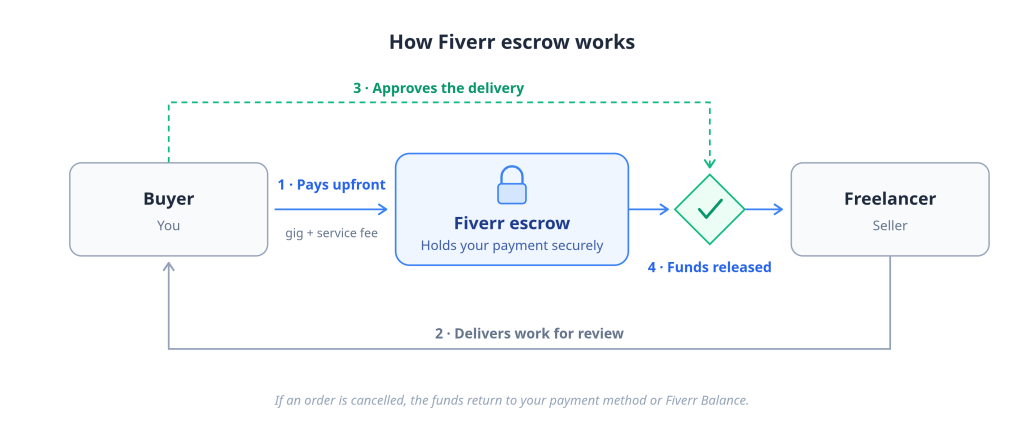
Fiverr uses an escrow model. You pay the full order amount when you place the order. Fiverr holds the funds, and the freelancer is paid only after you accept the delivery. This protects both sides: the freelancer knows the money exists, and you know it won’t move until the work is done.
What happens after you click “Continue to Checkout”
- You select a gig or accept a custom offer.
- Fiverr shows the order total: the gig price plus a service fee.
- You choose a payment method (saved or new).
- Your bank or payment provider authorizes the charge.
- The order starts, and your money sits in Fiverr’s escrow.
Why Fiverr charges buyers before work begins
Upfront payment is the escrow system working as designed, not a risk. Freelancers won’t start work on unfunded orders, and Fiverr won’t release your money until you approve the delivery or the revision window closes. If an order is cancelled, the funds are returned to your payment method or your Fiverr Balance.
When sellers receive the money
After you approve the delivery, the freelancer’s share enters a clearance period, typically 14 days, or 7 days for top-rated sellers, before they can withdraw it. This doesn’t affect you as a buyer, but it explains why sellers care so much about smooth, dispute-free orders.
What buyer protection actually covers
Escrow protects you against non-delivery and gives you a structured dispute process. It does not cover buyer’s remorse after approving work or payments made outside the platform. Never pay a freelancer off-platform: you lose all protection the moment money moves outside Fiverr.
Fiverr payment methods
Fiverr accepts credit and debit cards (Visa, Mastercard, American Express), PayPal, Apple Pay on the iOS app, Google Pay on the Android app, and your Fiverr Balance. US users can also pay with Venmo, Netherlands users with iDeal/Wero, and Fiverr Pro clients by wire transfer. Cryptocurrency is not accepted.
| Method | Who can use it | Notes |
|---|---|---|
| Credit/debit cards | Global | Visa, Mastercard, Amex. The card must support international online payments. |
| PayPal | Most countries | Account must be able to send payments (some countries have send-only or restricted accounts). |
| Apple Pay | iOS app, supported countries only | Availability depends on Apple Pay’s country list. |
| Google Pay | Android app, supported countries only | Availability depends on Google Pay’s country list. |
| Fiverr Balance | Anyone with a balance | Comes from refunds or seller earnings, buyers can’t top it up. |
| Venmo | United States only | US marketplace only. |
| iDeal / Wero | Netherlands only | Direct bank transfer at checkout. |
| Wire transfer (SWIFT) | Fiverr Pro clients only | For business accounts, minimum deposits apply. |
| Cryptocurrency | Not accepted | No coin or stablecoin is accepted at checkout. |
A note on country availability
The payment options you see at checkout depend on where you are. Fiverr relies on third-party payment providers, and those providers don’t operate everywhere. If Apple Pay or another option is missing for you, it’s a provider coverage gap, not an account problem.
Fiverr Balance: the detail most guides get wrong
You cannot deposit money into your Fiverr Balance as a regular buyer. A balance only exists if you’ve received refunds from cancelled orders, earned money as a seller, or been issued Fiverr credits. (Fiverr Pro business accounts are the exception; they can deposit funds, with a $1,000 minimum.) If your balance doesn’t cover a purchase, the remainder is charged to your card or PayPal.
Does Fiverr accept cryptocurrency?
No. Fiverr does not accept crypto in any form. If you hold stablecoins and want to spend them on Fiverr, the working route is converting them into a card-based payment method, covered later in this guide.
How much does Fiverr charge buyers?
On top of the gig price, Fiverr charges a service fee of 5.5% of the purchase amount, plus a $3.50 small-order fee on orders under $200. The fee is shown at checkout before you confirm, and it applies to every transaction, including gig extras and tips.
Worked examples
| Gig price | Service fee (5.5%) | Small-order fee | Total charged |
|---|---|---|---|
| $50 | $2.75 | $3.50 | $56.25 |
| $100 | $5.50 | $3.50 | $109.00 |
| $250 | $13.75 | — | $263.75 |
Two things to note. First, several older guides still say the small-order fee applies below $100; the current threshold is $200. Second, because each transaction carries its own fee, adding an extra or a tip after ordering costs slightly more than bundling everything into one order.
Why your bank statement may show a different amount
If your card is denominated in a currency other than the checkout currency, your bank converts the charge at its own exchange rate and may add a foreign transaction fee (commonly 1–4%). Fiverr shows you one number; your issuer decides the final one. This gap is also, as you’ll see shortly, one of the reasons payments fail.
How to add, change, or remove a payment method
To add a payment method on Fiverr: log in, click your profile picture, open Settings → Billing and Payments → Payment methods, choose Add a Payment Method, select card or PayPal, enter your details, and tick Save as default if you want faster checkouts.
Add a payment method
- Log in to Fiverr on desktop or the app.
- Click your profile picture in the top-right corner.
- Go to Billing and Payments, then the Payment methods tab.
- Click Add a Payment Method.
- Choose Card or PayPal and enter the details.
- Check Save as default to store it for future orders.
You can also save a card during checkout by ticking the save-as-default box on the Confirm & Pay page.
Change or remove a payment method
From the same Payment methods tab, select the saved card or PayPal account and click Remove, then add the new method. There’s no separate “edit”; replacing is the workflow.
Why Fiverr automatically removes inactive cards
If a saved payment method goes unused for an extended period, Fiverr’s system removes it automatically. If a card you saved months ago has vanished, nothing is wrong — just add it again.
Why your Fiverr payment failed
Most failed Fiverr payments are declined by the card’s issuing bank or blocked by risk rules along the payment route, not by Fiverr. Common causes include cards not enabled for international transactions, foreign-exchange restrictions, fraud scoring triggered by VPNs or mismatched details, and failed 3-D Secure verification.
Understanding where a payment dies makes it far easier to fix.
The journey your payment actually takes
When you click Pay, the charge travels through a chain in seconds:
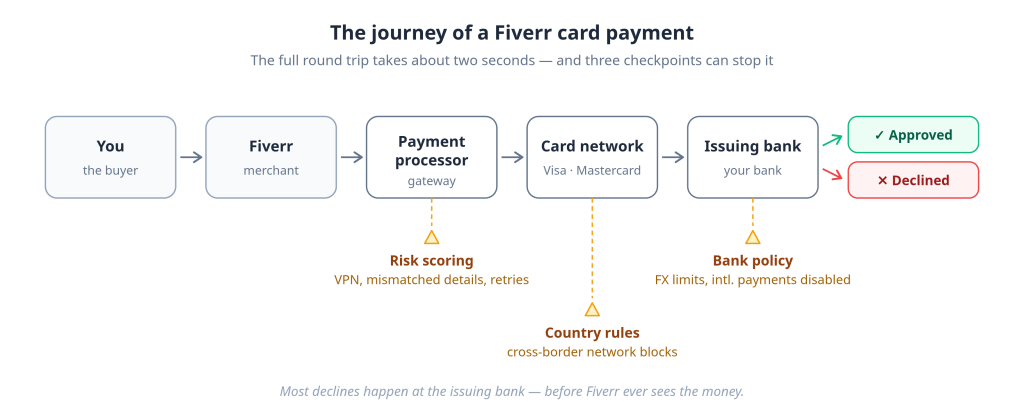
Any link in that chain can stop the payment. In practice, the overwhelming majority of declines happen at the last step, your issuing bank, or at the processor’s risk check just before it.
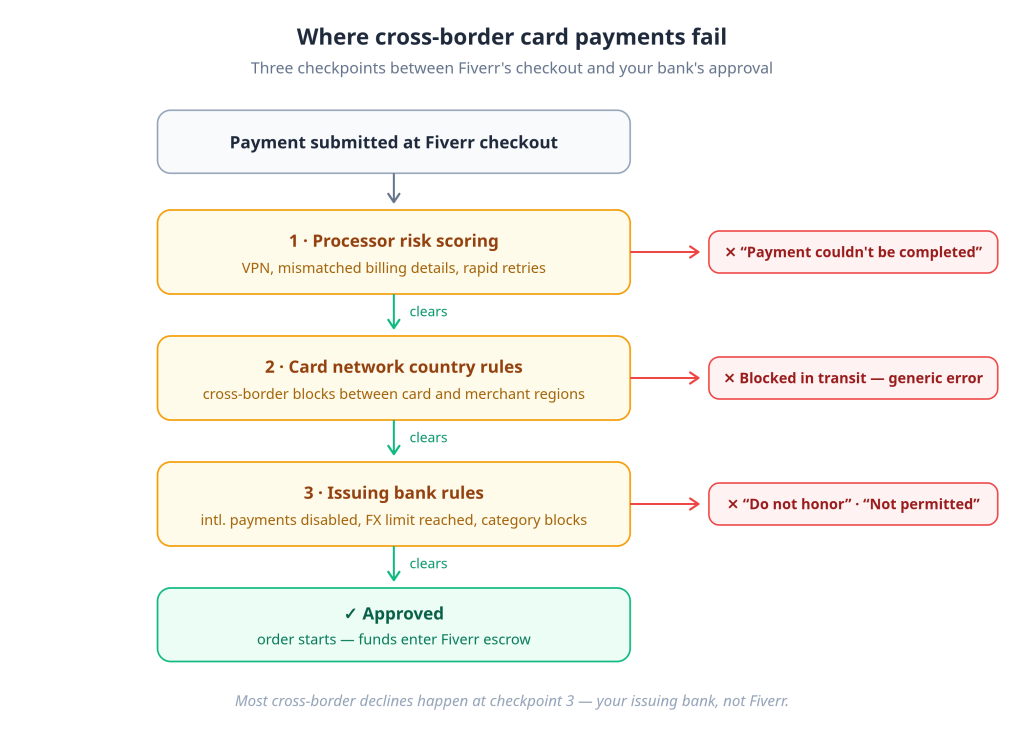
A cross-border card payment can fail at several points before it ever reaches the merchant. The payment processor may flag it as high risk, the card network may enforce regional rules, or most commonly, the issuing bank may decline it because of its international payment policies, fraud controls, or foreign exchange restrictions. When a customer sees messages like ‘Transaction Not Permitted’ or ‘Do Not Honor,’ the decision is usually being made by the issuing bank, not the merchant.
– EverTry Payments Engineering Team
The issuing bank declines
Your bank makes the final call on every charge. Banks decline international e-commerce transactions for reasons that never appear in the error message: the card isn’t enabled for cross-border use, a monthly foreign-spend limit was hit, or the bank simply blocks certain merchant categories abroad.
FX restrictions and central bank policy
In several countries, banks limit how much foreign currency a local-currency card can spend, sometimes to figures as low as $20–$100 per month. A $60 gig plus fees can exceed the entire monthly allowance. These limits come from banking regulation and bank risk policy, not from Fiverr.
Fraud scoring
Automated risk systems score every transaction. Signals that raise the score: a card issued in one country, an IP address in another, a billing address in a third; a first-ever purchase at a new merchant; several rapid attempts in a row. High score, silent decline.
3-D Secure failures
Many international charges require 3-D Secure, the OTP, or app-approval step. If your bank’s OTP doesn’t arrive, the verification page times out, or your registered phone number is outdated, the payment fails even though the card is fine. Fix the phone number with your bank first.
VPN and geo-mismatch problems
Paying through a VPN is one of the most common self-inflicted declines. If your card says one country and your IP says another, fraud systems flag it. Turn the VPN off before checkout and make sure your billing address matches the card’s issuing country.
Temporary authorization holds
When a payment fails, you may still see a pending charge on your statement. That’s a voided authorization, not a completed payment. The hold is released back to your card in roughly 2–7 days, depending on your bank. It won’t appear as a refund line because no money actually moved.
The retry trap
Repeatedly hammering the Pay button makes things worse. Each failed attempt raises your fraud score, and enough attempts in a short window can get the card temporarily blocked for online use entirely. If a payment fails twice, stop, change something (method, network, VPN off), then try once more from a fresh checkout; don’t use the browser’s back button or refresh mid-payment, which can occasionally produce duplicate charges.
Common decline messages, translated
| Message you see | What it usually means | What to do |
|---|---|---|
| Do not honor | The issuing bank refused, no reason given | Call your bank; ask specifically about international e-commerce |
| Transaction not permitted | Card not enabled for this transaction type | Enable international/online payments in your banking app |
| Insufficient funds (when you have funds) | FX conversion + fees exceeded your balance or FX limit | Check foreign-spend limits, not just your balance |
| Payment couldn’t be completed | Processor risk decline | Disable VPN, match billing address, wait, retry once |
| 3-D Secure failed | OTP/verification step broke | Update your phone number with the bank; retry |
Why Fiverr usually isn’t the one declining you
Fiverr wants your payment to succeed; declined checkouts are lost revenue. In almost every failure, Fiverr received no money and made no decision; the transaction was stopped upstream. That’s worth internalizing, because the fix is seldom “contact Fiverr” and almost always “fix the card, or change the card.”
Paying for Fiverr when your local card doesn’t work internationally
If your local card can’t complete international payments, you have four realistic options, in this order: ask your bank to enable international transactions and raise your foreign-spend limit; pay through PayPal if your account can send money; use a virtual dollar card; or open a domiciliary/foreign-currency account.
Why local cards fail internationally, the structural version
The declines described above are transaction-level. But in FX-restricted markets, there’s a structural layer underneath: local-currency cards depend on the bank converting your money to dollars at charge time, and that conversion is exactly what regulation limits. Every naira, rupee, or cedi card payment to a foreign merchant is a small FX transaction, and when FX is scarce or controlled, banks throttle those transactions with low limits, category blocks, or outright disablement.
A dollar-denominated card sidesteps the problem: the balance is already in USD before you reach checkout, so there’s no conversion for the bank to block.
The alternatives, honestly ranked
1. Fix your existing card first. Call your bank. Ask three questions: Is my card enabled for international online payments? What is my monthly foreign-spend limit? Can it be raised? This is free and solves a surprising share of cases.
2. PayPal, if your account can send. Fiverr accepts PayPal broadly, but PayPal account capabilities vary by country. In some markets, accounts are send-only or need a linked international card to fund payments, which loops you back to the card problem.
3. A virtual dollar card. A USD-denominated Visa or Mastercard created inside a fintech app, funded with your local currency. Because it’s a true dollar card from issuance, the charge doesn’t trigger an FX conversion at your local bank, doesn’t count against your local card’s foreign-spend cap, and doesn’t hit the BIN-level blocks that stop many local cards. EverTry issues virtual dollar cards that work this way: you fund the wallet in local currency, the balance is held in dollars, and Fiverr’s USD charge processes as an ordinary domestic-currency transaction from the card’s perspective.
4. A domiciliary or foreign-currency bank account. The traditional route: a USD account at a commercial bank with a linked card. It works, but account opening requirements, minimum balances, and funding friction make it slower to set up than a virtual card, better as long-term infrastructure than as a same-day fix.
Country-specific payment guidance
Nigeria
Nigerian naira cards face bank-set monthly dollar limits that are often too low for a single gig plus fees, and PayPal accounts in Nigeria are send-only, usable for buying, but only when funded by a working card. Virtual dollar cards have become the standard workaround. We’ve written a full walkthrough: How to Pay on Fiverr from Nigeria →
Pakistan
Outbound foreign-exchange transfers are restricted, so many Pakistani debit cards fail at international merchants regardless of the bank. If your bank offers a forex-enabled card tier, request it; otherwise, a dollar-denominated card is the reliable route.
India
RBI rules require international transactions to be explicitly enabled on your card, and enabling “international usage” in your banking app isn’t always enough, because some cards still don’t support cross-border e-commerce. Confirm both with your bank. Forex cards and enabled credit cards generally work well on Fiverr.
Ghana
Mobile money doesn’t work at Fiverr’s checkout. You’ll need a Visa or Mastercard enabled for international payments, or a virtual dollar card funded from mobile money or bank transfer.
Kenya
M-Pesa isn’t a supported Fiverr payment method. Bank-issued Visa cards with international e-commerce enabled work; where they don’t, a virtual dollar card fills the gap.
Egypt
Strict FX policy means Egyptian-pound cards frequently hit limits or category blocks on foreign merchants. Cards funded and held in USD avoid the EGP conversion step entirely.
Brazil
Payments generally go through, but the IOF tax on international card transactions adds a government levy on top of Fiverr’s service fee. Factor it into your total cost when comparing payment routes.
Bangladesh
International use requires endorsing your card against your passport (dollar endorsement). Unendorsed taka cards will decline. Once endorsed, standard cards work within your annual quota.
Sri Lanka
Periods of import and FX control have left many banks conservative about international card payments. If your bank’s card fails after enabling international use, a USD-denominated card is the dependable alternative.
Complete a Fiverr payment in under 15 minutes after a decline
If your card was just declined and fixing it with your bank isn’t an option today, here’s the fastest recovery path we’ve tested.
- Confirm the failure type (1 min). If the error was VPN- or OTP-related, fix that and retry once. If it’s a hard decline (“do not honor,” “not permitted”), move on.
- Create an EverTry account and complete KYC (3–5 min). ID document and a selfie; approval is typically fast.
- Fund your wallet in local currency (2–3 min). The balance converts to and is held in USD.
- Create a virtual dollar card (under 1 min). Card number, expiry, and CVV are issued instantly in the app.
- Add the card to Fiverr (2 min). Settings → Billing and Payments → Payment methods → Add. Use your real billing address.
- Complete the payment (1 min). Return to the gig, start checkout fresh (don’t resume the failed session), select the new card, and pay.
Fund the card with slightly more than the gig price, remember the 5.5% service fee plus $3.50 on orders under $200.
Fiverr payment troubleshooting checklist
Run through this before contacting anyone:
- International/online payments enabled on the card (confirm with your bank, not just the app toggle)
- Balance covers gig price + 5.5% fee + $3.50 (if under $200) + any FX conversion
- Monthly foreign-spend limit not exhausted
- Billing address matches the card’s registered address
- VPN off; IP country matches card country
- Phone number is current with your bank (for 3-D Secure OTPs)
- Fresh checkout session, no back button, no refresh
- Waited 15–30 minutes after two failures before the final retry
- Tried an alternative method (PayPal, different card, dollar card)
If everything checks out and payments still fail, contact Fiverr support with your order details, card type, and the exact error message. Occasionally, the issue really is on the platform side, and they can see what your bank can’t.
Frequently asked questions
How do I pay for Fiverr? Choose a gig, proceed to checkout, and pay with a Visa, Mastercard, or Amex card, PayPal, Apple Pay (iOS app), or Google Pay (Android app). Fiverr charges the full amount upfront and holds it in escrow until you approve the freelancer’s delivery.
Do I pay before or after the work is done? Before. Fiverr charges you the moment you place the order. The money sits in escrow and is only released to the freelancer after you approve the delivered work, which is what protects you as a buyer.
How much does Fiverr charge buyers? Fiverr adds a service fee of 5.5% of the purchase price, plus $3.50 on orders under $200. A $50 gig costs $56.25 total; a $250 gig costs $263.75. Your bank may add its own foreign transaction fee.
Which payment method should I use? Whichever is most reliable in your country. Where international cards work freely, a saved card is the fastest. Where local cards face FX restrictions, a dollar-denominated card or a fundable PayPal account is the dependable choice.
Why was my card declined on Fiverr? Usually, your issuing bank refused the charge: international payments not enabled, a foreign-spend limit reached, fraud scoring triggered by a VPN or mismatched billing details, or a failed 3-D Secure step. Fiverr itself rarely declines payments.
Can I pay for Fiverr with PayPal? Yes, in most countries. Your PayPal account must be able to send payments and have a funding source, a balance, or a linked card that works internationally. In some countries, accounts are limited to sending only.
Does Fiverr accept cryptocurrency? No. Fiverr does not accept any cryptocurrency or stablecoin at checkout. If your funds are in stablecoins, convert them into a card-based method, for example, funding a virtual dollar card, and pay with that.
Can I load money into my Fiverr Balance? No. Regular buyers can’t deposit into the Fiverr Balance; it only holds refunds, credits, or seller earnings. Fiverr Pro business accounts can deposit funds, with a $1,000 minimum.
Is a virtual dollar card safe to use on Fiverr? Yes. A virtual dollar card is a standard Visa or Mastercard issued digitally, processed through the same card networks as a physical card. Cards from providers like EverTry are USD-denominated, which is why they avoid the FX-related declines that stop local-currency cards.
Why is my payment showing as pending after it failed? That’s a temporary authorization hold. When a payment fails, the reserved amount is voided and released back to your card within about 2–7 days, depending on your bank. It won’t appear as a refund because no money was actually left in your account.
Fees, thresholds, and payment method availability were verified against Fiverr’s official documentation in July 2026. If your local card can’t complete international payments, you can create a virtual dollar card with EverTry in minutes and pay on Fiverr and thousands of other international merchants.
Jamilah is a digital marketer focused on fintech growth, SEO, and user acquisition.
She works on content and campaigns that help users navigate cross-border payments more easily.
At EverTry, she supports marketing initiatives aimed at making global payments simpler and more accessible.