To pay for Alibaba Cloud in Nigeria, you need a payment method that clears three requirements: it must be enabled for international online transactions, support 3-D Secure, and pass a $1.00 verification charge. In practice, that means a USD-denominated card, a bank dollar card, a credit-class virtual dollar card, or a PayPal account with a working funding source. Most naira debit cards fail at least one of the three requirements, which is why so many payments end in “payment unsuccessful.”
This guide explains how Alibaba Cloud billing actually works, every accepted payment method, the card verification process step by step, why cards get declined, and what a failed payment does to your running infrastructure. If your card was just declined, jump to the troubleshooting section.
How do you pay for Alibaba Cloud in Nigeria?
The payment methods that reliably work from Nigeria are: a bank-issued dollar card linked to a domiciliary account, a credit-class USD virtual card, a PayPal account with an internationally working funding source, or, for enterprise customers on invoicing terms, a wire transfer. Naira cards work only if they’re enabled for international payments and 3-D Secure, which many aren’t.
| Method | Works from Nigeria? | Best for | Watch out for |
|---|---|---|---|
| Bank dollar card (dom account) | Yes | Businesses with existing Dom accounts | Slow to set up; minimum balances |
| Credit-class USD virtual card | Yes | Developers, startups, freelancers | Must be credit-class, prepaid-class cards are rejected |
| Naira debit card | Sometimes | Small, occasional payments | 3DS gaps, monthly dollar limits, recurring-charge blocks |
| PayPal | Yes, with caveats | Users who already have working PayPal | Nigerian accounts need a funding source that works internationally |
| Wire transfer | Enterprise only | Credit-controlled invoiced accounts | Requires an account manager relationship |
The rest of this guide explains why the table looks like this, starting with the billing system, because half of all “payment problems” are really billing-model confusion.
How Alibaba Cloud billing works
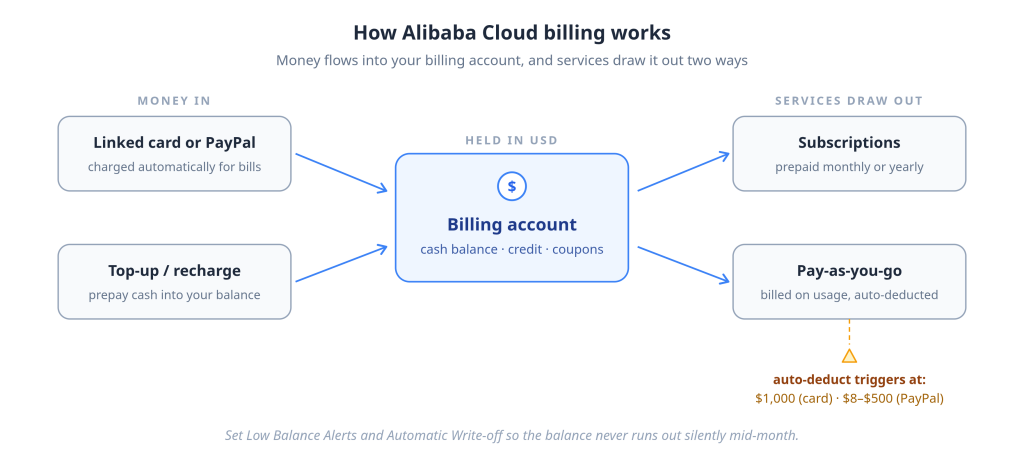
Alibaba Cloud gives every account a billing account, effectively a wallet that holds your cash balance and links to your card or PayPal. Services are billed in two modes: subscriptions are prepaid for a month or a year, while pay-as-you-go charges accumulate from usage and are deducted automatically. Everything is billed in USD by default.
The billing account (your wallet)
When you register, Alibaba Cloud creates a billing account that centralizes your cash balance, any coupons or credits, and your linked payment methods. Charges are settled against this account. You can pay directly from a linked card/PayPal, or top up the cash balance and let services draw from it.
Subscription billing
Subscriptions (a fixed server, a plan, a yearly package) are paid upfront for the term. Optional auto-renewal recharges your payment method when the term ends, is convenient, and is one more moment where a weak card silently fails.
Pay-as-you-go
PAYG resources bill on actual usage. Charges accumulate, and Alibaba Cloud automatically deducts from your default payment method, for cards, when accumulated fees reach $1,000; for PayPal, at much lower thresholds (between $8 and $500 depending on the account).
That threshold difference matters in Nigeria: PayPal users get frequent small deductions (more transactions that can each fail, but each small enough to fit tight FX limits), while card users get rare large deductions (fewer failure events, but each one bigger than most naira cards’ monthly caps). Neither is wrong, but you should know which pattern your payment method will face.
Recharge/top-up
You can add funds to your cash balance in advance and draw services from it, the closest thing to prepaying for peace of mind. Combined with Low Balance Alerts (notifications when your balance drops below a threshold you set) and Automatic Write-off (auto-settling bills), it’s the built-in toolkit for never waking up to a suspended server.
What payment methods does Alibaba Cloud accept?
Alibaba Cloud’s international edition accepts bank cards on the Visa, Mastercard, American Express, JCB, Discover, and Diners Club networks, plus PayPal and Alipay. Wire transfer is available only to credit-controlled enterprise customers. Prepaid cards, gift cards, and prepaid-classified virtual cards are not supported, and every card must meet three requirements before it can be used.
The three-card requirements
- Enabled for international online transactions. Domestic-only cards fail immediately.
- 3-D Secure (3DS) enabled. Alibaba Cloud requires it, the OTP/app-approval step during binding or payment. Many Nigerian naira debit cards have weak or absent 3DS support for international merchants, and this single gap explains a large share of failed payments.
- At least $1.00 available. Binding a card triggers a $1.00 pre-authorization; an empty card fails verification before anything else happens.
The card-class rule (read this before choosing a virtual card)
Alibaba Cloud rejects cards whose BIN, the card number’s issuing prefix, is classified as prepaid. This is not a rule against virtual cards as a format; it’s a rule against the prepaid card class. A virtual card issued as a standard Visa or Mastercard credit card carries a credit-class BIN and passes verification like any bank credit card. A virtual card issued on a prepaid BIN gets rejected no matter how much balance it holds.
This distinction is why advice like “just use any virtual dollar card” fails for so many people: the format is identical, the card class isn’t. When choosing a card for Alibaba Cloud, the question to ask the provider is not “is it virtual?” but “is it credit-class or prepaid-class?”
How merchants tell the difference: at authorization, the card network transmits the BIN’s class credit, debit, or prepaid before any charge is approved. A platform that blocks prepaid cards makes that decision in milliseconds from the BIN alone, which is why a rejected card fails instantly and consistently, regardless of balance.
PayPal
PayPal accounts (registered outside mainland China) can be linked as a payment method. Binding triggers a $1.00 pre-authorization on the PayPal account, and PayPal needs an active funding source, for Nigerian accounts, which are send-only, that means a card that itself works internationally.
Wire transfer
Available only to credit-controlled customers, enterprise accounts with invoicing terms arranged through an account manager. If you’re reading a how-to-pay guide, this probably isn’t your tier yet.
How to add and verify a payment method
Adding a card to Alibaba Cloud is a two-stage process: binding (the card is accepted and pre-authorized) and verification (you confirm a small charge amount to activate it). The card cannot be used for payments until verification is complete.
- Open the billing console. Log in and go to Expenses and Costs → Billing Account, then click Add Payment Method.
- Add the card. Enter the card number, expiry, CVV, and cardholder name exactly as issued. The billing address defaults to your registration address; edit it to match your card’s records if needed.
- Pass the pre-authorization. Alibaba Cloud places a $1.00 pre-authorization hold to confirm the card is live. Complete the 3-D Secure prompt if your bank triggers one; don’t close the page mid-redirect.
- Find the verification charge. A small charge of up to $1.00 posts to your card statement with the descriptor ALI*ALICLOUD, typically within 2–3 days.
- Confirm the exact amount. On the Payment Method Management page, click Verify and enter the exact charge amount. You get five attempts.
- Card goes Active. Once verified, the card can pay for orders and auto-deductions. The verification charge is refunded, initiated within 24 hours, though your bank may take up to 30 days to post it back.
⚠ The exact-amount trap for Nigerian users: if your card statement displays the verification charge converted to naira, don’t enter the naira figure; the amount Alibaba Cloud expects is the USD amount. Check the USD value in your card app’s transaction detail (usually shown alongside the converted amount) before burning one of your five attempts.
Two binding rules that cause mystery failures: each card can be linked to only one Alibaba Cloud account; if you ever added it to an old account, unlink it there first (cards on closed accounts stay locked through a 15-day silent period). And you can’t delete your only valid payment method while you have active resources or unpaid bills. Add the replacement first, set it as preferred, then remove the old one.
Why Alibaba Cloud keeps declining your card
Most declined payments on Alibaba Cloud fail at one of four points: the card class is rejected at binding, the 3-D Secure step fails, the issuing bank declines the charge, or the card can’t handle recurring automatic deductions. Alibaba Cloud itself is rarely the one saying no; in most failures, the decision happened at your bank or in the card network before Alibaba Cloud received anything.
Working through the failure points in order:
Card-class rejection. Prepaid-classified cards fail at binding, instantly and every time. If your card is rejected before any bank verification step appears, class is the first suspect.
International payments disabled. The most common naira-card failure. The card works everywhere domestically, so the owner assumes it works everywhere, but international e-commerce is a separate enablement your bank controls.
3-D Secure failure. The OTP doesn’t arrive, the bank’s verification page times out, or the card has no 3DS support for foreign merchants at all. Since Alibaba Cloud requires 3DS, a card without it cannot complete binding, no matter what else is right.
Issuer decline. The bank refuses the charge: monthly dollar limit exhausted, foreign merchant category blocked, or a fraud-score flag (a VPN at payment time is a classic trigger; turn it off).
Processor/network decline. Risk scoring and cross-border routing rules between your card’s country and the merchant’s region. Rare relative to issuer declines, but real.
Verification failure. The card is bound, but you entered the wrong micro-charge amount (see the naira-display trap above) or ran out of attempts.
Recurring-billing restriction. Some cards permit one-off international charges but block merchant-initiated recurring deductions, so the first payment succeeds and the auto-deduction weeks later fails. If your card “worked before and suddenly doesn’t,” this is a prime suspect.
Insufficient USD headroom. The balance covers the sticker price but not the FX conversion plus your bank’s foreign transaction fee. Alibaba Cloud charges no card processing fee of its own; the gap comes from your issuer’s conversion.
Expired or replaced card. Auto-renewals fail silently when a card expires. Update the card before the renewal date, not after the suspension email.
Can you pay Alibaba Cloud with a naira card?
Sometimes, if your bank has enabled the card for international online payments and 3-D Secure, and your monthly dollar limit covers the bill. In practice, many naira cards fail one of those conditions, and even the ones that pass often can’t sustain recurring auto-deductions month after month.
| Naira debit card | USD-denominated card | |
|---|---|---|
| International enablement | Bank-dependent; often off by default | Built for international charges |
| 3-D Secure | Inconsistent for foreign merchants | Supported |
| Monthly dollar limit | Often $20–$100, below a real cloud bill | No naira-card limit applies |
| FX conversion at charge | Every charge converts at bank rate + fee | None, balance already in USD |
| Recurring auto-deduction | Frequently blocked | Supported |
| Verdict | Occasional small payments, if enabled | Reliable for ongoing infrastructure |
The structural problem isn’t your bank being difficult: every naira-card charge to a foreign merchant is a small FX transaction, and FX transactions are exactly what banking policy constrains. A card whose balance is already in dollars simply has nothing left to constrain.
What happens if your Alibaba Cloud payment fails?
A failed payment doesn’t take your services down immediately. Alibaba Cloud gives direct customers a 15-day grace period during which existing pay-as-you-go services keep running (you just can’t buy new resources). But when the grace period ends with the bill unsettled, running resources are stopped, and some services go further: object storage, for example, suspends earlier and permanently deletes data after the grace period expires.
The timeline that matters:
| Stage | What happens |
|---|---|
| Payment fails / balance goes negative | Notifications sent; services keep running; new purchases blocked |
| During the 15-day grace period | Existing PAYG services run normally; billing continues and adds to the overdue amount |
| Product-specific suspensions | Some services suspend sooner (e.g. object storage suspends after 360 hours overdue) |
| Grace period ends, bill unsettled | Running resources are stopped |
| Beyond the grace period | Some services permanently delete data — object storage buckets are unrecoverable at this point |
For a business, translate that table: a card that quietly fails on the 1st can mean a production outage by mid-month and irreversible data loss after that. The prevention stack costs nothing to set up:
- Low Balance Alerts — get notified before the balance runs out, not after the suspension.
- Automatic Write-off — let bills settle automatically from your balance.
- A payment method that doesn’t intermittently fail, which is the subject of the next section.
Payment solutions that work for Nigerian users
Ranked by practicality, try them in this order:
1. Fix or upgrade your bank card
Ask your bank three questions: Is this card enabled for international online payments? Does it support 3-D Secure with foreign merchants? What’s my monthly dollar limit, and can it be raised? If you already hold a domiciliary account, ask for a dollar card linked to it. Dom-account cards clear all three Alibaba Cloud requirements and handle recurring billing well. The trade-off is setup friction: documentation, minimum balances, and time.
2. PayPal, with a working funding source
Alibaba Cloud accepts PayPal, and PayPal’s low auto-deduction thresholds suit users managing tight FX limits. The catch for Nigerian accounts: they’re send-only and need a funding source that works internationally, which usually means solving the card problem anyway, then attaching that card to PayPal.
3. A credit-class USD virtual card
This is where the card-class rule from earlier becomes practical advice. A virtual card issued as a standard credit card, a credit-class BIN on Visa or Mastercard rails, passes Alibaba Cloud’s verification, supports 3-D Secure, and handles recurring auto-deductions, while being fundable in naira or stablecoins and holding its balance in USD. EverTry issues exactly this class of card: credit cards, not prepaid, the same card class that also works with Apple Pay, Google Pay, and Samsung Pay, and that EverTry customers already use to pay for Alibaba Cloud subscriptions today.
What matters when evaluating any virtual card for Alibaba Cloud: confirm it’s credit-class (prepaid-class cards fail at binding), confirm 3DS support, and keep the balance topped up above your expected auto-deduction. A dollar card with an empty balance fails just like a naira card with a blocked one.
4. Enterprise wire transfer
If your spend justifies invoicing terms, an account manager can set up credit control with monthly wire settlement. Right tool for large teams; overkill for everyone else.
How to pay Alibaba Cloud using EverTry
The full path from nothing to a verified Alibaba Cloud payment method:
- Create an account and complete KYC. ID document plus a selfie; approval typically takes minutes.
- Fund your wallet. Top up in naira or USDT/USDC; the balance is held in USD.
- Create your USD card. The card number, expiry, and CVV are issued instantly in the app.
- Add the card to Alibaba Cloud. Expenses and Costs → Billing Account → Add Payment Method. Use your real billing address, and complete the 3-D Secure prompt when it appears.
- Pass verification. The $1.00 pre-authorization clears against your balance; when the ALI*ALICLOUD micro-charge appears in your card transactions, enter the exact USD amount on the Verify screen.
- Pay, and stay paid. Fund your first subscription or let PAYG auto-deductions run. Keep the card balance above your expected monthly bill, and pair it with Low Balance Alerts on the Alibaba Cloud side.
Troubleshooting checklist
Run through this before opening a support ticket:
- Card is credit-class, not prepaid-class (ask your provider if unsure)
- International online payments enabled, confirmed with the bank, not just the app toggle
- 3-D Secure is enabled, and your phone number is current for OTPs
- At least $1.00 available for the pre-authorization; full balance covers the bill + any issuer FX fee
- Recurring/merchant-initiated charges supported (ask specifically, one-off enablement isn’t enough)
- Billing address matches the card’s records exactly
- Verification completed card status shows Active, not just saved
- The card isn’t bound to another Alibaba Cloud account (including closed ones in the 15-day silent period)
- Exact USD amount entered for the micro-charge, attempts remaining
- VPN off at payment time
- Tried Chrome or incognito mode, cached sessions, and ad blockers break the 3DS redirect (Alibaba Cloud’s own recommendation)
Still failing on every method? Check whether the console is requesting KYC documents at checkout; inconsistent or blurry documents stall payments silently. Then contact Alibaba Cloud support with the exact error, timestamps, and card type.
Frequently asked questions
Can I use a Naira card on Alibaba Cloud? Sometimes. The card must be enabled for international online payments, support 3-D Secure, and have enough monthly dollar limit for your bill. Many naira debit cards miss at least one requirement, and recurring auto-deductions fail even on cards that manage a first payment.
Does Alibaba Cloud accept PayPal? Yes, PayPal accounts registered outside mainland China can be linked as a payment method, with a $1.00 pre-authorization at binding. Your PayPal account needs a working funding source; Nigerian PayPal accounts are send-only, so that funding source must itself work internationally.
Can I pay monthly for Alibaba Cloud? Yes. Subscriptions can be purchased month to month, and pay-as-you-go billing charges are based on actual usage with automatic deductions. You can also top up your account balance in advance and let services draw from it.
What payment methods does Alibaba Cloud accept? Bank cards on the Visa, Mastercard, American Express, JCB, Discover, and Diners Club networks, plus PayPal and Alipay. Wire transfer is limited to enterprise customers on credit terms. Prepaid cards, gift cards, and prepaid-classified virtual cards are not supported.
Why does my payment keep failing? The usual causes, in order: the card isn’t enabled for international payments, 3-D Secure fails or isn’t supported, the issuing bank declines (limits or fraud scoring), the card class is prepaid, or the card blocks recurring deductions. Alibaba Cloud itself rarely rejects a valid, verified card.
Is Alibaba Cloud free? No, but new accounts get free trial credits, and some products have always-free tiers with usage caps. Ongoing infrastructure is paid for via subscription or pay-as-you-go.
How do I add a payment method? Go to Expenses and Costs → Billing Account → Add Payment Method, enter your card or PayPal details, pass the $1.00 pre-authorization and any 3-D Secure prompt, then verify the card by entering the exact amount of the small ALI*ALICLOUD charge that appears on your statement within 2–3 days.
Does Alibaba Cloud charge payment processing fees? No, Alibaba Cloud doesn’t add a card processing fee. If your card’s currency isn’t USD, your bank applies its own FX conversion and possibly a foreign transaction fee, which is why the debit can exceed the invoice amount.
Can I use a virtual dollar card on Alibaba Cloud? Only if it’s a credit class. Alibaba Cloud rejects prepaid-classified cards at binding, so prepaid-BIN virtual cards fail regardless of balance. Credit-class virtual cards, like EverTry’s, which customers use for Alibaba Cloud subscriptions, pass verification the same way bank credit cards do.
What happens if my invoice becomes overdue? You get a 15-day grace period during which existing services keep running, but new purchases are blocked. If the bill stays unsettled, running resources are stopped, and some services, like object storage, permanently delete data after the grace period. Set Low Balance Alerts to avoid ever reaching that point.
Is Alibaba Cloud the same as Alibaba.com or AliExpress? No. Alibaba Cloud (alibabacloud.com) sells cloud infrastructure billed in USD; Alibaba.com is B2B wholesale; AliExpress is consumer retail — each with different payment systems. This guide covers Alibaba Cloud only; we have a separate guide for paying on AliExpress from Nigeria.
Conclusion
Paying for Alibaba Cloud from Nigeria comes down to clearing three requirements: international enablement, 3-D Secure, and the $1 verification, with a payment method that can also survive recurring auto-deductions. Bank dollar cards clear them with setup friction; PayPal clears them if its funding source does; naira cards clear them occasionally and fail unpredictably. Most payment “mysteries” are one of those requirements failing silently, and most infrastructure horror stories are a quiet card failure left unattended through the grace period.
Set Low Balance Alerts, keep a verified backup method, and, if your local cards can’t sustain international recurring billing, use a credit-class USD card created in minutes with EverTry and funded in naira or stablecoins to keep your servers running and your storage intact.
Matt Aluya is the founder of EverTry. A software engineer focused on virtual card issuance and stablecoin settlement for cross-border payments in emerging markets. LinkedIn · matt.aluya@evertry.co