
You can pay for Namecheap in Thailand with a Visa or Mastercard, with PayPal, or with account funds. Namecheap charges in US dollars (USD), not baht, so your bank handles the conversion. If your Thai card gets declined, the cause is usually a bank setting. It is rarely something you did wrong.
This guide shows each way to pay for Namecheap in Thailand. You’ll also learn how to fix a declined payment, how renewals work, and when a USD virtual card like EverTry can help.
Quick Answer
- Namecheap bills in USD. It does not bill in baht.
- It accepts Visa, Mastercard, Discover, American Express, Diners Club, JCB and UnionPay.
- PayPal works at checkout, but not for most automatic renewals.
- Crypto adds money to your Namecheap account funds. It is not a direct checkout option.
- If your card is declined, check international online payments in your bank app first.
- A USD virtual card is another option if your Thai card keeps failing.
What payment methods does Namecheap accept in Thailand?
Namecheap accepts the options below. The list is the same for all countries. Whether your own card gets approved is a separate question, and your bank decides that.
| Method | How it works | Watch out for |
|---|---|---|
| Visa or Mastercard | Pay at checkout | Your bank must allow online payments abroad |
| Other cards (Amex, Discover, Diners, JCB, UnionPay) | Pay at checkout | Fewer people in Thailand hold these |
| PayPal | Pick it at checkout | Not available for most automatic renewals |
| Account funds | Top up first, then pay from the balance | Card and PayPal top-ups have a $5 minimum |
| Crypto | Deposit into account funds | $1 minimum, and it can be slow |
| Virtual USD card | Use it like any card | Check the card is supported first |
Namecheap does not list baht, PromptPay or Thai bank transfers as ways to pay. Plan on paying in USD.
Check the payment options at checkout too. They can change, and not every method shows up for every order.
Can you use a Thai debit or credit card on Namecheap?
Yes, often. Many Thai cards work, but some need a setting changed first. Here is what to check:
- International online payments. Open your bank app (for example K PLUS, SCB Easy or Krungthai NEXT) and look for a setting that allows payments abroad.
- Card limits. Check your daily and online spending limits.
- Balance. Make sure there is enough money to cover the USD price plus fees.
- Billing details. Your name and address must match what the bank has on file.
- Extra verification. Your bank may text you a code. Finish it fast, or the payment fails.
What does it cost? Namecheap charges in USD. Your bank picks the exchange rate and may add a foreign transaction fee. Check your statement to see the real cost.
Why is your Namecheap payment declined in Thailand?
Don’t switch cards right away. Find the cause first. Many declines come from one of these six reasons.
| Problem | What to check | Next step |
|---|---|---|
| International payments are off | Bank app settings | Turn them on or call your bank |
| Limit or balance too low | Daily limit and balance | Raise the limit or add money |
| Wrong billing details | Card number, expiry date, address | Fix any mismatch and try again |
| Verification failed | Text message or app prompt | Finish the code step quickly |
| Bank fraud filter | Alerts from your bank | Tell the bank the charge is yours |
| Method not allowed for the order | Options shown at checkout | Pick another method or ask Namecheap support |
Were you charged, but your order still shows pending? Wait a short time. Check your email for a confirmation. If it is still pending after an hour, contact Namecheap support. Don’t pay a second time.
How to pay for a Namecheap domain or hosting plan from Thailand
Step 1: Decide what you are paying for. A new domain, a renewal, a hosting plan and an account top-up work a little differently.
Step 2: Pick a payment method. Use a card that works for online payments abroad. You can also choose PayPal, or pay from account funds.
Step 3: Check out. Enter your details exactly. Finish any code your bank sends.
Step 4: Confirm the order. Check your email and your Namecheap account. Make sure the order or renewal shows as complete before you try again.
Namecheap’s pages can change. If a button looks different from what you see here, follow what’s on the screen.
Can you pay for Namecheap with crypto?
Not directly. Namecheap lets you add crypto to your account funds, then you pay from that balance.
- Sign in to Namecheap.
- Open the account funds (top-up) page.
- Choose a crypto option.
- Enter the amount and follow the payment steps shown.
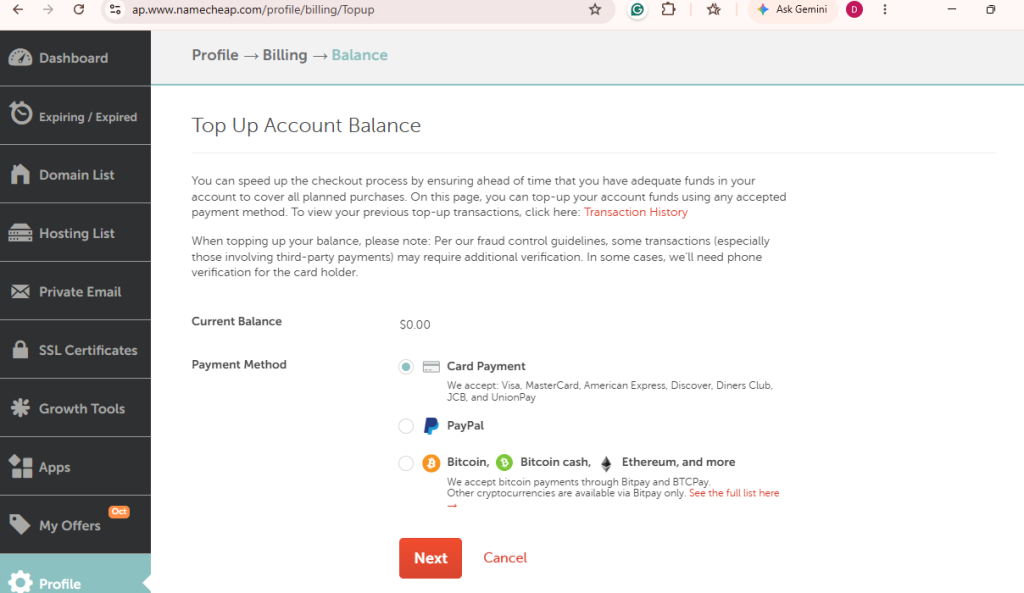
Here are the details to know.
- The minimum crypto deposit is $1.
- The minimum for card and PayPal deposits is $5.
- Crypto usually shows up within an hour. In rare cases it can take up to 24 hours.
Fees and options can change, so check them before you send money.
How do Namecheap renewals work for people in Thailand?
Renewals are where many readers get stuck. A card can work once and then fail a year later. These are the rules to know.
- For regular services, Namecheap tries your account funds first. Next it tries your default card, then any other cards on file.
- PayPal generally can’t renew regular services automatically. There are a few exceptions, such as Apps.
- You need enough money in your funds or on your card when the service expires.
To avoid a lapse:
- Check that your card hasn’t expired.
- Keep your billing address up to date.
- Keep enough balance for the renewal date.
- Turn on auto-renew only after you know your payment method works.
- Watch for Namecheap’s renewal reminder emails.
Can a virtual dollar card help you pay for Namecheap in Thailand?
It can. It won’t fix every decline, though. Merchants and card networks still make their own checks, so no card is guaranteed to work.
When a virtual USD card may help
A virtual dollar card is worth trying in these cases:
- Your Thai card keeps getting declined, even with international payments on.
- You want a card that is already in USD.
- You want to keep subscription payments off your main bank card.
What EverTry offers in Thailand
Here is what EverTry’s page says:
- A virtual USD card
- Wallet funding with USDT or USDC
- A $3 card creation fee
- No monthly maintenance fee
- Setup in about five minutes once your identity check is done
How to use EverTry for a Namecheap payment
- Create an EverTry account.
- Complete identity verification (KYC).
- Fund your wallet with a supported option, such as USDT or USDC.
- Create your virtual USD card and fund it in the app.
- Add the card at Namecheap checkout. Use the billing details shown in your EverTry app.
- Confirm the payment, then check that your order or renewal shows as complete.
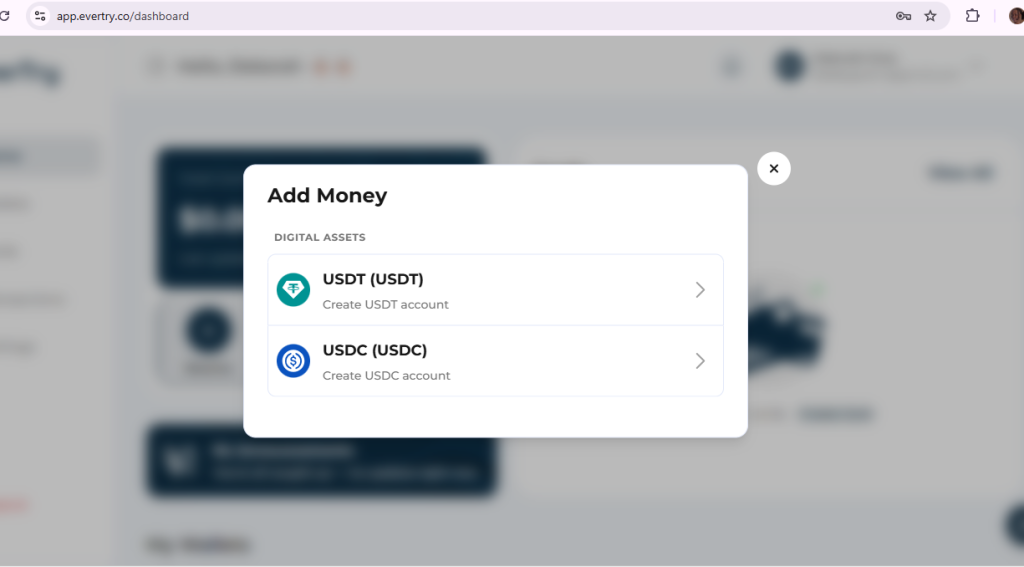
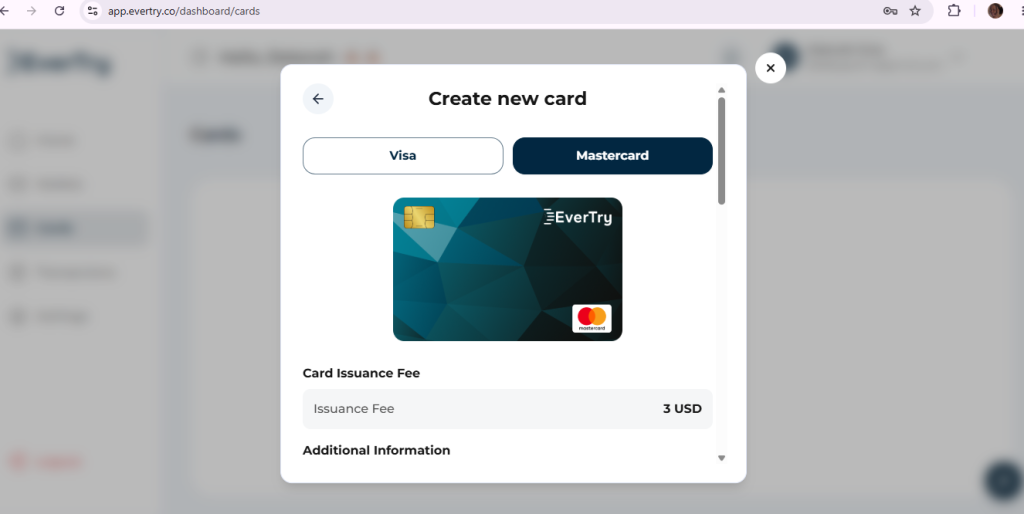
Learn more about the EverTry virtual card in Thailand, then download the app when you’re ready.
For a wider view, see our guide to Namecheap payment options across Asia.
Frequently Asked Questions
Does Namecheap accept payment in Thai baht?
No. Namecheap charges in USD. Your bank or card provider converts baht to dollars.
Can I use a Thai debit card on Namecheap?
Yes, if the card allows online payments abroad. If it doesn’t, ask your bank to turn that on. You can also use another card type.
What should I do if Namecheap declines my card?
Check your bank’s international payment setting, your limits, your balance and your billing details. Then try again. If it still fails, ask your bank, or try another supported method.
Can I use PayPal for Namecheap renewals?
PayPal works at checkout for many orders. It generally can’t renew regular services automatically.
Can I pay for Namecheap with crypto?
Not at checkout directly. You add crypto to your account funds, then pay from the balance.
Can I add money to my Namecheap account before a renewal?
Yes. Top up your account funds with a card, PayPal or crypto. Check the minimums first.
Can I use a virtual USD card for Namecheap from Thailand?
Often yes, if the card is supported and the payment is allowed. Check the card’s fees and eligibility first. No card is guaranteed to be approved.
The best way to pay for Namecheap in Thailand
Pick the option that fits your situation:
- Your Thai card works: use it, and keep international payments switched on.
- You want to pay ahead: top up your account funds.
- You use PayPal: remember it generally won’t auto-renew regular services.
- Your card keeps failing: try a virtual USD card that EverTry confirms is supported.
Whatever you pick, check Namecheap’s official pages for current payment options. This article is for information only and is not affiliated with or endorsed by Namecheap. EverTry services are subject to eligibility, verification and its terms.
Final Thoughts
If your Namecheap payment keeps failing, it’s almost always your bank’s international settings, not anything you did wrong. The simplest fix is a USD virtual card that doesn’t run into those restrictions at all. Create your EverTry account, fund your wallet, generate a card, and pay for your Namecheap subscription in Thailand; without a bank visit, and without waiting on anyone else to help you.
This article is for informational purposes only and is not affiliated with, endorsed by, or sponsored by Namecheap. Payment methods, pricing, supported countries, and platform policies may change over time. Always verify the latest information on Namecheap’s official website before making a purchase. EverTry’s services are subject to eligibility, verification requirements, and applicable terms and conditions.
Deborah Giwa is a Marketing Associate at EverTry, where she works on content and growth initiatives focused on helping users navigate international payments. She is passionate about simplifying access to global financial tools for people in emerging markets through clear, practical, and user-focused content.