Quick answer: To pay for Google Workspace, sign in to the Google Admin console as an admin. Go to Billing, then Subscriptions, and add a payment method. Google accepts major credit and debit cards in over 230 countries. The methods you can use depend on the billing country you pick. Most people pay by card. Some countries also allow direct debit or PayPal.
Let’s Make Google Workspace Billing Simple
Paying for Google Workspace sounds easy. Most days, it is. You add a card, and you’re done.
But sometimes a card fails, and nobody tells you why. Maybe you’re not sure which method to use. Maybe you just want to know what you’ll pay.
I’ll walk you through all of it. We’ll cover how to pay for Google Workspace, what Google accepts, and what to do when a payment fails. I’ll keep it short and plain.
How to Pay for Google Workspace Bill: Step by Step
First, a quick check. You need to be an admin on the account. If you’re not, ask your admin to pay or to give you billing access.
If you’re a new customer
Here is how to pay for Google Workspace when you’re just starting out:
- Sign up for Google Workspace.
- Finish the setup steps.
- Go to admin.google.com and sign in as admin.
- Click Billing, then Subscriptions.
- Click Start Paid Service or Set Up Billing.
- Pick your billing country and currency.
- Add your payment details.
- Save.
That’s it. It takes about five minutes.
Pick your country with care. Your country and currency decide which payment methods you can use. You can’t change them after setup. Google’s own help pages say this too.
If you’re already a customer
Want to pay or fix a method? Do this:
- Open the Admin console.
- Go to Billing, then Payment accounts.
- Click View payment methods.
From here you can add a new method. You can also make a payment, or switch your main method.
If you owe money right now
Do you see a payment alert in your Admin console? Here’s the quick fix:
- Go to Billing, then Payment accounts.
- Under your balance, click Make a Payment or Pay Early.
- Pick a saved method or add a new one.
- Enter the amount and confirm.
Pay the full amount if your account is suspended. A part payment will not lift a suspension. And if you pay from a bank account, it can take up to 10 business days to clear.
Google Workspace Payment Methods: What You Can Use
Google accepts major credit cards in over 230 countries. That includes Visa, Mastercard and American Express.
But the full list of methods depends on your billing country. Here’s a simple view:
| Payment method | Where it’s available | Good to know |
|---|---|---|
| Credit or debit card | Most countries | Still depends on your country |
| Direct debit | Some countries | Needs a supported bank |
| PayPal | Some countries | Not available everywhere |
| Manual payment | Some accounts | You pay before the bill |
| Invoiced billing | Eligible businesses | Needs Google’s approval |
| Backup card | Most accounts | Used if your main method fails |
Want the exact list for your country? Check Google’s page called “Payment options in my country.” It’s the best source, and it changes over time.
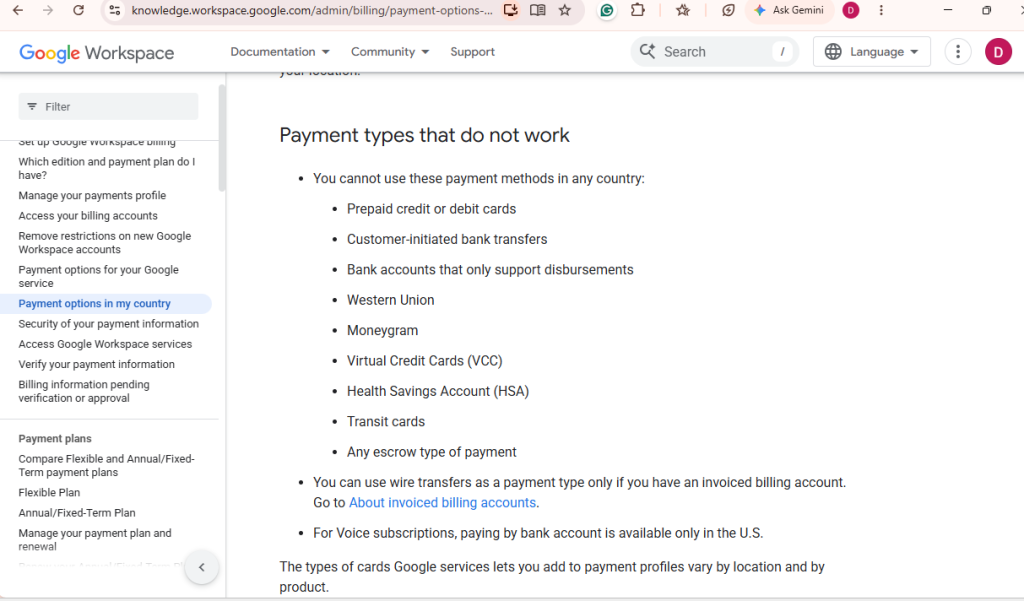
What Google does not accept
This part matters, so please read it. Google says these do not work:
- Prepaid cards
- Virtual credit cards (VCCs)
- Transit cards
- Escrow-type payments
We’ll talk more about virtual cards in a moment. They are the most confusing part of how to pay for Google Workspace.
How Much Does Google Workspace Cost?
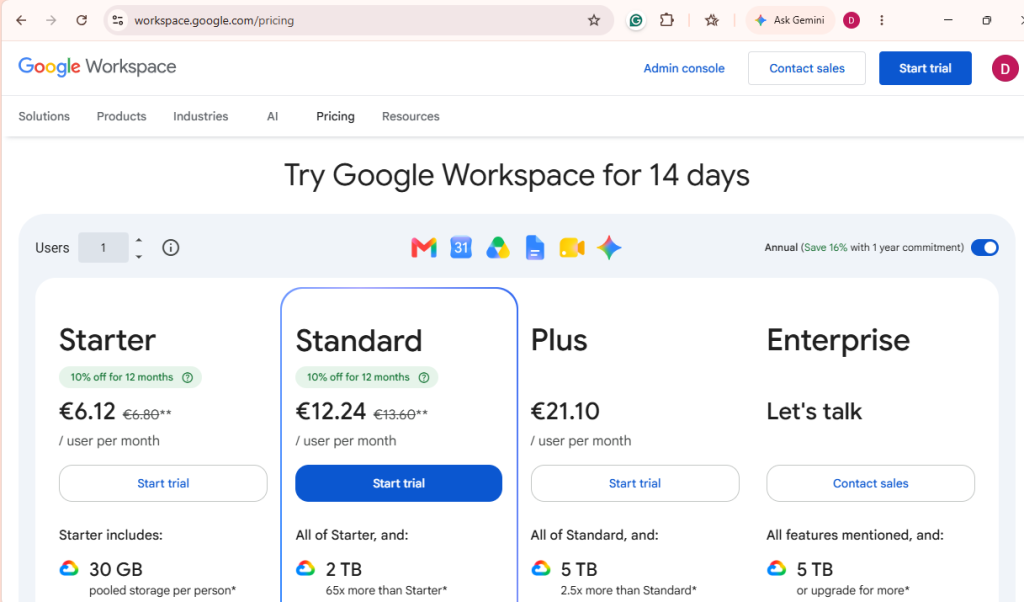
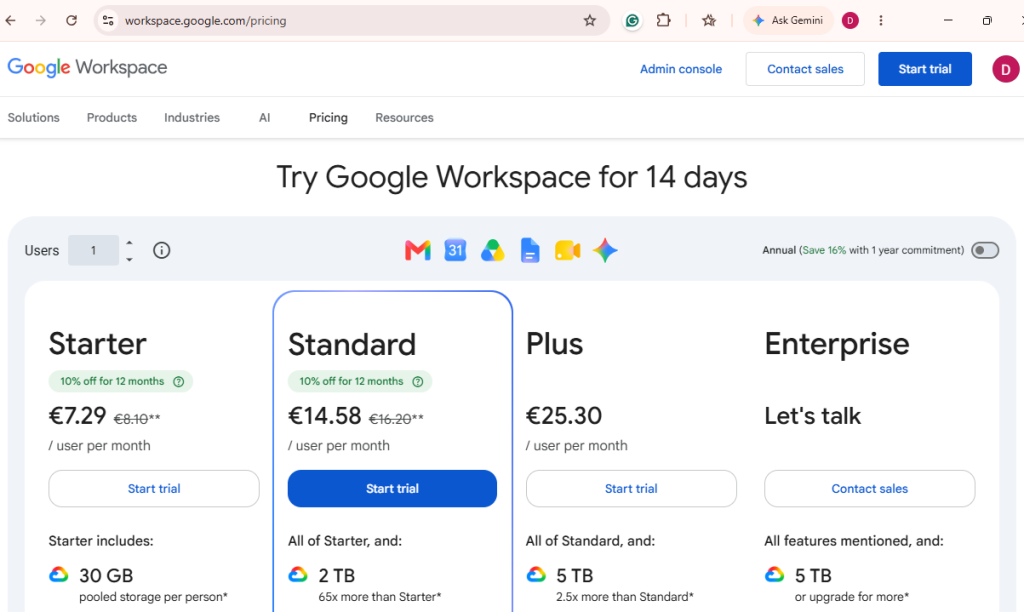
Let’s talk numbers. These are the standard Euro prices per user, per month:
| Plan | Flexible plan | Annual plan |
|---|---|---|
| Business Starter | €7.29 | €6.12 |
| Business Standard | €14.58 | €12.24 |
| Business Plus | €25.30 | €21.10 |
Prices can differ by country and currency. Google also runs short deals from time to time. Treat those as bonuses, not the normal price.
Flexible or Annual: which should you pick?
Flexible means you pay month to month. It costs about 20% more. But you can add or remove people as you need.
Annual means you commit for a year. You pay less per user. You can add users during the year. But you can’t cut licenses until renewal.
Not sure? If your team keeps changing, go flexible. If your team is steady, go annual.
How Does Google Workspace Billing Work?
Knowing how billing works makes it easier to pay. Here’s the short version.
What is a payments profile?
Think of it as your billing home. It holds your billing details and your payment methods. One of those methods is your main one. That’s the one Google tries first.
When does Google charge you?
Google usually charges you at the start of the next month. You may also see a charge sooner in some cases. That can happen when your unpaid charges pass a set amount.
What is a prorated charge?
Say you add a new user halfway through the month. You pay only for the days they use. That smaller amount is called a prorated charge.
What about tax?
Tax rules change from country to country. Some places need a tax ID or add VAT to your invoice. Check your billing details so your invoice is right.
Can You Use a Credit Card for the Google Workspace Free Trial?
Many people ask this, so here is the plain answer.
For the standard web trial, you add a payment method when you sign up. But Google does not charge it until the trial ends. The standard trial runs for 14 days.
Here’s what happens next:
- If billing is set up: your plan turns into a paid one when the trial ends.
- If billing is not set up: your account may be limited or stop working until you add a method.
- You cancel before the trial ends: you should not be charged.
One more note. If you sign up through an Android or iOS app, billing may run through Google Play or Apple. That is a different path from the Admin console.
How to Add, Change or Replace Your Payment Method
Cards expire. Banks change. Here’s how to keep things current.
Add a new method
Go to Billing, then Payment accounts, then View payment methods. Click Add payment method. Enter the details and save.
Change your main method
In the same screen, choose the method you want. Set it as your main one.
Update an expiring card
Add the new card details before the old card expires. Check that your billing address is right too.
Add a backup card
This is the best habit you can build. A backup card gives you a second chance. If your main method fails, Google can try the backup. That one step can stop a lot of stress.
Why Is My Google Workspace Payment Declined?
Your card can have money and still fail. That feels unfair. But the reason is often small.
Here are the common causes and fixes:
| Problem | What to check |
|---|---|
| Not enough funds or limit | Check your balance and card limit |
| Online payments are blocked | Ask your bank to allow online use |
| Recurring payments are blocked | Ask your bank to allow automatic billing |
| International payments are blocked | Ask your bank to allow foreign charges |
| Card is expired | Add a new card |
| Wrong billing address | Match the address your bank has on file |
| Payments profile needs a check | Follow the steps shown in the Admin console |
| Country rules differ | Check Google’s country payment page |
Many people miss the “recurring” row. A card may work for a one-time buy. But it may block a charge that repeats every month. That is a common reason people struggle with how to pay for Google Workspace.
How to Fix a Failed Google Workspace Payment
Don’t panic. Work through these steps in order.
- Read the alert. Your Admin console shows what went wrong.
- Check your main method. Look for an expired card or a wrong address.
- Fix it or switch. Update the card, or choose another method.
- Pay the balance. Go to Payment accounts and click Make a Payment.
- Add a backup. Do this so it doesn’t happen again.
Still stuck? Here’s who to contact:
- Your bank: if the card keeps getting blocked.
- Google Workspace support: if the card is fine but the payment fails.
- Your reseller: if you bought Workspace through one.
Please don’t keep trying the same card again and again. If it failed once, it will likely fail again.
What Happens If You Don’t Pay Your Google Workspace Bill?
It helps to know the steps, so nothing surprises you.
- The payment fails. Google tells you.
- A grace period starts. Your Admin console shows your exact deadline. Check it, because the time can vary.
- Your plan may be suspended. Your team can lose access to Gmail, Drive and Calendar.
- You pay and it comes back. Pay the full balance, and your service returns.
Your files are not wiped out right away. But no one can reach them until the bill is paid. So act fast.
Can You Use a Virtual Card for Google Workspace?
This is the part that confuses people the most. So let’s be honest about it.
Google says virtual credit cards and prepaid cards do not work for Workspace. That is in Google’s own payment help page. We won’t tell you otherwise. The word “virtual” just means the card has no plastic. But cards differ in how they are built. Some are prepaid, others are single-use and/or linked to an account in a different way.
So before you use any virtual card, ask three things:
- Is it a prepaid card?
- Is it single-use?
- Does the provider say it works for monthly billing?
If the answer to any of these is yes or unclear, test it first. Do it before your team depends on it.
How EverTry fits in
At EverTry, we build USD virtual cards for people in markets where local cards often struggle with international payments. Our cards run on the Visa and Mastercard networks, and they are accepted by Google. You can use one to pay for Google Workspace, even if your local card keeps failing.
Here is how to set it up. It takes a few minutes.
How to pay for Google Workspace with an EverTry card
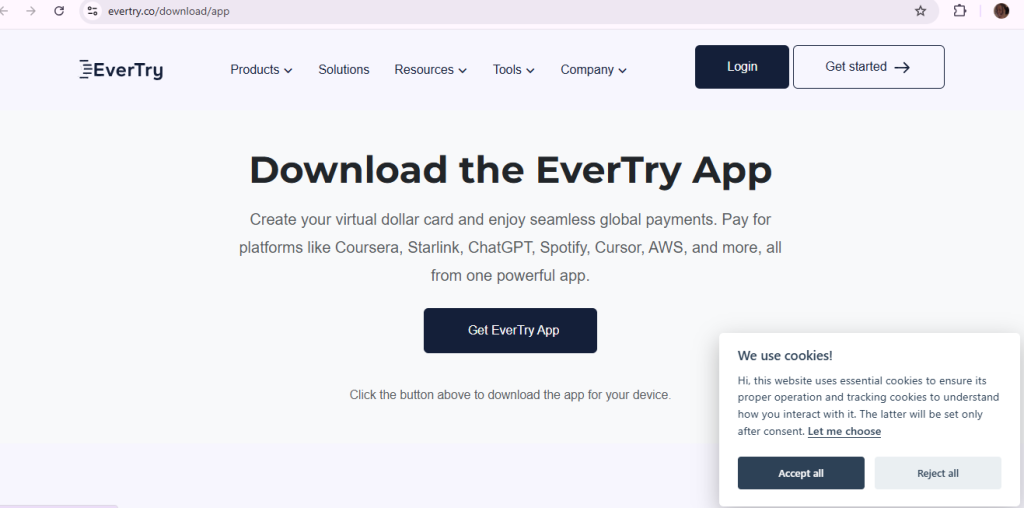
- Get started. Download the EverTry app, or sign up on the web.
- Complete KYC. This is a quick identity check. It keeps your account safe.
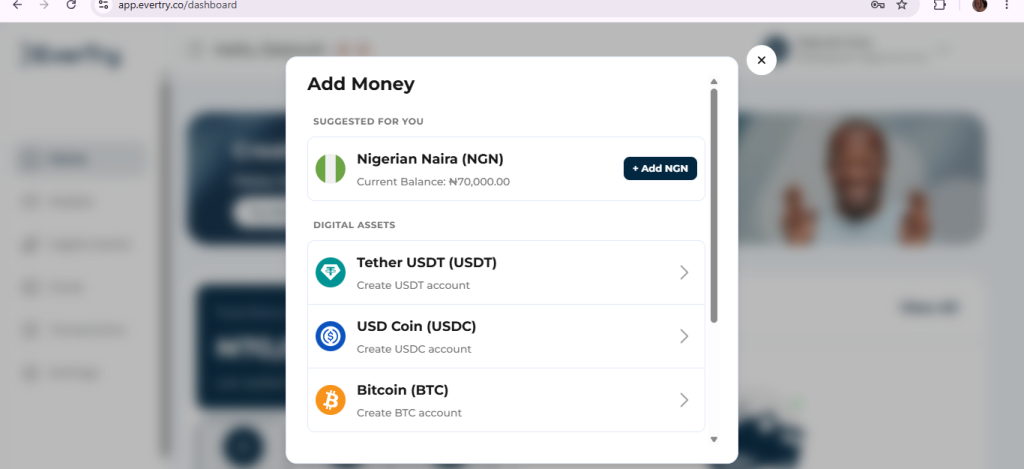
- Fund your wallet. Add money to your EverTry wallet.
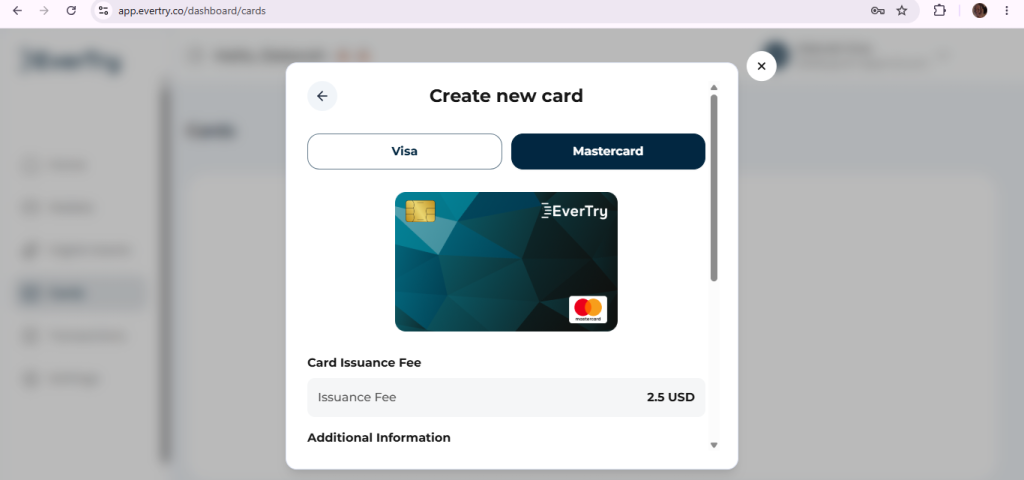
- Create your card. Pick Visa or Mastercard.
- Fund your card. Move money from your wallet to your card. Add enough to cover your Workspace bill.
- Add the card to Google. Go to admin.google.com. Click Billing, then Payment accounts, then View payment methods. Click Add payment method. Enter the card details from your EverTry app, then save.
That’s the same flow you’d use for any card. Nothing special is needed on the Google side.
NB: Minimum funding amount may differ by country or region
Two tips to keep your service running
- Keep your card funded. Google charges you every month. If your card is empty on billing day, the payment fails. Top it up a few days early.
- Add a backup method. Set your EverTry card as your main method. Then add a second card as a backup. That way one failed charge won’t stop your team.
G Suite Payment: Is It the Same as Google Workspace?
Yes. G Suite was the old name. Google renamed it Google Workspace. So if you searched “G Suite payment,” the steps in this guide are the ones you need.
Frequently Asked Questions
How do I pay for Google Workspace?
Sign in to the Admin console as admin. Go to Billing, then Subscriptions, and add a payment method.
What payment methods does Google Workspace accept?
Major credit cards are the most common. Other methods depend on your billing country.
Can I use PayPal for Google Workspace?
Only in some countries, such as the US, Chile and some European markets. It depends on your billing country.
Does Google charge my card during the free trial?
Not until the trial ends. The standard trial runs for 14 days.
Can I use a virtual card for Google Workspace?
Google says virtual credit cards and prepaid cards are not accepted. Check your card type, and test it first.
What happens if my payment fails?
Google gives you a grace period. After that, your plan may be suspended until you pay the full balance.
Can I change my billing country later?
No. You would need to set up billing again in the new country.
Your Next Step
Now you know how to pay for Google Workspace. You know the steps, the methods and the fixes. So pick your method and add a backup card. Then check your Admin console once in a while.
Local cards often fail for reasons that have nothing to do with your balance. Your bank may block foreign charges or recurring payments. A card funded in USD gives you a payment method that is set up for online subscriptions from the start.
Ready to pay for Google Workspace without the stress? Download the EverTry app today and get started.
This article is for informational purposes only and does not constitute financial, legal, or tax advice. Google Workspace, Visa, and Mastercard are trademarks of their respective owners and are not affiliated with EverTry. Product features, fees, and availability may vary by region and are subject to change. Card issuance is subject to eligibility, verification, and applicable terms of service.
Deborah Giwa is a Marketing Associate at EverTry, where she works on content and growth initiatives focused on helping users navigate international payments. She is passionate about simplifying access to global financial tools for people in emerging markets through clear, practical, and user-focused content.