
If you are looking for the Gemini student offer in Nigeria, you can check your eligibility through Google’s current student offer page. Google is currently rolling out student benefits in more than 140 markets, with eligible students able to get Google AI Plus free for 12 months; Google also offers student discounts on Google AI Pro, with the discount varying by market.
The important part is this: you need to verify your student status first to see the offer available to your account. Google uses SheerID for student verification. If you are not a student, or you want a paid Google AI plan outside the student offer, you can use a payment method such as an EverTry virtual dollar card.
Gemini Student Offer in Nigeria: Quick Answer
| Question | Answer |
|---|---|
| Is there a Gemini student offer? | Yes. Google currently has a student offer in more than 140 markets. |
| What can eligible students get? | Google AI Plus free for 12 months in eligible markets. |
| Is Google AI Pro also discounted? | Yes. Google says student savings on AI Pro can vary by market. |
| How do I check? | Go to Google’s student offer page and select the student verification option. |
| How is student status checked? | Through SheerID. |
| Do I need to be a student? | Yes. You need to meet Google’s current student eligibility rules. |
| What if I’m not a student? | You can use Gemini’s regular plans and pay for them with a supported payment method. |
Google’s offer can vary by country and account. So don’t assume that a deal you see in a US article is the same deal available in Nigeria.
What Is the Gemini Student Offer?
The Gemini student offer is Google’s promotion for students who want access to its paid AI tools at a lower price.
The current international student promotion includes 12 months of Google AI Plus at no cost for eligible students. Google AI Plus gives you more access to Gemini than the free plan.
The current student push also comes with new study tools, including:
- Study notebooks
- Flashcards
- Practice quizzes
- Guided learning tools
- Higher Gemini usage limits
- Gemini Omni
- 400 GB of storage with Google AI Plus
So, if you’re a student, this is more than just a discount on a chatbot. You can use the tools for actual school work.
Is the Gemini Student Offer Available in Nigeria?
The best way to check is through Google’s current student offer page.
This matters because Google has changed the student promotion over time.
In 2025, Google offered eligible students in Nigeria and several other African countries a free year of Google AI Pro. That earlier offer had a December 9, 2025 redemption deadline. Since then, Google has changed its student offer structure.
As of August 2026, Google is promoting a new student offer across more than 140 markets. Eligible students can receive Google AI Plus free for one year, while Google AI Pro student discounts vary by market.
This is why you may find older articles saying one thing and Google’s current page showing another. Don’t rely on an old article. Check Google’s live student offer page.
How to Check the Gemini Student Offer in Nigeria
You don’t need to guess whether you qualify. You can check directly.
Step 1: Go to Google’s student offer page
Open the official Google One student page:
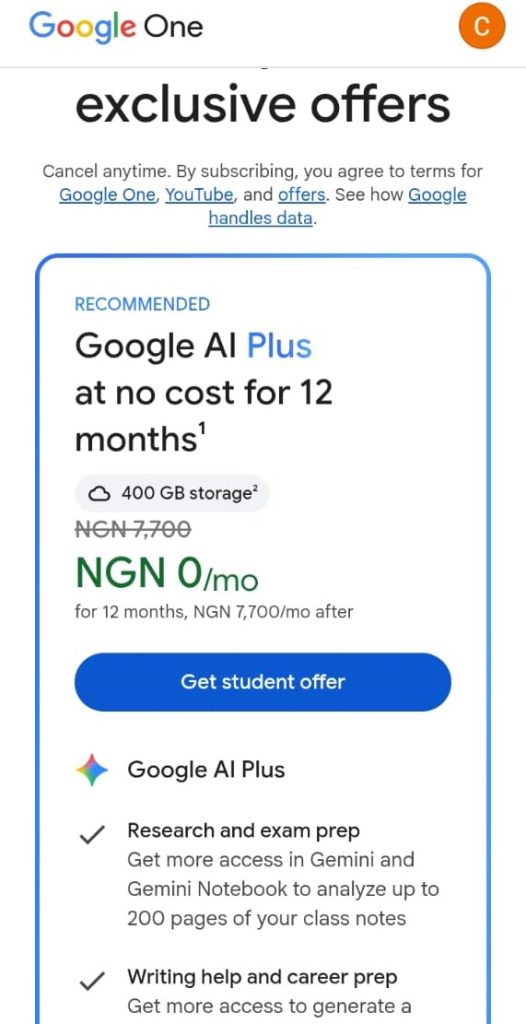
Make sure you’re signed into the personal Google Account you want to use for the subscription.
Google’s student-offer guidance has stated that the student benefit is tied to a personal Google Account, while a school email may be used for verification.
Step 2: Select the student verification option
Look for the option to verify your student status. Google will take you through the verification process.
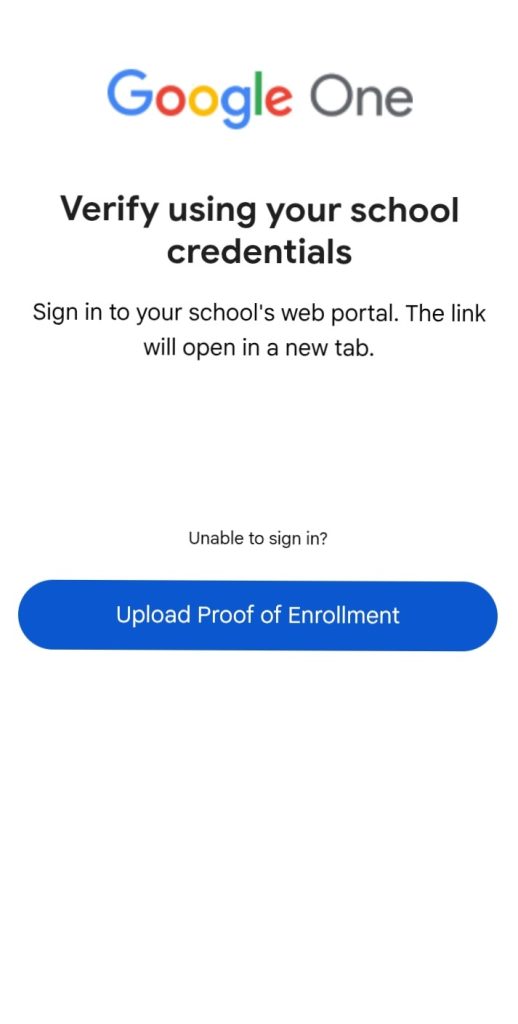
Step 3: Verify your student status with SheerID
SheerID handles the student verification. You may be asked for information about:
- Your school
- Your student status
- Your student email
- Proof of enrollment
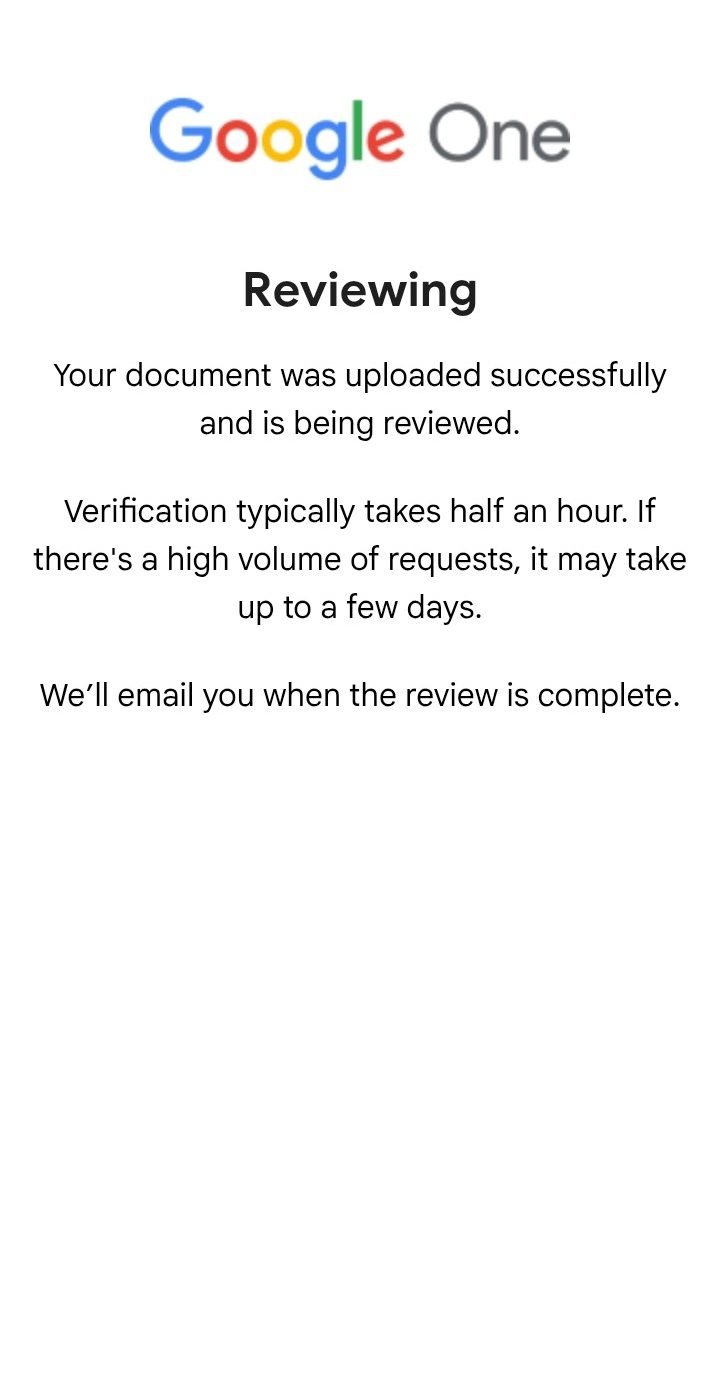
If SheerID cannot verify you automatically, you may need to upload proof of enrollment. Google’s student guidance says manual document review can take up to 48 hours.
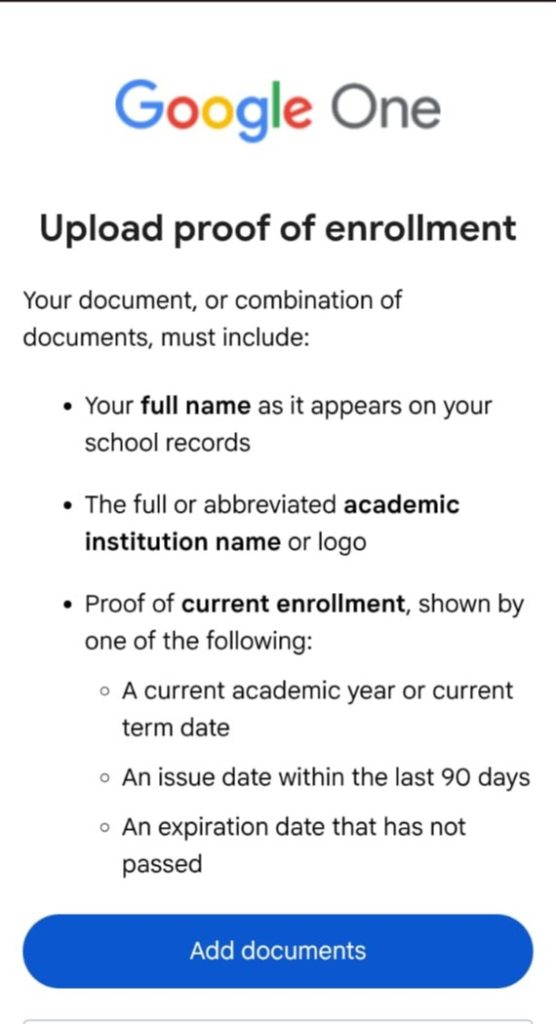
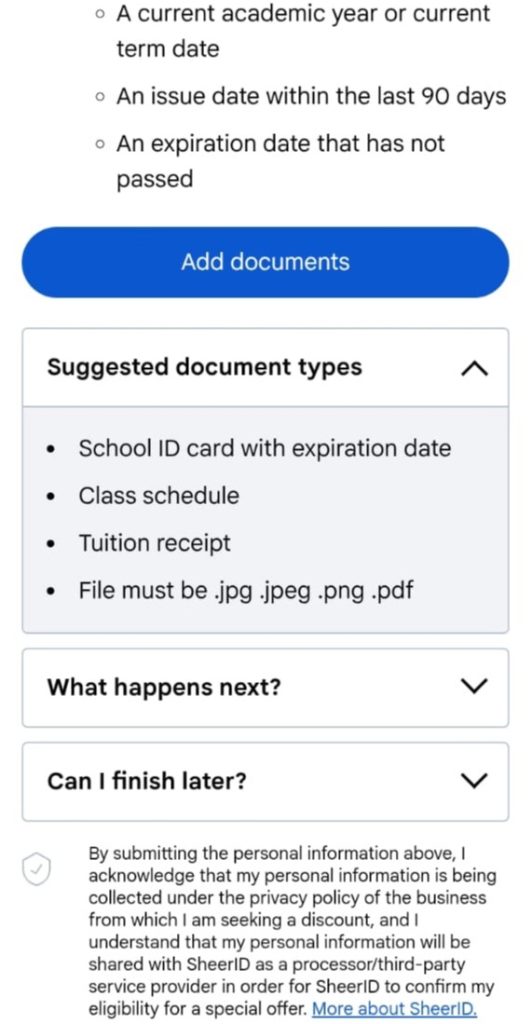
Step 4: Check the offer shown after verification
This is the important part. Once Google verifies you, look at the exact offer displayed for your account.
You may see:
- Google AI Plus free for 12 months
- A discounted Google AI Pro plan
- Another student promotion based on your market
Google says AI Pro student savings can vary by market.
So if you see 75% off Google AI Pro, for example, check the price shown on your own checkout page before subscribing. Don’t rely on a price quoted in an article.
Step 5: Review the payment details
Google’s student sign-up instructions have included adding or selecting a payment method before completing the subscription. This can feel strange.
You might be thinking:
“If the plan is free, why does Google need my card?”
That’s because the promotion is a subscription. The payment method can be used for billing after the promotional period or when the terms require it.
Read the checkout screen carefully before you click Subscribe.
Step 6: Complete the subscription
Once you’ve checked the offer, price and billing terms, complete the signup.
If you’re eligible, your student benefit should then appear on the Google account you used during the process.
Who Can Get the Gemini Student Offer?
The exact rules can change, so always check Google’s current eligibility terms.
Previous Google AI student offers have required students to:
- Be at least 18
- Be a student in an eligible country or region
- Attend an eligible higher education institution
- Verify their student status through SheerID
- Use an eligible personal Google Account
Google’s previous student-offer guidance also listed restrictions for some existing Google One users, such as certain family-plan members and users subscribed through third-party partners.
What about Nigerian universities?
If you are currently enrolled at a Nigerian higher education institution, the simplest approach is to try Google’s live verification process.
You don’t need to decide from an old blog post whether your school qualifies. Let Google’s verification system tell you. If your school cannot be found, SheerID may ask you to provide proof of enrollment.
What Can You Do With Gemini as a Student?
The value of the offer depends on what you actually do with it.
For example, you can use Gemini to:
Study for exams
Ask it to turn your notes into practice questions.
Understand difficult topics
Instead of asking for an answer, ask Gemini to teach you.
Work with PDFs
Upload course material and ask Gemini to explain the key points. This can be useful when you have a 100-page document and don’t know where to start.
Create a study plan
You can give Gemini your exam dates and topics and ask it to build a study schedule.
Practise with quizzes
Google’s new student tools include practice quizzes and study notebooks.
Work on projects
You can use Gemini for brainstorming, research, coding, writing and presentations.
Just remember that AI can make mistakes.
For assignments and research, check important facts and sources yourself.
Gemini Student Offer vs Google AI Plus vs Google AI Pro
One reason people get confused is that Google has several names for its AI products.
Here’s the simple version:
| Option | Who it’s for | Main idea |
|---|---|---|
| Gemini Free | Anyone | Basic Gemini access |
| Google AI Plus | Anyone who wants more | More AI access and 400 GB storage |
| Google AI Pro | Heavy AI users | Higher limits and more advanced features |
| Gemini student offer | Eligible students | Special student pricing or free promotional access |
The student offer isn’t a separate AI model. It’s a promotional way for eligible students to access Google’s paid AI benefits; and the exact plan you receive can change. That’s why you should always check the offer shown on Google’s current student page.
Do You Need a Card for the Gemini Student Offer?
You may need one. Google’s student-offer instructions have included selecting or adding a payment method before completing the subscription. This doesn’t necessarily mean you’ll be charged immediately.
If Google shows you a free promotional period, check the checkout page carefully. Look for:
- Current price
- Promotional period
- Renewal date
- Regular price after the promotion
- Cancellation terms
This is especially important because the subscription can become a paid plan after the promotional period.
Recent reporting on Google’s 2026 student promotion also says users need a valid payment method and that free plans automatically become paid subscriptions after the 12-month period unless cancelled.
What If Your Nigerian Bank Card Doesn’t Work?
This is where things can get frustrating. You may have enough money in your account and still get a payment error. That doesn’t always mean the subscription is unavailable to you.
Your card could fail because of:
- International transaction limits
- Online payment restrictions
- Recurring payment restrictions
- Bank security checks
- Billing information problems
- Google Payments checks
- Card authorisation issues
So if your Nigerian card doesn’t work, don’t immediately assume you’ve done something wrong. Try checking your card settings and Google Payments details first. If the card still fails, you can try another supported payment method.
How to Pay for Google AI Plans From Nigeria
If you’re not a student, the student offer isn’t available to you. You may also be a student who wants to use a paid plan outside the promotion. In either case, you’ll need a supported payment method.
One option is a virtual dollar card.
A virtual dollar card can be useful for international subscriptions because it gives you a card designed for online payments in dollars. That’s where EverTry can help.
How to Use EverTry to Pay for Google AI Plans
If you need a payment card for a Google AI subscription, you can create an EverTry virtual dollar card online.
Here’s how it works:
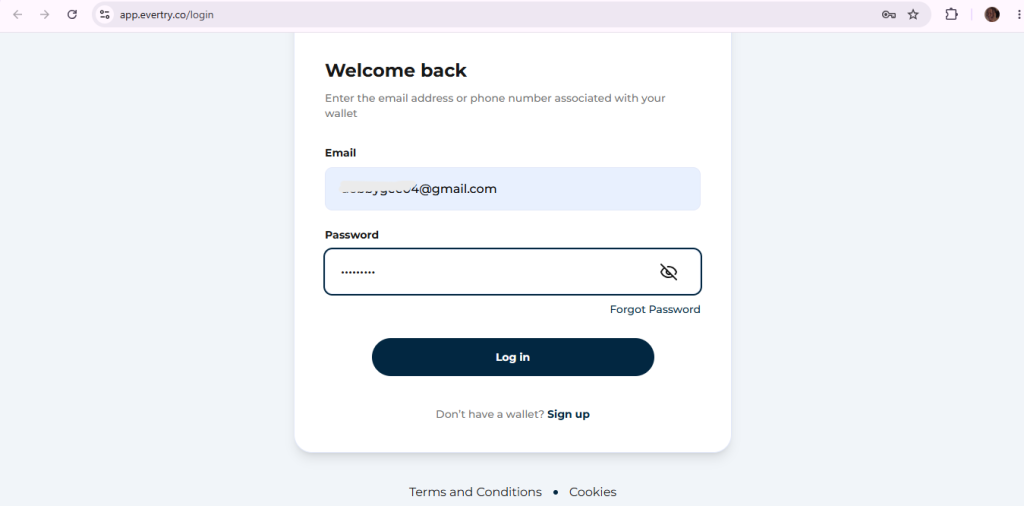
1. Create an EverTry account
Sign up online. You don’t need to visit a bank.
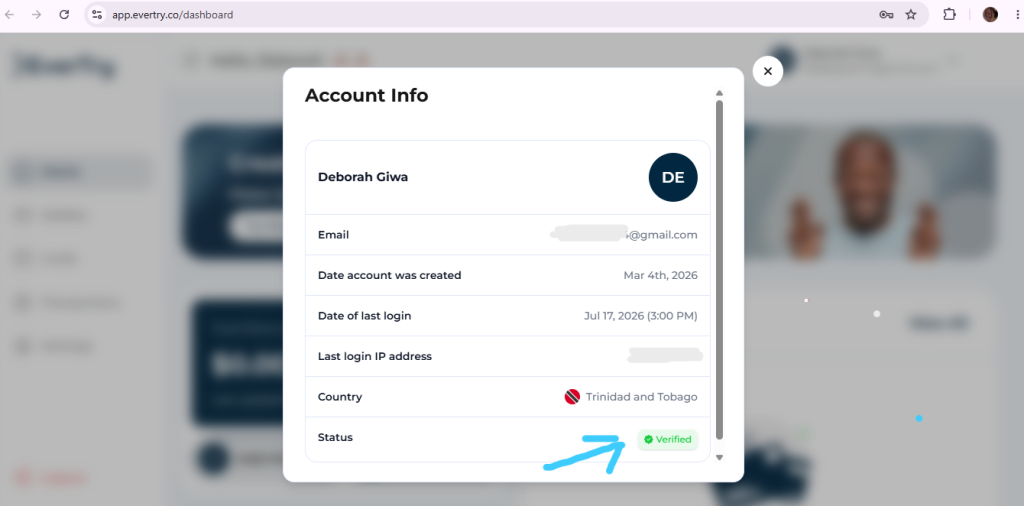
2. Complete KYC
Follow the steps to verify your account.
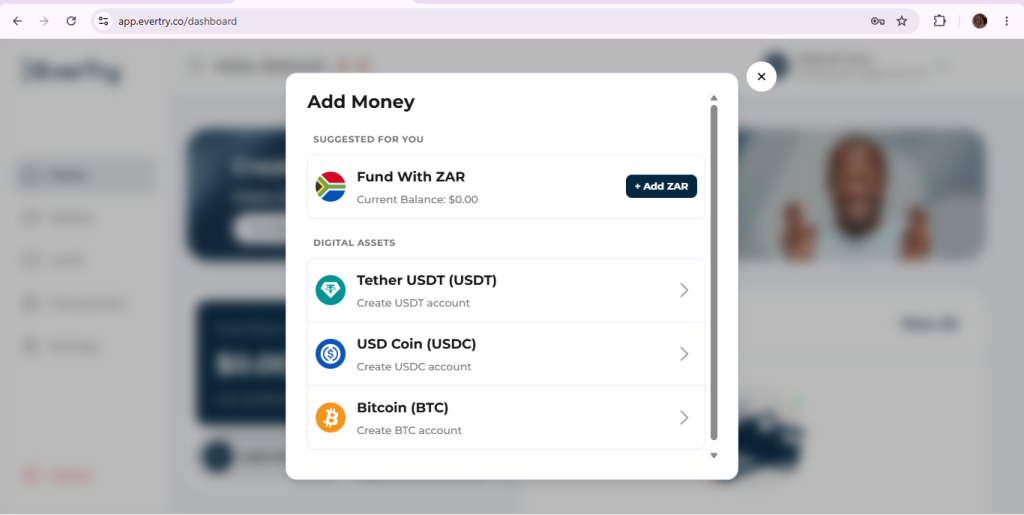
3. Fund your wallet
You can fund your EverTry wallet using:
- Local currency
- Stablecoin (USDT/USDC)
4. Create your virtual dollar card
Create the card from your account. You can create your card in under 15 minutes.
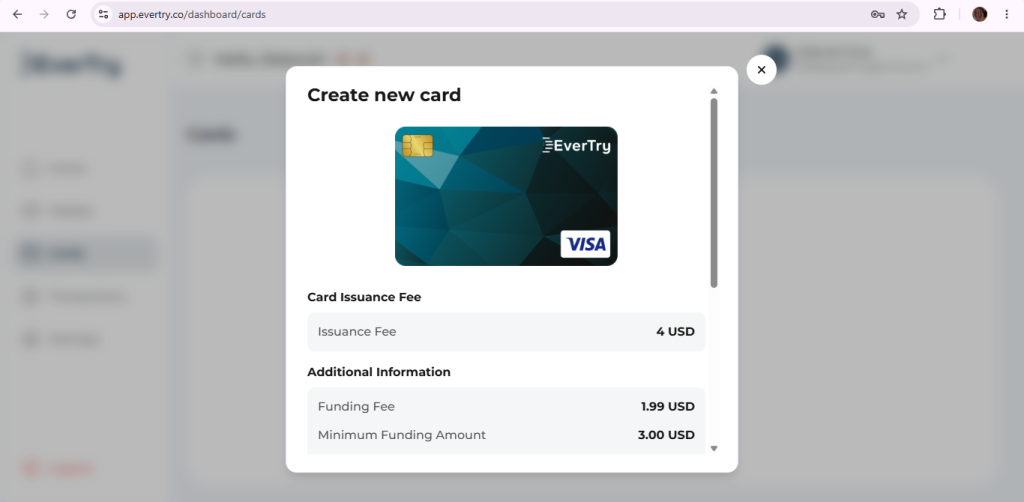
5. Add the card to your Google billing page
Enter your card details when Google asks for a payment method.
6. Review the charge
Before confirming, check the price and renewal terms shown by Google.
That’s it.
You don’t need to ask someone abroad to make the payment for you; or to visit a bank to request a dollar card. And you can manage the payment yourself.
One important note: EverTry is a payment option, not a way around Google’s student eligibility rules. If you’re not eligible for the student offer, you should subscribe through Google’s regular paid plans.
Why Use a Virtual Dollar Card for Gemini?
A virtual dollar card can make sense if your local card isn’t working for an international subscription.
It can also be useful if you regularly pay for services such as:
- AI tools
- Software subscriptions
- Cloud services
- Design tools
- Online learning platforms
- Other international digital services
The benefit is simple: you have a payment card you can manage yourself. For a student who needs a paid AI plan, that can be much easier than asking a friend or relative to pay on your behalf.
What If SheerID Can’t Verify You?
Don’t panic. It doesn’t always mean that you’re not eligible.
First, check that the information you entered is correct. If Google asks for proof of enrollment, submit the requested document. Google’s student guidance says that manual verification can take up to 48 hours.
You should also avoid submitting repeated verification requests without checking the status of the first one. Some users have reported getting verification-limit errors or being sent back through the verification flow. If the problem is with SheerID, Google’s community guidance directs users to SheerID for verification help.
What Happens After the Free Student Period?
This is one part you should pay close attention to. A student offer is a promotion, not necessarily a permanent free subscription. Google’s current student promotion is described as a 12-month offer for eligible students in supported markets.
After the promotional period, the subscription can move to the regular paid price unless you cancel. So here’s a simple tip:
Set a reminder for your renewal date.
You can then decide whether you still use the plan enough to keep paying for it.
Frequently Asked Questions
Can I get Gemini for free as a student?
Yes. Eligible students can access Google’s current student promotion in supported markets. Google says eligible students can get Google AI Plus free for 12 months in more than 140 markets.
Is the Gemini student offer available in Nigeria?
The current offer is being rolled out across more than 140 markets. The best way to confirm your Nigerian eligibility is to use Google’s live student offer page and complete the verification process.
How do I claim the Gemini student offer?
Go to Google’s student offer page, sign in with your Google Account, select student verification and complete the SheerID process. Once verified, Google will show you the offer available to your account.
Is Gemini Pro free for students?
Google’s student offers can include discounted or free access to paid AI plans. The exact offer varies by market. Google currently says eligible students outside the US can get Google AI Plus free for one year, while AI Pro discounts vary by market.
Does the Gemini student offer give you one year free?
The current international promotion offers eligible students 12 months of Google AI Plus free in supported markets.
What is the 75% Google AI Pro student discount?
Google’s student discounts on AI Pro vary by market. If your Nigerian account shows 75% off Google AI Pro, use the price shown on your own Google checkout page as the source of truth.
Do I need a payment method for the student offer?
Google’s student-offer instructions have required users to select or add a payment method before completing the subscription.
Can I use a Nigerian bank card to pay for Gemini?
You can try one, but acceptance depends on your card, bank, Google Payments profile and the transaction.
What can I do if my Nigerian card is declined?
Check your international payment settings, billing details and available balance. If the card still fails, try another supported payment method, such as a virtual dollar card.
Can I use an EverTry virtual dollar card for Google AI?
EverTry provides virtual dollar cards for online payments. You can create an account, complete KYC, fund your wallet with local currency or USDT, and create your card online. Payment acceptance remains subject to Google’s payment rules.
Do I need EverTry to claim the student offer?
No.
You do not need EverTry simply because you are claiming the student offer.
If Google accepts your existing payment method, use it.
EverTry is an alternative for people who need a suitable card for international subscriptions, including students whose local card does not work or users who want to subscribe to paid plans.
What if I’m not a student?
You cannot use a student offer if you don’t meet Google’s student eligibility rules.
You can still use Gemini’s free plan or subscribe to one of Google’s regular paid AI plans.
A virtual dollar card such as EverTry can be an option if you need a supported payment method.
So, What Next?
If you’re a Nigerian student, don’t assume the Gemini student offer is unavailable just because you saw an older article saying the previous promotion ended.
Google’s student program has changed.
The current offer is being rolled out across more than 140 markets, with eligible students able to get Google AI Plus free for 12 months. Google also offers student discounts on AI Pro, with the exact discount depending on the market.
The safest way to find out what you can get is simple:
Go to Google’s student offer page → verify your student status with SheerID → check the offer shown to your account → review the payment and renewal terms → subscribe.
Check your eligibility on Google’s student offer page
If you’re not a student, don’t worry. You can still use Gemini’s free plan or subscribe to a regular Google AI plan.
And if you need a payment method for that subscription, EverTry gives you a way to create a virtual dollar card online. You can complete KYC, fund your wallet with local currency or USDT, and create your card without visiting a bank or asking someone else to pay for you. Get started with EverTry today.
This article is strictly for educational and informative purposes. EverTry is not in any way affiliated to Google or Gemini AI. Google’s student offers, prices, eligibility rules and renewal terms can change. Always check the live Google checkout page and terms before subscribing.
Deborah Giwa is a Marketing Associate at EverTry, where she works on content and growth initiatives focused on helping users navigate international payments. She is passionate about simplifying access to global financial tools for people in emerging markets through clear, practical, and user-focused content.