An eSIM is a digital SIM built into your phone. It lets you connect to a mobile network without inserting a physical SIM card. Yes, eSIM is available in Nigeria. You can get one through local mobile networks or buy an international travel eSIM for use abroad. The right option depends on your phone, destination, and whether you need a phone number or mobile data only.
This guide explains how eSIM works, which Nigerian networks offer, compatible phones, costs, payment options, and how to set one up.
What Is an eSIM and How Does It Work?
An eSIM, short for embedded SIM, is a digital version of a regular SIM card. It is built into your phone, so you don’t need to insert a plastic SIM to connect to a mobile network.
Instead, you download a mobile network profile. This usually involves scanning a QR code or following the setup steps from your network or eSIM provider.
Once installed, the eSIM connects your phone to the supported network.
You can also use an eSIM alongside a physical SIM if your phone supports dual-SIM functionality. For example, you could keep your Nigerian number on a physical SIM and use a travel eSIM for internet access abroad.
However, not every eSIM comes with a phone number. Some plans provide data only, while others may include calls and SMS.
Is eSIM Available in Nigeria?
Yes. You can get an eSIM in Nigeria through local mobile networks. You can also purchase an international travel eSIM for use abroad.
Here are the Nigerian networks with publicly documented eSIM services.
MTN Nigeria
MTN offers eSIM services to customers with compatible phones.
If you want to move your existing MTN number from a physical SIM to an eSIM, visit an MTN service center. The process generally involves:
- Providing the required identification.
- Having your phone checked for eSIM compatibility.
- Receiving a QR code.
- Scanning the code and following the installation steps.
MTN currently advertises free eSIM activation. Normal data, calls, and SMS charges still apply.
Official information: MTN Nigeria eSIM.
Airtel Nigeria
Airtel also allows customers with compatible phones to use eSIM.
You can visit an Airtel service centre to request an eSIM or move your existing number from a physical SIM. You’ll need to verify your line and follow the instructions provided to download the eSIM profile.
Airtel currently states that eSIM activation has no charge. Check its latest terms before visiting a service center.
Official information: Airtel Nigeria eSIM.
Glo
Glo offers eSIM services through its Gloworld outlets and authorized dealers. You can request a new eSIM or migrate your existing Glo number.
The process generally involves:
- Visiting a Gloworld outlet or authorized dealer.
- Providing the required identification and completing NIN checks.
- Checking your phone’s compatibility.
- Receiving and installing your eSIM profile.
Glo advertises free migration for a limited period, subject to a minimum ₦1,500 data purchase at activation. Its published offer also includes a one-time 5GB bonus valid for seven days.
Check the Glo eSIM page for current terms.
Local Telco eSIM vs International Travel eSIM
Both options use eSIM technology, but they serve different purposes.
A local telco eSIM connects you to a Nigerian mobile network. An international travel eSIM gives you mobile connectivity in another country or across several countries.
| Feature | Local Nigerian eSIM | International travel eSIM |
|---|---|---|
| Main purpose | Use a Nigerian mobile network | Stay connected abroad |
| Coverage | Local network coverage | Countries included in the plan |
| Phone number | Usually keeps or provides a Nigerian number | Often data-only |
| Calls and SMS | Depends on the mobile plan | Depends on the travel plan |
| Mobile data | Uses the network’s data bundles | Uses the plan’s data allowance |
| Activation | Usually through the mobile network | Usually through an app or QR code |
For example, a local eSIM may suit you if you want to keep your Nigerian number without using a physical SIM card.
However, if you’re travelling to the UK, the US, or Saudi Arabia and need internet access when you arrive, an international travel eSIM may be a better option.
Which Phones Support eSIM in Nigeria?
Not every smartphone supports eSIM. Your phone needs the right hardware and software, and compatibility may vary by model and country.
iPhones
Apple introduced eSIM support with the iPhone XS, XS Max, and XR.
Supported generations include
- iPhone XS, XS Max, and XR
- iPhone 11, 12, and 13 series
- iPhone 14, 15, 16, 17, and 18 series
Some models sold in mainland China, Hong Kong, and Macao have different SIM configurations. Check your exact model before buying an eSIM.
Samsung Galaxy
Many Samsung Galaxy S and Z series phones support eSIM.
These include supported versions of:
- Galaxy S20 series and newer
- Galaxy Z Fold series
- Galaxy Z Flip series
- Selected Galaxy FE models
- Selected Galaxy A models
Support varies by model and region, so check your device specifications.
Google Pixel
Many Google Pixel phones support eSIM, starting with the Pixel 3a generation.
Some newer models can also use two eSIM profiles at once, provided the network supports this feature.
Does Tecno Support eSIM?
Not all Tecno phones support eSIM. Many models sold in Nigeria use physical SIM cards only.
Some newer models have been listed as eSIM-compatible in selected markets. However, this does not mean every regional version supports it.
Check your exact model before buying a plan.
Does Infinix Support eSIM?
Most Infinix phones commonly used in Nigeria rely on physical SIM cards. Some newer models have been reported to support eSIM in selected markets.
Confirm your exact model and regional version before purchasing an eSIM.
Does itel Support eSIM?
We could not find reliable manufacturer information confirming specific itel phone models with eSIM support.
If you use an itel phone, check its specifications and settings before buying an eSIM.
How to Check If Your Phone Supports eSIM
You can run a quick check:
- Open your phone’s dialer.
- Dial
*#06#. - Look for an EID number.
If an EID appears, your phone likely has eSIM hardware.
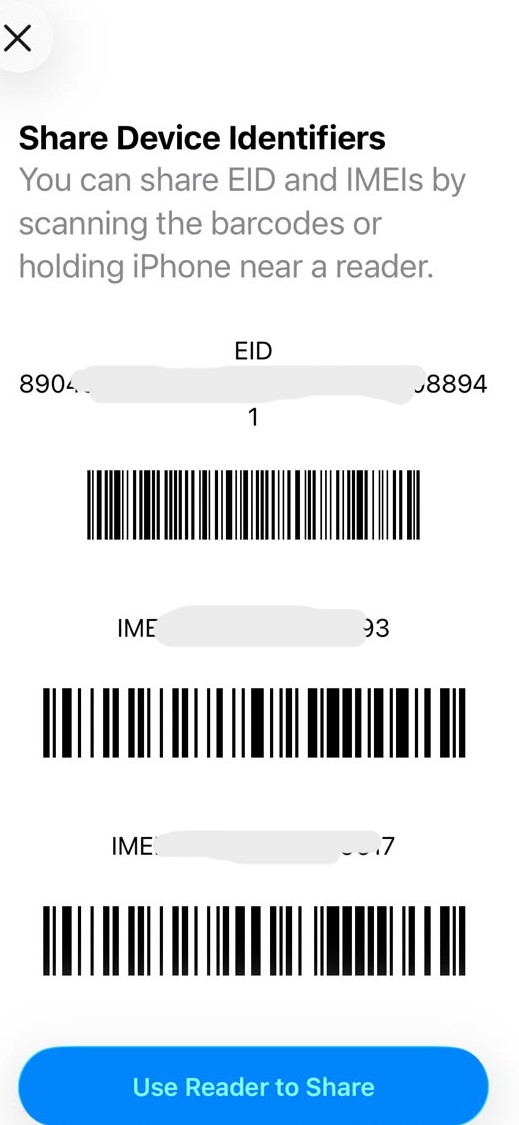
A phone screen showing an IED number
You can also check your settings for an option such as Add eSIM, Add Mobile Plan, or Add Cellular Plan.
How Much Does an eSIM Cost in Nigeria?
The cost depends on whether you want a local network eSIM or an international travel eSIM.
Local Nigerian eSIM Costs
Here are the published activation terms from local networks:
| Network | Published activation terms |
|---|---|
| MTN | Free eSIM activation |
| Airtel | No activation charge currently advertised |
| Glo | Free migration for a limited period, with a minimum ₦1,500 data purchase |
These are activation terms, not the total cost of using mobile data. You may still need to buy a data bundle or pay the network’s normal charges.
International Travel eSIM Costs
Travel eSIM prices depend on the destination, data allowance, and validity period.
Our published starting prices as of 18 November 2026 were
| Destination | Starting price (USD) | Approximate price (NGN) |
|---|---|---|
| United Kingdom | $2.70 | ₦3,657 |
| United Arab Emirates | $4.90 | ₦6,636 |
| United States | $3.53 | ₦4,781 |
| Canada | $5.23 | ₦7,083 |
| Saudi Arabia | $4.63 | ₦6,271 |
| Ghana | $4.63 | ₦6,271 |
| Kenya | $8.20 | ₦11,106 |
| South Africa | $3.80 | ₦5,147 |
Exchange rate: The Naira equivalents use an indicative rate of ₦1,354.38 per USD as of November 18, 2026. Actual payment amounts may differ because of exchange-rate movements, conversion rates, and applicable fees.
These are starting prices, not fixed prices for every plan. The final cost depends on the package you choose.
Before buying, check:
- The data allowance.
- How long the plan lasts.
- Which countries it covers.
- Whether top-ups are available.
- When the validity period begins.
- Whether hotspot sharing is allowed.
How to Buy an eSIM on the EverTry App
You can buy an eSIM directly from the EverTry app or web in a few steps. The app lets you choose your destination, compare available data plans, check the validity period, and pay for your preferred plan.
Here’s how to get started:
Step 1: Open the EverTry app
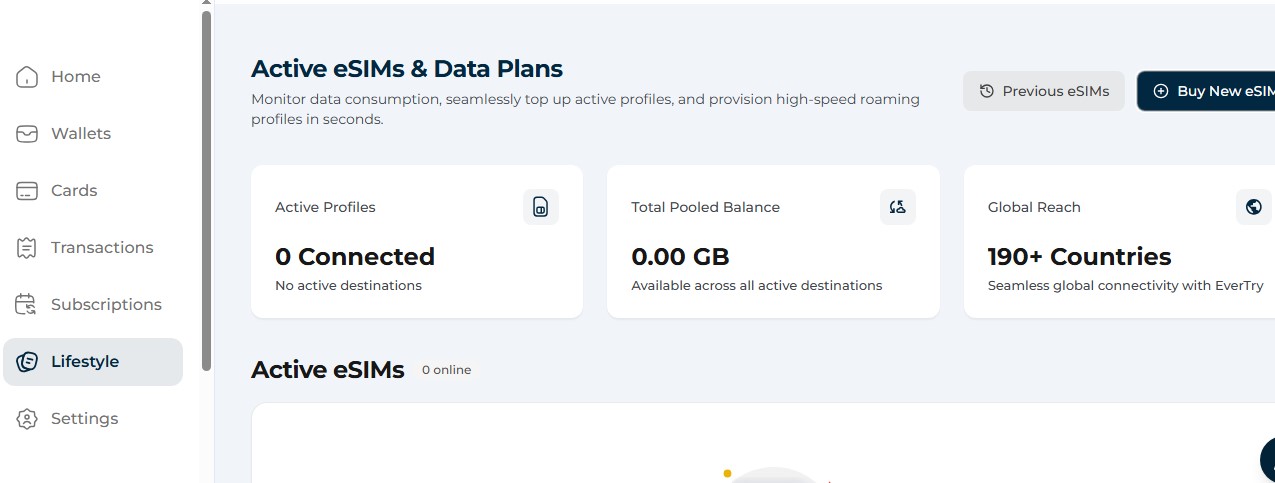
Log in to your EverTry account. On the home screen, select Lifestyle from the navigation menu.
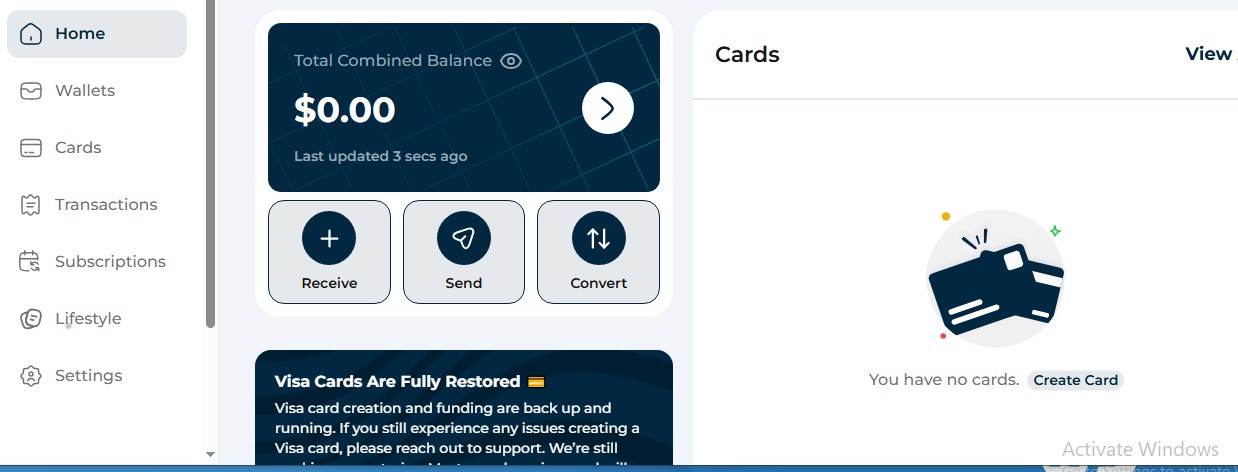
Step 2: Select eSIMs
Under the Everyday Utilities & Services section, select the eSIMs option. This opens the eSIM dashboard, where you can view your active eSIMs and data plans.
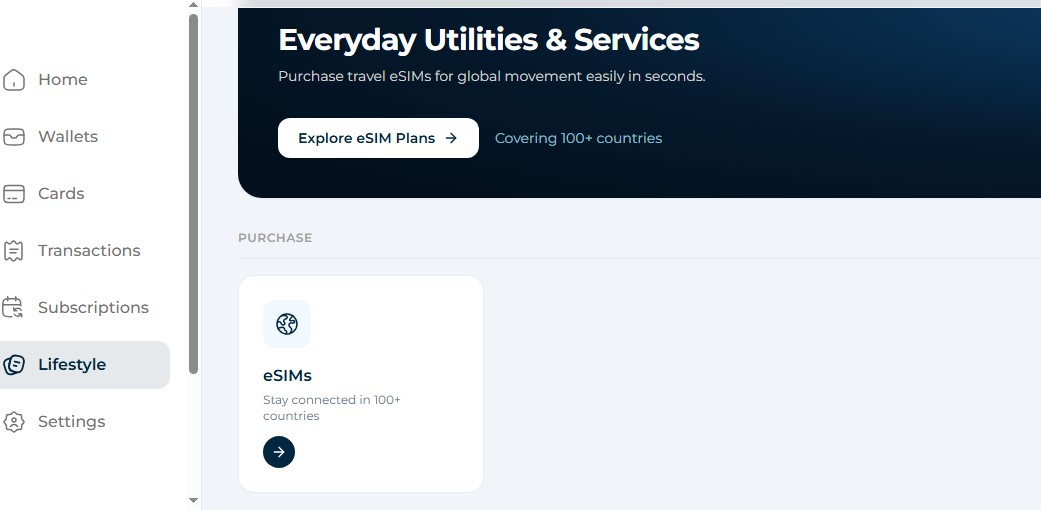
Step 3: Choose your destination
On the eSIM dashboard, select Buy New eSIM. You’ll see a list of available destinations. Choose the country you want to visit, such as Nigeria or Ghana.
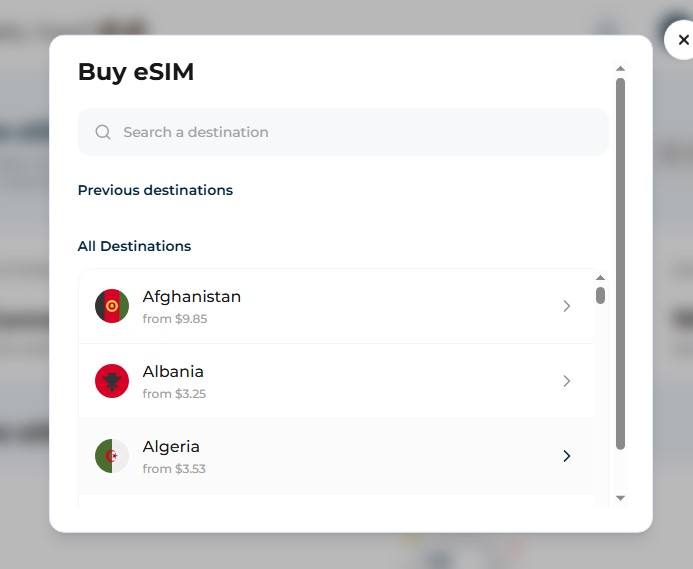
Step 4: Select a data plan
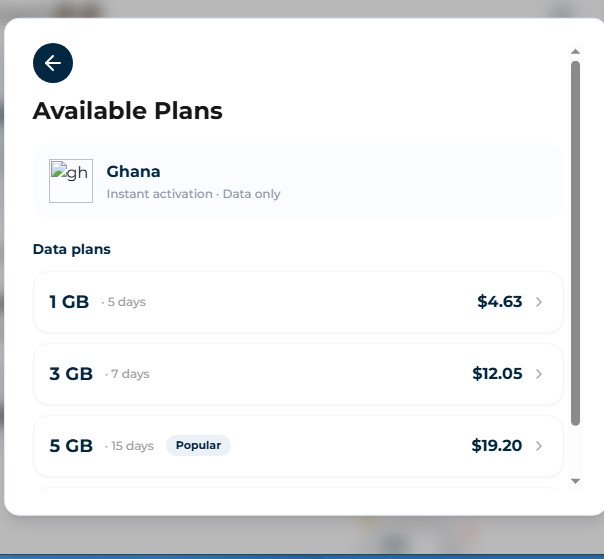
After choosing your destination, the app displays the available data plans. Each plan shows the amount of data, validity period and price.
Compare the options and select the plan that best suits your needs.
Step 5: Review your plan details
Before proceeding, check the plan summary to confirm that the data allowance, validity period, coverage and price are correct.
Step 6: Continue to payment
Once you’ve confirmed the details, select Continue to proceed to payment. Follow the payment instructions in the app to complete your purchase.
Step 7: Install and activate your eSIM
After completing your purchase, follow the installation instructions provided in the app to add the eSIM to your device. Once installed, it will connect when you reach a supported coverage area.
How Can Nigerians Pay for an International eSIM?
Nigerians can pay for an international eSIM on EverTry using USDT, USDC, or Bitcoin. If you hold your funds in Naira, you can swap NGN to USDT in the app before purchasing your eSIM.
Here’s how the payment options work:
- Naira (NGN): Convert your Naira balance to USDT before making the payment.
- USDT: Pay directly from your available USDT balance.
- USDC: Use your USDC balance to pay for your eSIM.
- Bitcoin (BTC): You can also use Bitcoin to complete your purchase.
If you fund your EverTry wallet with supported local currencies such as Ghanaian cedis, Kenyan shillings, South African rand, Zambian kwacha, Egyptian pounds or CFA francs, the deposit is automatically converted to USDT.
This gives Nigerians and other supported African users a way to pay for international mobile data without relying solely on an internationally issued bank card.
You can read more about our travel eSIM and how to purchase a plan through the app.
How to Install and Activate an eSIM
The setup process depends on your phone and the instructions from your network or eSIM provider.
Before you start, make sure:
- Your phone supports eSIM.
- Your phone is unlocked, where required.
- You have a stable Wi-Fi connection.
- You have the QR code or activation details.
How to Install an eSIM on an iPhone
- Connect your iPhone to Wi-Fi.
- Open Settings.
- Select Cellular or Mobile Service.
- Tap Add eSIM.
- Follow the instructions from your network or provider.
- Scan the QR code if required.
- Wait for the eSIM profile to download and activate.
- Choose how you want to use the new line.
How to Install an eSIM on Android
The menu names may vary by phone brand and Android version.
On many Samsung Galaxy phones:
- Connect your phone to Wi-Fi.
- Open Settings.
- Select Connections.
- Tap SIM Manager.
- Select Add eSIM.
- Scan your QR code or follow the activation steps.
- Wait for the profile to download.
- Select the eSIM for mobile data if needed.
Other Android phones may use options such as Network & Internet, SIMs or Add Mobile Plan.
Can You Use an eSIM and Physical SIM at the Same Time?
Yes, many phones support both a physical SIM and an eSIM.
For example, if you’re travelling from Nigeria to the UK, you may be able to set up your phone like this:
| Phone setting | SIM to use |
|---|---|
| Mobile data | International travel eSIM |
| Calls | Nigerian SIM, if needed |
| SMS | Nigerian SIM |
| Your existing WhatsApp account |
This lets you use travel data while keeping your Nigerian number active.
However, receiving bank OTPs depends on whether your Nigerian network supports roaming in your destination and whether your line can receive SMS there. Normal roaming charges may apply.
Common eSIM Problems and How to Fix Them
Here are some common eSIM problems and what you can do.
| Problem | What you can do |
|---|---|
| No Add eSIM option | Check your phone model and look for an EID. |
| QR code won’t scan | Check your internet connection, screen brightness and QR code. |
| eSIM won’t download | Connect to stable Wi-Fi and try again. |
| eSIM has no internet | Check your data line and the plan’s roaming settings. |
| No network abroad | Confirm that your plan covers the country and check network settings. |
| Bank OTP isn’t arriving | Check that your Nigerian SIM is active and roaming is available. |
| eSIM deleted by mistake | Contact your provider before trying to install it again. |
Don’t delete your travel eSIM just because it stops working. Some profiles cannot be installed again after deletion.
Frequently Asked Questions About eSIM in Nigeria
Is eSIM available in Nigeria?
Yes. MTN, Airtel and Glo have published eSIM services. You can also buy international travel eSIMs for use abroad.
Can I convert my physical SIM to an eSIM in Nigeria?
Yes. Supported networks allow eligible customers to move an existing number from a physical SIM to an eSIM. You may need to visit a service centre and complete identity checks.
Does Tecno or Infinix support eSIM?
Some newer models have been reported to support eSIM in selected markets, but many models use physical SIM cards only. Check your exact phone model before buying.
Can I use WhatsApp with an eSIM?
Yes. WhatsApp works over the internet provided by your eSIM. You don’t need to change your existing WhatsApp number.
Can I receive Nigerian bank OTPs abroad with an eSIM?
Yes, if your Nigerian SIM stays active and your home network supports SMS roaming in the country you’re visiting. A data-only travel eSIM does not receive normal bank SMS messages on your Nigerian number.
Can I buy an international eSIM with Naira?
Payment options depend on the provider. With our travel eSIM, you can swap Naira to USDT in the app and use your balance to buy a plan.
When Does Billing Start on EverTry eSIM?
Payment is made when you purchase your eSIM. However, your plan’s validity period starts when you install the eSIM and it first connects to a supported network. This means your plan’s validity countdown does not begin simply because you’ve completed the purchase.
When should I install my travel eSIM?
It’s best to install it before travelling while you have stable Wi-Fi. However, check when the plan starts. Some plans begin counting down at installation, while others start when the eSIM first connects to a supported network.
Conclusion
An eSIM gives you another way to stay connected without using a physical SIM card. You can get a local eSIM to keep your Nigerian number or use a travel eSIM for mobile data abroad.
Before buying, check that your phone supports eSIM. Also, review the plan’s price, data allowance, coverage and validity period.
If you’re travelling, consider keeping your Nigerian SIM active too. This can help you receive calls and SMS abroad, as long as your network supports roaming.
eSIM availability, prices, network coverage, speeds and device compatibility may vary by provider, destination and device. Prices and exchange rates are subject to change. Always confirm the latest plan details, activation requirements and refund terms with your provider before purchasing.
Jamilah is a digital marketer focused on fintech growth, SEO, and user acquisition.
She works on content and campaigns that help users navigate cross-border payments more easily.
At EverTry, she supports marketing initiatives aimed at making global payments simpler and more accessible.