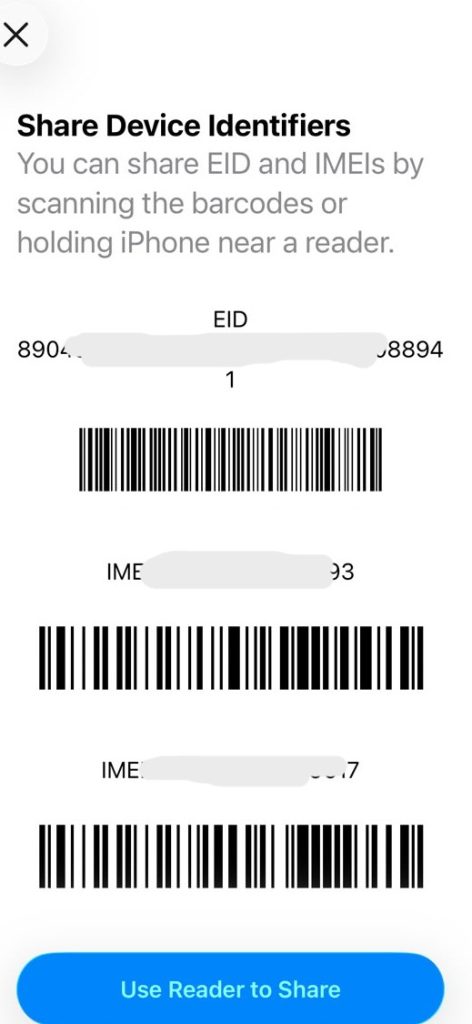
Does my phone support eSIM? Dial *#06# in your phone app. If an EID number shows up, your phone has eSIM hardware. An EID is a 32-digit code. No EID? Search your Settings for “eSIM.” Support depends on your exact model, not just the brand. Most iPhones from the XS onward and Samsung Galaxy S and Z phones support eSIM. Most Tecno, Infinix and itel phones do not. This guide shows you how to check, with a model-by-model list.
Quick answer: How do I know if my phone supports eSIM?
You can check in under a minute:
- Open your phone app (the dialler).
- Type
*#06#. - Look for a number labelled EID.
- If you see a 32-digit EID, your phone has eSIM hardware.
- If you don’t, open Settings, search “eSIM,” and check your exact model number.
| What you see | What it means |
|---|---|
| An EID number | Your phone very likely has eSIM hardware |
| An “Add eSIM” option in Settings | Your phone can use eSIM |
| No EID and no “Add eSIM” | Check your exact model and country version |
| EID shows, but setup fails | Check network lock and carrier support |
Do not mix up IMEI and EID. The IMEI is a 15-digit ID for your phone. The EID is a 32-digit ID for the eSIM chip. They are different numbers.
What is an eSIM?
An eSIM is a SIM that is built into your phone. You don’t slide a card into a tray. You add a mobile plan with a QR code or an app.
- Physical SIM: a plastic card. You can lose it or damage it.
- eSIM: a chip inside the phone. The plan downloads digitally.
- Why it matters: you can keep your home number and add a data plan for a trip. You don’t need to hunt for a local SIM after you land.
The catch is simple. Your phone must have the eSIM chip. A software update can’t add one.
Which phones support eSIM?
Brand names can mislead you. Two phones in the same series can differ. The same model can also change between countries.
We use four labels in the tables below:
- Supported: the maker lists eSIM for this model.
- Region-dependent: only some country versions have it.
- Unconfirmed: the sources disagree, or we found too little proof.
- Not listed: we found no native eSIM support in the sources we checked.
Which TECNO phones support eSIM?
Most TECNO phones do not have confirmed eSIM support. The CAMON 50 Ultra 5G is the main exception. TECNO’s product page lists it with eSIM, and a note says availability depends on your region and network.
| TECNO model | eSIM status | What to know |
|---|---|---|
| CAMON 50 Ultra 5G | Supported (region-dependent) | Check your country version and network |
| CAMON 50 Pro 5G | Unconfirmed | One database reports it in some regions. TECNO has not confirmed it |
| CAMON 50 / 50 Pro 4G | Not listed | Check your exact phone |
| CAMON 40 and CAMON 30 series | Not listed | Some lists name the CAMON 30 Premier. Sources disagree, so verify it yourself |
| PHANTOM V Fold / V Flip | Unconfirmed | Older lists claim eSIM. Newer checks do not back it up |
| POVA series | Not listed | POVA Curve 2 5G is reported to have it. Verify before you rely on it |
| SPARK series (including Spark 40) | Not listed | These use physical SIM cards |
| POP series | Not listed | No confirmed model found |
A few lessons from this table:
- 5G does not mean eSIM. Many 5G phones have no eSIM chip.
- A high price does not mean eSIM. Even foldables can lack it.
- Online lists can be wrong. Your phone’s own EID check beats any list.
Which Infinix phones support eSIM?
The Infinix NOTE 60 family is where Infinix eSIM support begins. Infinix says the NOTE 60 series supports eSIM, but it also says availability depends on your region and carrier. So check the exact version you have.
| Infinix model | eSIM status | What to know |
|---|---|---|
| NOTE 60 Ultra | Supported | Regional specs list eSIM |
| NOTE 60 Pro | Region-dependent | Series-level support, but market listings differ |
| NOTE 60 | Region-dependent | Don’t assume every country gets the same build |
| NOTE Edge | Unconfirmed | Evidence varies by market |
| NOTE 50 and NOTE 40 series | Not listed | No confirmed support found |
| ZERO, GT, HOT and SMART series | Not listed | No confirmed support found |
Why can an online listing disagree with the phone in your hand? Makers sell different versions in different markets. A phone bought in Lagos may not match a spec sheet from another country.
Does itel support eSIM?
We could not confirm native eSIM on any itel phone. The sources we checked list none. Most itel phones are built for low prices, and they use physical SIM cards.
We can’t say no itel phone ever will. So don’t rely on the brand name. Dial *#06# on your phone instead. Also remember that two SIM slots do not mean eSIM support.
Which Samsung Galaxy phones support eSIM?
Samsung’s Africa support page (updated September 2026) lists many models.
| Samsung family | Supported examples | What to know |
|---|---|---|
| Galaxy S | S20 through S26 | Check your country version |
| Galaxy Z Fold | Fold through Fold8 | Check your model variant |
| Galaxy Z Flip | Flip through Flip8 | Check your model variant |
| Galaxy FE | Selected S23 FE to S26 FE | Availability varies |
| Galaxy A | A37, A55, A56, A57 and some others | Some are limited to certain regions |
| Galaxy XCover | XCover7 and XCover7 Pro | Check your exact version |
The A35, A36 and A54 are examples with regional limits. Many cheaper A-series phones have no eSIM at all. To check, go to Settings > Connections > SIM manager and look for Add eSIM.
Which iPhones support eSIM?
iPhone XS, XS Max, XR and every later iPhone support eSIM. That includes the iPhone 11 to 18 families and the iPhone SE (2nd and 3rd generation). Some details by country:
- Mainland China: Apple lists only some models with eSIM.
- Hong Kong and Macao: some models use two physical SIM slots instead.
- United States: newer iPhones are eSIM-only and have no SIM tray.
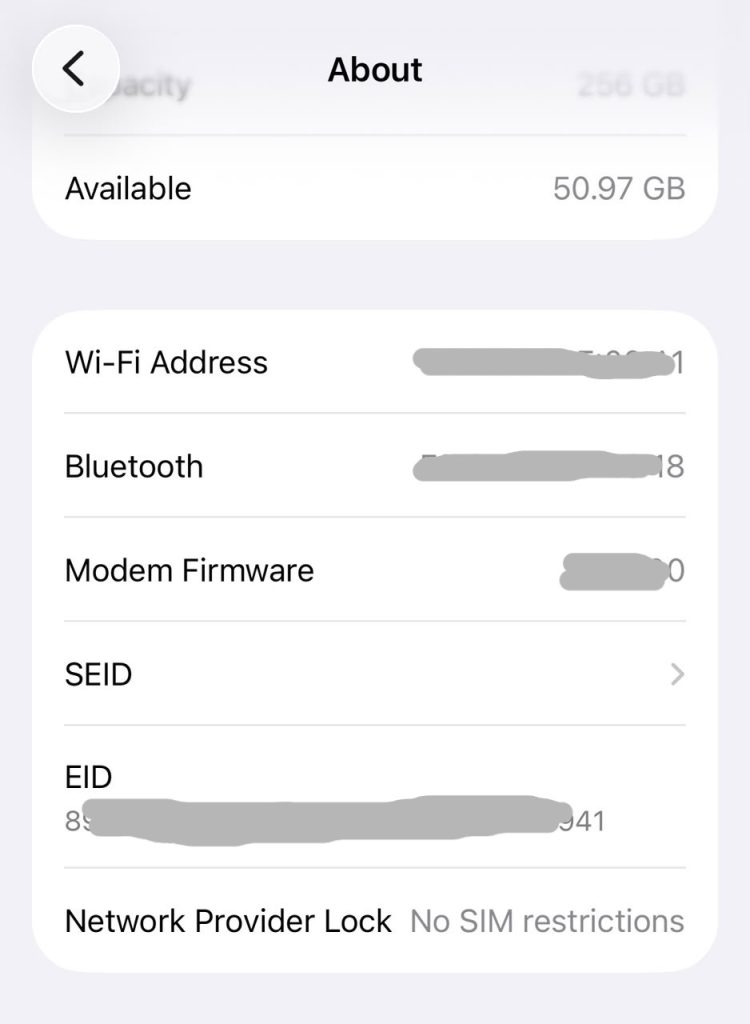
To check, go to Settings > General > About. Look for the EID and the Carrier Lock line.
What about Google Pixel and other phones?
Most Google Pixel phones from the Pixel 3 onward support eSIM. Other brands vary by model. The rule stays the same: dial *#06#, then check the exact model.
Last verified: 19 November 2026. Sources: TECNO and Infinix product pages, Samsung Africa support, Apple Support. Support can differ by country and software.
How to check eSIM compatibility on your phone
Use all three methods if you can. They back each other up.
Method 1: Dial *#06# to find your EID
- Open your phone app.
- Type
*#06#. The screen appears at once, and you don’t need to press call on most phones. - Find the line marked EID.
- Make sure it is 32 digits long. A 15-digit number is the IMEI.
Screens look different from phone to phone. Some show the EID in a menu you must scroll.
Method 2: Check your Settings
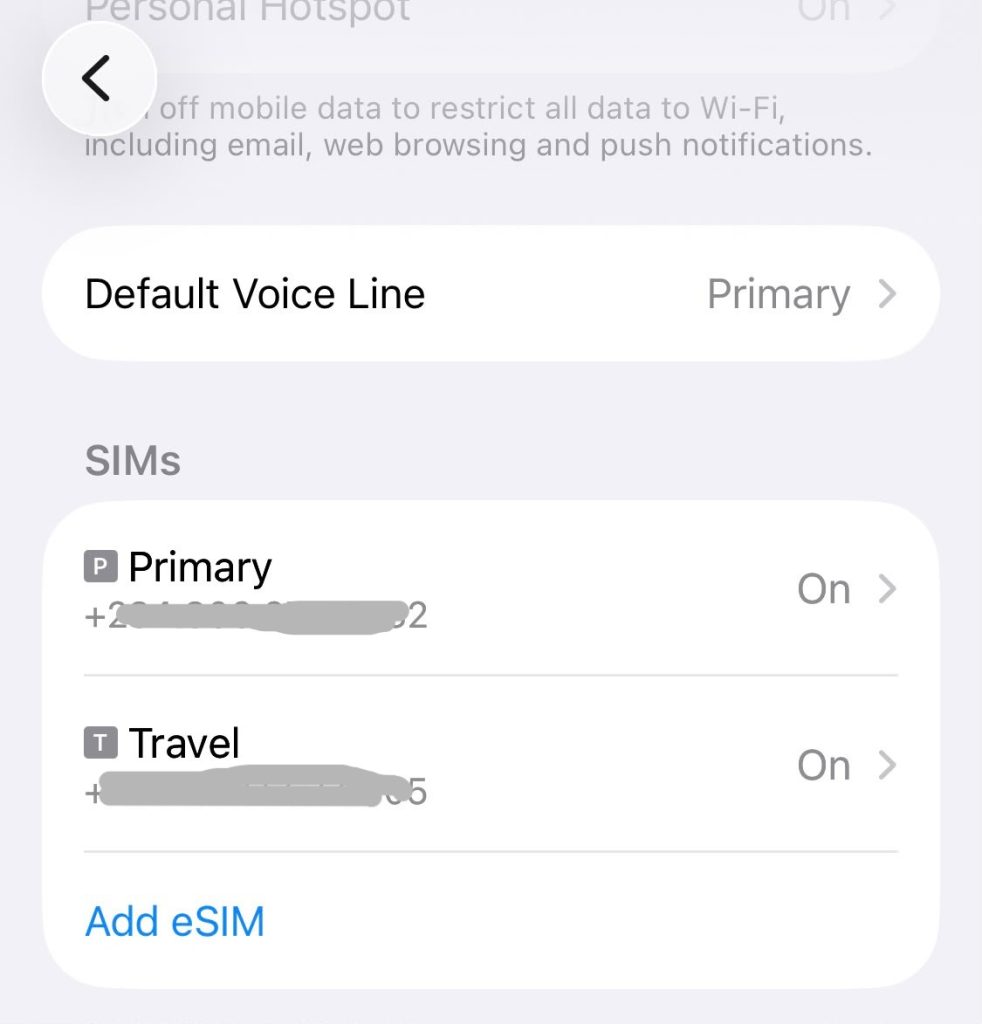
- iPhone: Go to Settings > General > About and find EID. Or go to Settings > Cellular (or Mobile Service) and look for Add eSIM.
- Samsung: Go to Settings > Connections > SIM manager and look for Add eSIM.
- TECNO, Infinix and other Android phones: Open Settings and search “eSIM.” Then look in the SIM or mobile network menu. Menu names change between software versions, so don’t trust a fixed path.
Method 3: Confirm your exact model number
Go to About phone (or General > About). Find the full model number. Compare it with the maker’s spec page for your country. The product name alone is not enough.
What if my phone does not show an EID?
Work through this list:
- Search Settings for “eSIM.”
- Check your full model number.
- Look up your country’s spec page.
- Update your phone’s software.
- Ask the maker or your network to confirm.
Do not buy a plan just to test your phone.
Does your phone need to be unlocked to use eSIM?
Often, yes. Three things must line up:
- Your phone has eSIM hardware.
- Your phone is not locked to one network.
- The provider supports your phone.
A phone can have the chip and still refuse another provider’s eSIM. A network lock is the usual reason.
On an iPhone, go to Settings > General > About > Carrier Lock. If it says No SIM restrictions, the phone is unlocked. On Android, the check depends on the brand and the original network. Ask your carrier if you’re unsure.
Can I use an eSIM and a physical SIM at the same time?
On most eSIM phones, yes. This is called dual SIM. You keep your normal SIM and add an eSIM.
A common trip setup works like this:
- Keep your home SIM on for calls and bank codes by SMS.
- Use a travel eSIM for mobile data.
Your home network’s roaming charges still apply to anything you use on the home SIM. Some phones also limit how many lines run at once. And remember that a phone with two SIM slots may still have no eSIM.
What if my phone does not support eSIM?
You have good options:
- Keep using a physical SIM. Your phone still works well.
- Buy a local SIM when you land, or use a pocket Wi-Fi.
- Upgrade later. If you plan to travel often, pick a phone with eSIM next time.
- Be careful with eSIM adapter cards. They are not the same as built-in eSIM. They don’t work on every phone.
A normal travel eSIM can’t turn an unsupported phone into a supported one.
Got a compatible phone? How to get a travel eSIM
Now the useful part. Once you know your phone works, you can sort out mobile data before you fly.
First, know the two types of eSIM:
- Local carrier eSIM: gives you your network’s service, often with calls, SMS and data.
- Travel eSIM: gives you mobile data in the countries it covers. Most are data-only.
EverTry offers travel eSIMs for 100+ countries. You can buy a plan for one country or a regional plan that covers several. Each plan shows its data, days, coverage and price before you pay. You pay from your wallet with USDT, USDC or Bitcoin. In Nigeria, you can swap naira to USDT in the app first.
How much does a travel eSIM cost?
These are “from” prices in the app on 18 November 2026. Your exact price depends on the plan.
| Destination | From (USD) | About (NGN) |
|---|---|---|
| United Kingdom | $2.70 | ₦3,890 |
| United Arab Emirates | $4.90 | ₦7,060 |
| United States | $3.53 | ₦5,080 |
| Canada | $5.23 | ₦7,540 |
| Saudi Arabia | $4.63 | ₦6,670 |
| Ghana | $4.63 | ₦6,670 |
| Kenya | $8.20 | ₦11,820 |
| South Africa | $3.80 | ₦5,480 |
Naira figures use ₦1,441.27 per $1 on 19 November 2026 and are rounded. Your own rate may differ.
How to buy a travel eSIM
- In the EverTry app, tap Lifestyle, then the eSIMs card, then Buy eSIM.
- Search for your country, or open Regional plans if you’re visiting several.
- Compare data, days, coverage and price. Check the plan details, then tap Buy eSIM.
- On Review & Pay, check your order. Choose USDT, USDC or Bitcoin, and confirm.
If your balance is too low, the app shows an “Insufficient balance” message.
Install test: what it looks like on a real phone
Install your eSIM at home, on Wi-Fi, a day or two before you travel.
On iPhone
- Connect to Wi-Fi.
- Open your eSIM in the app and tap Install now. Follow the prompts.
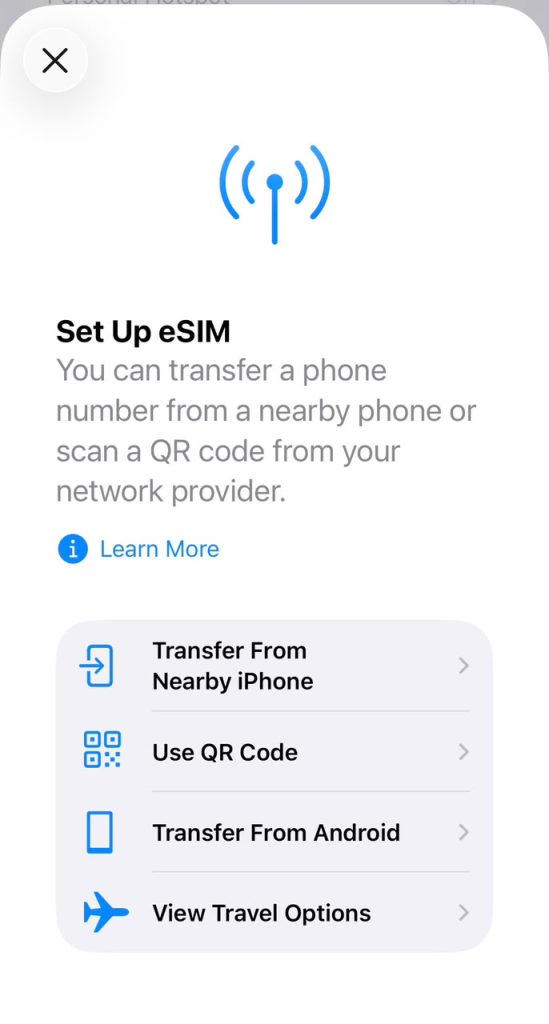
- Prefer to do it by hand? Go to Settings > Mobile Service > Add eSIM. Scan the QR code from another screen, or enter the details.
- Wait for Activating your eSIM to finish. When you see Your eSIM is active, you’re set.
On Android
- Connect to Wi-Fi.
- Open your eSIM in the app and tap Install now. Follow the prompts.
- By hand: Settings > Connections > SIM manager > Add eSIM. Menu names vary by brand.
- Wait for Activating your eSIM to finish.
Two things to remember about timing and cost. The plan’s days start when you install the eSIM and first connect, not when you buy it. And EverTry eSIM is data-only. It has no calls or SMS, but WhatsApp and other apps still work over your data.
After you land
- Set the travel eSIM as your line for mobile data.
- Turn on data roaming for the eSIM line only.
- Keep your home SIM on for calls and bank codes.
- Don’t delete the eSIM until your trip ends. Most eSIMs can’t be reinstalled once deleted.
- Top up before the plan expires if you run low.
Frequently Asked Questions
How do I know if my phone is eSIM compatible?
Dial *#06# in your phone app. If you see an EID number (32 digits), your phone has eSIM hardware. You can also search Settings for eSIM or look for an Add eSIM option. Always confirm your exact model number with the maker.
How can I tell if my phone support eSIM?
Check three places. Dial *#06# for an EID. Open Settings and look for Add eSIM or Add Cellular Plan. On an iPhone, go to Settings > General > About and find EID. If none show up, your phone may have no eSIM, or it may be switched off in your country.
Is my IMEI compatible with eSIM?
Your IMEI alone does not tell you. The IMEI is a 15-digit ID for your phone. The EID is a 32-digit ID for the eSIM chip. Dial *#06# and look for the EID. An EID means eSIM hardware is present.
Does a Tecno phone support eSIM?
Most do not. A few models list eSIM, such as the CAMON 50 Ultra 5G, and that can depend on your country and network. Spark and POP phones have no confirmed eSIM support. Dial *#06# on your phone to be sure.
Can a Tecno Camon use eSIM?
Only some. TECNO lists eSIM for the CAMON 50 Ultra 5G. Other CAMON models, including the CAMON 40 and CAMON 30 series, have no confirmed eSIM support. Check your exact model number and dial *#06#.
Does the Tecno Spark 40 use eSIM?
We found no confirmed eSIM support for the Spark 40 or other Spark phones. They use physical SIM cards. Dial *#06# to confirm on your own phone.
Does the Infinix Note 60 support eSIM?
The NOTE 60 Ultra lists eSIM. Infinix says the NOTE 60 series supports eSIM, but the NOTE 60 and NOTE 60 Pro can differ by region. Check your exact model and dial *#06#.
Does itel have eSIM?
We could not confirm native eSIM on any itel phone. Most itel phones use physical SIM cards. Dial *#06# to check yours.
Which Samsung Galaxy A phones support eSIM?
Only some. Samsung’s Africa list includes the A37, A55, A56 and A57, and some A-series models work only in certain countries. Many cheaper A phones have no eSIM. Look for Add eSIM in Settings > Connections > SIM manager.
Which phones have eSIM?
iPhone XS, XS Max, XR and newer; Samsung Galaxy S20 and newer, plus Z Fold and Z Flip; and Google Pixel 3 and newer. A few Android phones also have it, such as the TECNO CAMON 50 Ultra 5G and Infinix NOTE 60 Ultra. Country versions differ.
Can I add eSIM to any Android phone?
No. Your phone needs built-in eSIM hardware, and a software update can’t add it. Plug-in eSIM adapter cards exist, but they are not native eSIM and don’t work on every phone.
Can I use eSIM and a physical SIM at the same time?
Yes, on most phones with eSIM. One physical SIM and one eSIM can run together. Use the physical SIM for calls and bank texts, and the eSIM for data. Some phones limit how many lines are active, so check yours.
Check your phone before your next trip
Three points to keep:
- eSIM support depends on your exact model, not just the brand.
- The
*#06#EID check and the maker’s spec page are your best tools. - A compatible phone can use a travel eSIM to stay online abroad.
If your phone passes the check, open the EverTry app, tap Lifestyle, then eSIMs, and pick your destination before you fly. Get the app.
This article is general information and for educational purpose only . Phone support, plans, prices and coverage can change, and network providers set their own terms.
Deborah Giwa is a Marketing Associate at EverTry, where she works on content and growth initiatives focused on helping users navigate international payments. She is passionate about simplifying access to global financial tools for people in emerging markets through clear, practical, and user-focused content.