Most big learning sites take cards. Many also take PayPal, app-store billing, or local payment options. What you see depends on your country, your device, and the course. If your card is declined, try another method at checkout. A virtual USD card can also help. In this guide, we’ll walk through how to pay for online courses step by step. We’ll cover Udemy and Coursera in detail. We’ll also fix declined payments and look at your other options.
Let’s get you to the course.
How to Pay for Online Courses: The Quick View
Here’s a simple look at the most common platforms. Always check the checkout page for what is open to you.
| Platform | Common payment methods | Good to know |
|---|---|---|
| Udemy | Cards, PayPal, Udemy credits, app-store billing, some local methods | Options change by country and device |
| Coursera | Cards, PayPal, Klarna in some places, some local methods | Options change by country and product |
| Skillshare | Cards and other methods | Check checkout for your region |
| edX | Cards and PayPal | Check current rules before you pay |
| LinkedIn Learning | Cards and some local methods | Availability varies |
Two things matter most here. First, the checkout page is the final word. Second, a method that works for your friend may not work for you.
Is your local card not working? Skip ahead to why your online course payment is declined.
How to Pay for Udemy Courses
Udemy is often the first stop for new learners. Let’s start there.
What payment methods does Udemy accept?
Udemy takes most major cards. That includes Visa, Mastercard, American Express, JCB, and Discover. Many prepaid cards work too.
Depending on where you live, you may also see:
- PayPal
- Udemy credits
- Apple App Store or Google Play billing
- Buy now, pay later, such as Klarna or Afterpay
- Bank transfers and cash payments
- Local options like UPI, Pix, Boleto, and Oxxo
You won’t see all of these. Udemy shows the ones that fit your account country and location.
How to pay for a Udemy course, step by step
The screens may look a little different over time. The steps stay about the same.
- Pick your course.
- Add it to your cart.
- Go to checkout.
- Look at the payment methods shown to you.
- Enter your payment details.
- Finish any bank check, like a code or app prompt.
- Wait for the confirmation, then open your course.
That’s the whole flow. Most people only get stuck at step 5 or 6.
Why is my Udemy payment declined?
There are a few common reasons:
- Your card is set for local use only.
- The bank you use blocked an international payment.
- Your card type isn’t supported.
- You don’t have enough money on the card.
- Your billing details are wrong.
- The bank code (3D Secure or OTP) didn’t go through.
- You are paying on the app, and the app store has its own rules.
Want a deeper fix? Our guide on why your card is declined on Udemy goes step by step.
What if your local card doesn’t work on Udemy?
Try these in order:
- Call or message your bank. Ask if your card can pay online in other countries.
- Try another method shown at checkout.
- Use PayPal, if it’s offered to you.
- Try a virtual USD card.
A virtual card is not magic. It won’t work everywhere. But it can help when your regular card can’t make an international payment. We’ll cover that soon.
How to Pay for Coursera Courses
Coursera works a bit differently. It sells single courses, subscriptions, and degrees. Each one can have its own rules.
What payment methods does Coursera accept?
Coursera accepts major credit cards. These include Visa, Mastercard, Discover, JCB, and American Express. American Express only works for courses priced in US dollars. For debit cards, Coursera takes Visa and Mastercard.
You can also pay with prepaid cards and PayPal. In some places, Klarna is an option too. It can cover single courses and subscriptions like Coursera Plus.
Methods and currencies change by country. So use what you see at checkout. Don’t assume you must pay in one currency.
How to pay for a single Coursera course
- Choose your course.
- Click to enroll.
- Pick the paid option, not audit.
- Choose your payment method.
- Enter your details and confirm.
If you only want to watch the lessons, some courses let you audit for free. You just won’t get everything a paid learner gets.
How to pay for Coursera Plus and other subscriptions
A subscription is not the same as a one-time buy. It charges you again and again. So your card must support repeat payments.
Here is what to know:
- Many subscriptions start with a free trial. Coursera Plus has been listed with a 7-day trial.
- Coursera still asks for a payment method up front.
- You are charged when the trial ends, unless you cancel first.
- If a renewal fails, update your saved card.
Coursera has an error many learners see: “Card does not support recurring payments.” It means your card can pay once, but it can’t handle repeat billing. Try a different card or method.
Prices change. At the time of writing, Coursera Plus was listed at $59 a month or $399 a year. Check the current price before you pay.
Can you get Coursera Financial Aid?
Yes, some learners can. It’s not for every course. You usually apply, and then Coursera reviews your request.
Aid can lower the cost of a paid course. It is not the same as auditing, which is free but limited. Look for the aid link on the course page to see if you qualify.
What to do if your Coursera payment fails
- Check your card details and balance.
- Make sure the card supports online and recurring payments.
- Finish any bank code or approval step.
- Try another browser or the web instead of the app.
- Try another card or payment method.
Still stuck? Then a virtual USD card may be worth a try. See how to pay for Coursera courses in Nigeria for a local view.
How to Pay for Skillshare, edX and LinkedIn Learning
These platforms follow a similar pattern. Let’s keep it short.
Skillshare
Skillshare is a subscription. You pay monthly or yearly. Most people pay by card, and other methods may show up in your region. Check the checkout screen to see what you can use.
edX
edX sells courses and certificates. Cards and PayPal are the usual options. Rules can change, so read the payment page before you pay.
LinkedIn Learning
LinkedIn Learning is also a subscription. Cards are the main way to pay, and some regions have other methods. A larger monthly fee can make banks look more closely at the charge.
Why Was My Online Course Payment Declined?
When you’re learning how to pay for online courses, this is the part that matters most. A decline can feel random. It usually isn’t.
Use this table to find your problem fast.
| Problem | Likely cause | What to try |
|---|---|---|
| Card declined | Bank or site said no | Try another accepted method |
| International payment blocked | Card is for local use only | Use an international card or another method |
| Not enough funds | Balance is too low | Add enough to cover the full price |
| Card type not supported | Site doesn’t take that card | Use a supported card |
| 3D Secure fails | Bank check did not finish | Finish the check or call your bank |
| OTP didn’t arrive | Code was not sent or entered | Retry, or try another method |
| Payment method missing | Country or product limit | Use a method shown at checkout |
| Renewal failed | Repeat payment was rejected | Update your saved card |
| App payment error | App-store billing issue | Update the app, or pay on the web |
A quick tip: write down the exact error message. It tells you where to look.
Still blocked by an international payment limit? A virtual USD card can be another way to pay when your local card can’t make the payment.
Other Ways to Pay When Your Local Card Doesn’t Work
You have more choices than you think. Here is how they compare.
| Method | Best for | Main limit |
|---|---|---|
| Local card | Cards that allow the payment | May block international charges |
| International card | People with global spending turned on | Bank and exchange limits |
| Domiciliary card | People with a foreign currency account | Setup can be slow |
| PayPal | People who already have an account | Not offered in every country |
| App-store billing | Mobile purchases | Store rules apply |
| Virtual USD card | People whose local card is limited | Sites can still decline it |
| Financial aid | Eligible Coursera learners | Not for every user or product |
So which one should you pick? Start with the easiest one you already have. If that fails, move down the list.
Can You Use a Virtual USD Card to Pay for Online Courses?
Sometimes, yes. Let’s look at what it is and what it can’t do.
What is a virtual USD card?
It’s a digital card. It has a card number, an expiry date, and a security code, just like a plastic one. But you create it in an app, and it holds US dollars.
When does it help?
It can help when:
- Your local card can’t make an international payment.
- You want a card that holds US dollars.
- You want to keep your main bank card details off the site.
What it can’t promise
Here’s the honest part. A virtual card is not a guarantee.
- Some sites still won’t accept it.
- Fraud checks can still reject a payment.
- Some card types face limits.
- Repeat payments may have extra rules.
If anyone tells you a virtual card works everywhere, be careful.
How to Pay for Online Courses With EverTry
Let’s say you want to try a virtual USD card. Here is how it works with EverTry.
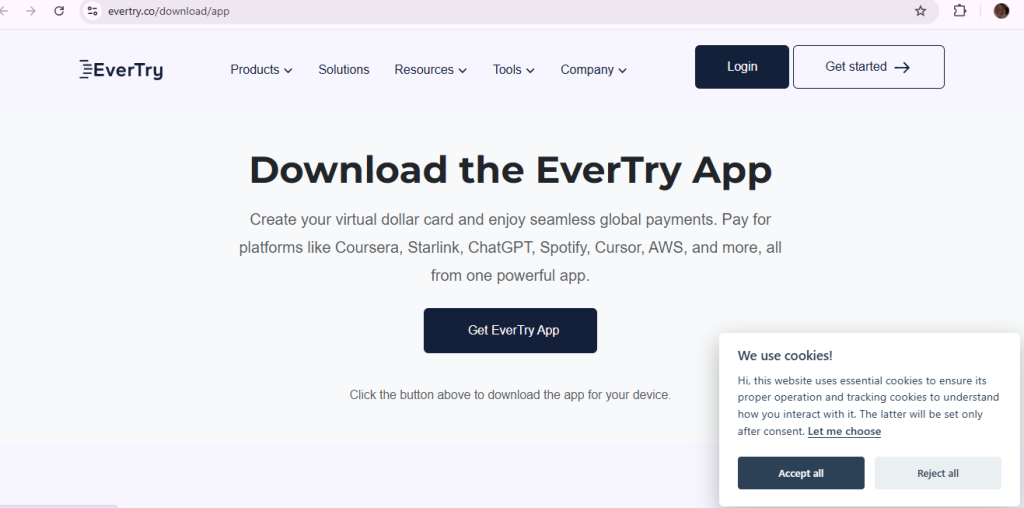
- Create your EverTry account. You can download the app or sign up on the web.
- Complete your ID check, called KYC.
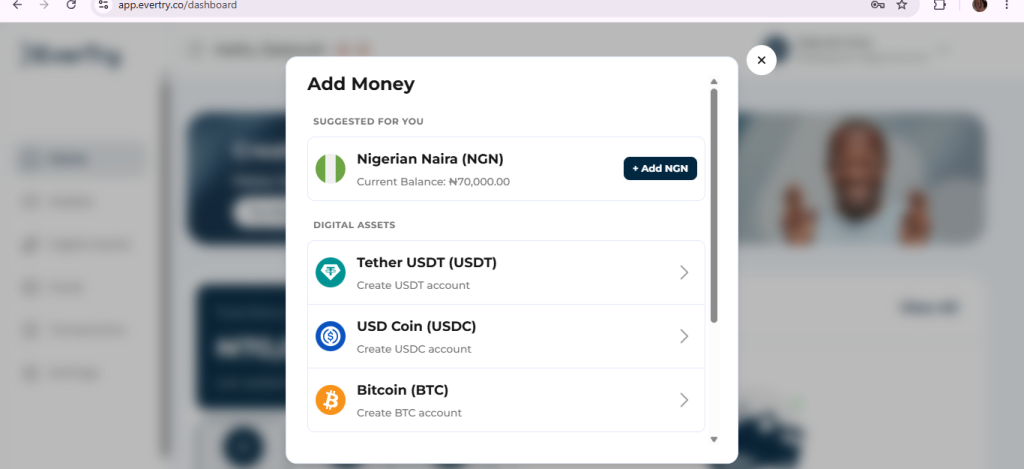
- Fund your wallet. Use the options shown in the app.
- Create your virtual USD card.
- Enter the card details at checkout on Udemy, Coursera, or another site.
- Finish any bank or site check, if asked.
- Save your receipt.
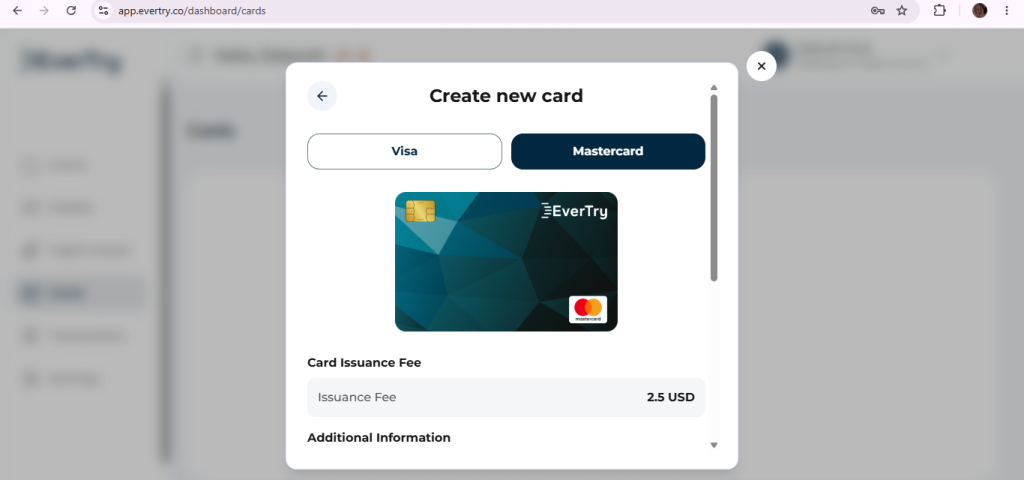
EverTry cards run on Visa and Mastercard. Fees, limits, and timing can change, so check the app for current details before you fund your card.
EverTry is not linked to Udemy, Coursera, or any other learning site. A card still has to be accepted by the site you’re paying.
Course Prices, Discounts and Free Options
Cost matters too. A few simple ways to spend less:
- Watch for sales. Udemy runs sales often. Prices can drop a lot.
- Check the refund window. Look at each platform’s rules before you buy.
- Try free first. Many Coursera courses let you audit.
- Apply for aid. Coursera Financial Aid may cut the cost.
- Pick the right plan. One course? Buy that course. Many courses? A subscription may cost less.
- Look at buy now, pay later. Some places offer Klarna or Afterpay.
Prices and offers change. So check the checkout price before you pay.
How to Pay for Online Courses From Nigeria, Ghana, Kenya, Egypt and India
Payment rules depend on your bank, the platform, and the kind of payment. So we can’t say one rule fits a whole country. Here’s a short guide.
Nigeria. Many learners find that local cards limit international payments. Banks differ, so ask yours first. Read our guide on paying for Coursera courses in Nigeria.
Ghana. Similar limits can show up. Check with your bank and read the checkout options.
Kenya. Card limits and bank checks can affect payment. See our guide on paying for Coursera courses in Kenya.
Egypt. International payments can fail for some cards. Our guide on paying for Udemy courses in Egypt can help.
India and Pakistan. Local payment methods can look quite different. In India, Coursera supports options like UPI, local cards, and NetBanking for some purchases. Check what shows at checkout.
For a wider view, see how to pay for Udemy courses in Africa.
Frequently Asked Questions
What payment methods does Udemy accept?
Udemy accepts major credit and debit cards, and many prepaid cards. Depending on your location, you may also see PayPal, Udemy credits, app-store billing, buy now pay later, bank transfers, and local methods. Checkout shows what you can use.
How do I pay for Udemy if my card is declined?
Start by asking your bank to allow international online payments. Then try another method at checkout, such as PayPal. If that fails, a virtual USD card may help. No method is guaranteed.
Can I use a virtual card to pay for Udemy?
Often, yes. Udemy accepts many prepaid cards, and a virtual card can work like one. But a site can still decline any card. Try it and see.
How do I pay for Coursera?
Pick your course or plan, go to checkout, and choose a method. You can use cards, PayPal, and in some places Klarna or local options. Use the methods and currency shown at checkout.
Can I pay for Coursera with PayPal?
Yes, in many places. Coursera lists PayPal as an option. In India, PayPal only works for single courses. Look at your checkout page to be sure.
Why is my online course payment being declined?
Common causes are international limits, an unsupported card, low funds, wrong billing details, or a failed bank check. Subscriptions can also fail if the card doesn’t support repeat payments.
Can I pay for online courses from Nigeria?
Yes, many learners do. The best method depends on your bank and the platform. Try your local card first, then another method, then a virtual USD card if needed.
What is the best card for paying for online courses internationally?
The best card is one that allows international online payments and works with the site. For many learners, that’s an international card, a domiciliary card, or a virtual USD card.
Can I pay for online courses with a virtual USD card?
Yes, if the site accepts it. Many learners use one when a local card is blocked. Always check the platform’s rules, and keep your receipt.
Ready to Pay for Your Course?
You now know how to pay for online courses, fix a decline, and pick the right option. That’s most of the battle.
If your local card keeps failing, a virtual USD card may be your next step. Create your EverTry account, finish verification, fund your wallet, and make your card.
Happy learning!
This article is for informational and educational purposes only. EverTry is not affiliated with, endorsed by, or sponsored by Udemy, Coursera, Skillshare, LinkedIn Learning, or any other online learning platform mentioned in this guide. Platform names, logos, and trademarks are the property of their respective owners.
Deborah Giwa is a Marketing Associate at EverTry, where she works on content and growth initiatives focused on helping users navigate international payments. She is passionate about simplifying access to global financial tools for people in emerging markets through clear, practical, and user-focused content.