
To pay for a Google Developer Account from Uganda, sign up on the Google Play Console and pay the one-time $25 registration fee with an international Visa or Mastercard. If your local bank card is declined, a virtual USD card is a reliable backup. Mobile money isn’t accepted directly, but it can sometimes fund an eligible card. Once payment goes through, Google runs an identity verification check before your account is fully approved.
Here’s everything you need to get it right the first time.
Can You Pay for a Google Developer Account from Uganda?
Yes. Google accepts Play Console payments from Uganda; you just need the right kind of card.
Before you pay, make sure you have:
- A Google account you’ll use for your developer profile
- A government-issued ID for verification
- An international Visa or Mastercard (or a virtual USD card)
- A stable internet connection for the registration flow
Supported payment methods:
- Local bank-issued Visa or Mastercard, with international/online payments enabled
- Virtual USD cards
- Google Pay, as the checkout layer that processes your card
Mobile money (MTN, Airtel) doesn’t work as a direct payment method; more on that below.
How Much Does a Google Developer Account Cost?
$25, paid once. That’s the entire cost of registering.
| Question | Answer |
|---|---|
| Is it a subscription? | No, one-time fee |
| Does Google charge renewal fees? | No |
| Does the price differ for Individual vs Organization? | No, both pay $25 |
| Does the fee cover app submission costs later? | Yes, publishing itself is free after registration |
The $25 Google Play Console fee is a one-time charge. You won’t be billed again for keeping your developer account active.
What Is a Google Play Console Account?
Google Play Console is the dashboard developers use to publish and manage Android apps. A “Google Developer Account” is really just your registered access to that dashboard.
- Google Play Console: the platform where you upload apps, manage listings, and view analytics
- Google Developer Account: your registration/identity within that platform
- Who needs one: anyone publishing an Android app: solo developers, students, agencies, and companies
Requirements Before Paying
- A Google account
- Government-issued ID (for the verification step after payment)
- A payment card that supports international transactions
- Organization accounts only: a D-U-N-S number, which Google uses to verify registered businesses. If you don’t have one, you can request it free from Dun & Bradstreet, but it can take a few days to issue; plan if you’re registering as an Organization.
Step-by-Step: How to Pay for a Google Developer Account in Uganda
- Visit Google Play Console and start the registration flow.
- Sign in with the Google account you want tied to your developer profile.
- Choose Individual or Organization. Individual is faster to set up; Organization needs the D-U-N-S number above.
- Enter your developer information: name, address, and contact details exactly as they appear on your ID.
- Click “Create Account and Pay.”
- Enter your Visa or Mastercard details when Google Pay prompts you.
- Complete payment. You should see a confirmation screen once the $25 charge clears.
- Verify your identity by uploading the ID Google requests.
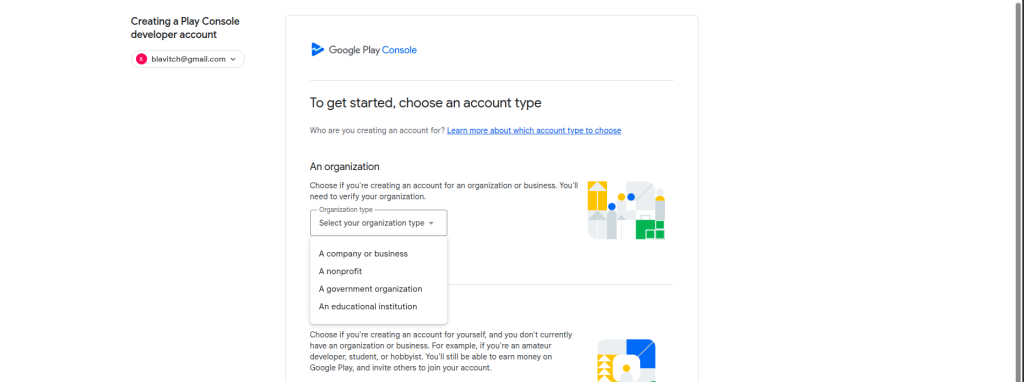
A quick note before you pay: billing name and address should match your card and ID exactly. Mismatches are one of the more common and most avoidable reasons registrations stall at verification.
Payment Methods That Work in Uganda
1. Local Bank Visa Cards
Banks like Stanbic, Equity, and Centenary issue Visa cards that can work for this payment, but success depends less on the bank and more on your card’s settings:
- International/online payments must be switched on (often via your bank’s app)
- Your card needs enough balance to cover $25 plus a small buffer for currency conversion
- Some cards default to local-transactions-only until you enable cross-border payments yourself
There’s no universal guarantee here; the same bank can issue both cards that sail through and cards that get flagged, depending on the account type and settings. If yours doesn’t work on the first try, check these settings before assuming the card itself is the problem.
2. Mastercard
Mastercard works the same way as Visa for this purpose. It tends to succeed when:
- International transactions are enabled
- The card is credit-class or a fully-featured debit card, not a basic local-use-only prepaid card
Common issues mirror Visa’s: disabled international payments, insufficient FX buffer, or a card type Google’s payment processor doesn’t recognize as eligible.
3. Virtual USD Cards
If your bank card keeps failing, a virtual USD card is usually the fastest fix. These are dollar-denominated cards created specifically for online payments, so they sidestep the local-card issues above entirely: no international-payments toggle to hunt for, no FX buffer guesswork, since the card is already funded in USD.
They’re particularly useful if:
- Your bank doesn’t support international online payments at all
- You need a dedicated card for recurring developer/subscription tools rather than mixing it with your everyday spending card
- You’ve had repeated declines and want to stop troubleshooting and just get registered
If your local bank card doesn’t work, a virtual USD card such as EverTry is one option that can simplify payment; it’s funded in USD, so no international-payments is setting to configure.
Comparison at a Glance
| Payment Method | Accepted by Google | Ease of Use | Notes |
|---|---|---|---|
| Local Visa | Yes | High | Depends on bank settings |
| Mastercard | Yes | High | International payments must be enabled |
| Virtual USD Card | Yes | Very High | Good backup if a bank card fails |
| MTN Mobile Money | No | Low | Can only fund supported cards |
| Airtel Money | No | Low | Cannot be entered into Google Pay |
Why Your Google Developer Payment Was Declined
Most declines trace back to one of these:
- Card doesn’t support international payments: the most common cause by far
- International payments disabled: enabled cards can still be switched off by default until you turn the setting on
- Insufficient balance: remember to budget slightly above $25 for conversion
- Foreign exchange conversion issues: some banks reject the transaction rather than auto-convert
- Temporary bank restriction: banks sometimes flag a first-time international charge as suspicious
- Google flagged the payment: mismatched billing details can trigger a hold
- Card verification failed: happens if the name or address on file doesn’t match what you entered
Troubleshooting Table
| Error | Likely Cause | Fix |
|---|---|---|
| Card Declined | International payments disabled | Enable online/international transactions via your bank app |
| Payment Failed | Insufficient funds | Add a small buffer above $25 for FX conversion |
| Invalid Card | Unsupported card type | Try a different Visa/Mastercard, or use a virtual USD card |
| Verification Failed | Google couldn’t confirm your identity | Re-upload a clear, valid ID matching your registration details |
| Google Pay Error | Payment profile issue | Review and correct your Google Payments profile details |
Can You Pay Using MTN Mobile Money or Airtel Money?
Not directly. Google Play Console’s checkout only accepts card payments through Google Pay; mobile money isn’t a listed payment method there.
That said, mobile money isn’t entirely irrelevant: some providers let you fund a supported virtual card using mobile money as the top-up source, which then gets used for the actual Google payment. If you don’t have a bank card at all, that’s usually the more practical route than trying to open a new bank account just for this.
Best alternatives if you rely on mobile money day-to-day:
- Ask whether your virtual card provider supports mobile money top-ups
- Use a bank card if you have one, even an infrequently used one, and just enable international payments
- Fall back to a virtual USD card funded through whatever method your provider supports
Google Play Console vs Google Pay
These are two different things people often mix up:
| Google Play Console | Google Pay | |
|---|---|---|
| What it is | Developer dashboard for publishing apps | Payment processing layer |
| What you do there | Register as a developer, manage app listings | Enter and store card details for charges |
| Do you need both? | Yes — Console is where you register, Pay is how you’re charged |
In short: you register on Play Console, but the $25 charge itself is processed through Google Pay.
What Happens After You Pay?
- Identity verification: Google checks the ID you uploaded against your registration details.
- Account review: Google may take some time to confirm everything is in order, especially for Organization accounts with a D-U-N-S number attached.
- Approval timeline: This varies; straightforward Individual registrations tend to clear faster than Organization ones.
- Common verification mistakes: blurry ID photos, a name that doesn’t match your card or registration exactly, and incomplete address details are the most frequent causes of delay.
Tips to Avoid Payment Problems
- Keep enough balance to cover $25 plus a currency-conversion buffer
- Enable international/online transactions on your card before you start
- Make sure your legal name matches across your ID, card, and Google registration
- Double-check your billing address details before submitting
- Avoid retrying the same failing card repeatedly; some banks flag accounts after multiple failed attempts, which can make the next try harder too
Is the Google Developer Fee Refundable?
Google’s $25 registration fee is generally non-refundable once your account is created, since it’s meant as a one-time registration charge rather than a purchase you can return. If you believe you were charged in error, your best route is to contact Google Play Console support directly and explain the situation; refund decisions are handled case by case.
Frequently Asked Questions
How much is a Google Developer Account? $25, paid once during registration.
Is the fee one-time? Yes. There are no renewal or subscription charges tied to keeping your developer account active.
Is a Google Developer Account free? No, publishing apps requires the one-time $25 registration fee. Using Android and building apps for personal, non-published use doesn’t require it.
Can I pay in UGX? Google charges in USD. Your bank or card provider handles the UGX-to-USD conversion on their end.
Does Google automatically convert currency? Google itself charges in USD; the conversion happens on your card issuer’s side, which is also where conversion fees, if any, get applied.
Can I use Google Pay? Yes, Google Pay is how the card payment is processed during registration.
Can I use MTN Mobile Money? Not directly. It may be usable to fund an eligible card, but it can’t be entered as a payment method on its own.
Can I use Airtel Money? Same as MTN, not accepted directly by Google Pay.
Can I use prepaid cards? Some prepaid cards work if they support international online payments; many local-use-only prepaid cards don’t. A virtual USD card is often more reliable if your prepaid card fails.
Can I use Visa Debit? Yes, as long as international payments are enabled on the card.
Can I use Mastercard? Yes, under the same conditions as Visa.
Can I create an Organization account? Yes. You’ll need a D-U-N-S number for business verification, which takes longer to set up than an Individual account.
What is a D-U-N-S number? A unique nine-digit identifier issued by Dun & Bradstreet that Google uses to verify registered organizations. It’s free to request but can take a few days to receive.
Why was my payment declined? Usually because international payments aren’t enabled on your card, there’s an FX-conversion issue, or your bank flagged the transaction. See the troubleshooting table above.
Can I get a refund? Generally no, since it’s a one-time registration fee, but you can contact Google Play Console support if you believe you were charged in error.
How long does Google verification take? It varies by account type; Individual accounts tend to clear faster than Organization accounts.
Do I need a passport? Any valid government-issued ID typically works; a passport isn’t specifically required unless it’s the ID you choose to submit.
What happens after payment? Google moves you into identity verification, then reviews your account before final approval.
Can I change from Individual to Organization later? Google’s account type is tied to your registration and generally isn’t something you can switch after the fact; it’s worth deciding upfront which type fits your situation.
Final Thoughts
Paying for a Google Developer Account from Uganda is straightforward once you have a card that supports international payments. Most failures come down to bank or card settings, not Google rejecting Ugandan users. If your local bank card doesn’t cooperate, a virtual USD card like EverTry is a practical alternative for paying the one-time registration fee, and it works the same way for other international developer tools like AWS, OpenAI, GitHub, and Apple Developer.
Matt Aluya is the founder of EverTry. A software engineer focused on virtual card issuance and stablecoin settlement for cross-border payments in emerging markets. LinkedIn · matt.aluya@evertry.co