You’ve chosen your Zoom plan, entered your card details, clicked Subscribe, and the payment fails. No explanation. Just a decline.
If you’re reading this from the Philippines, Indonesia, Pakistan, Malaysia, India, or anywhere else in Asia, you’re not alone. Payment failures on Zoom are one of the most common frustrations for professionals across the region, and almost none of them are caused by something you did wrong. They’re caused by how international payments work and how Zoom’s billing interacts with local banking infrastructure.
This guide covers every working payment method for Zoom across Asia, explains exactly why cards fail, and walks you through a fix that takes less than 15 minutes.
How to Pay for Zoom in Asia
Visa and Mastercard credit cards work in most Asian countries if your card allows USD transactions. PayPal is available in select markets. Apple Pay and Google Pay work in some regions. If your local card keeps getting declined, the fastest reliable fix is a virtual dollar card, you fund it with your local currency (PHP, IDR, PKR, MYR, SGD, USDC, or USDT), generate a USD Visa card, and enter it on Zoom’s billing page. For enterprise purchases or countries like Bangladesh where direct billing is limited, authorized local Zoom resellers accept local currency. To add or update any payment method: log into zoom.us → Account Portal → Billing → Billing Information.
Why Zoom Payments Fail in Many Asian Countries
Before jumping to solutions, it’s worth understanding what’s actually happening when a payment fails. There are three distinct causes, and they require different fixes.
Zoom Charges Most Asian Users in USD
Zoom’s default billing currency is USD for the majority of Asian markets. Your bank receives a charge in US dollars, and many banks, especially those issuing local debit cards, block foreign currency transactions by default or cap them at very low daily limits. This is a bank-side rule, not a Zoom setting you can change.
Credit cards tend to handle cross-border USD charges better than debit cards. But even credit cards from markets like Pakistan, the Philippines, and Indonesia can get flagged for USD subscription charges.
Local Bank Restrictions on Recurring Payments
Recurring subscriptions create a second layer of friction. Many Asian banks require the cardholder to manually approve each transaction or block subscription-style recurring charges entirely, particularly on debit cards. Your card might complete a one-time USD payment but still fail when Zoom tries to auto-renew your subscription.
Users in India using UPI face this directly: UPI is accepted by Zoom, but it’s non-recurring. Every billing cycle requires you to re-enter payment manually. Miss the window, and your account downgrades.
The “Payment Currency Option Is Not Available” Error
This specific error message, “The payment currency option is not available for your country”, is a Zoom-side issue, not your bank. It appears when the billing country on your Zoom account doesn’t align with what Zoom expects for your region, or when Zoom hasn’t fully enabled local currency billing for your market.
Indian users report hitting this even with valid international credit cards that work on other platforms. It’s been an active thread on Zoom’s Community forums. The workaround is to either contact Zoom Billing support or use a virtual dollar card, which bypasses the country-currency mismatch entirely.
PayPal Isn’t the Universal Backup You Think It Is
PayPal is often the first alternative people try when a card fails. It doesn’t always work. PayPal does not support Indonesian Rupiah (IDR), which means Indonesian users can’t use it on Zoom. In Pakistan and Bangladesh, PayPal availability is limited or requires currency workarounds. Even in markets where PayPal technically works, Zoom’s support for PayPal-based recurring subscriptions varies by region.
What Payment Methods Does Zoom Accept?
Here’s a complete table of Zoom’s accepted payment methods and their regional availability:
| Payment Method | Accepted on Zoom? | Regional Notes |
|---|---|---|
| Visa (credit) | Yes | Works in most countries if card allows USD charges |
| Mastercard (credit) | Yes | Same as Visa |
| American Express | Yes | Less widely issued in South/Southeast Asia |
| Discover | Yes | Rare outside North America |
| JCB | Yes | More common in Japan, some Southeast Asian markets |
| Visa / Mastercard (debit) | Partial | Subject to bank-level international payment restrictions |
| PayPal | Where available | Not supported for IDR; limited in Pakistan, Bangladesh |
| Apple Pay | Regional | Select markets only |
| Google Pay | Regional | Select markets only |
| UPI | India only | Non-recurring, must manually pay each billing cycle |
| Bank transfer / Wire | Eligible accounts only | Manual pay for accounts with monthly spend ≥ $250 USD |
Where to Add Your Payment Method in Zoom
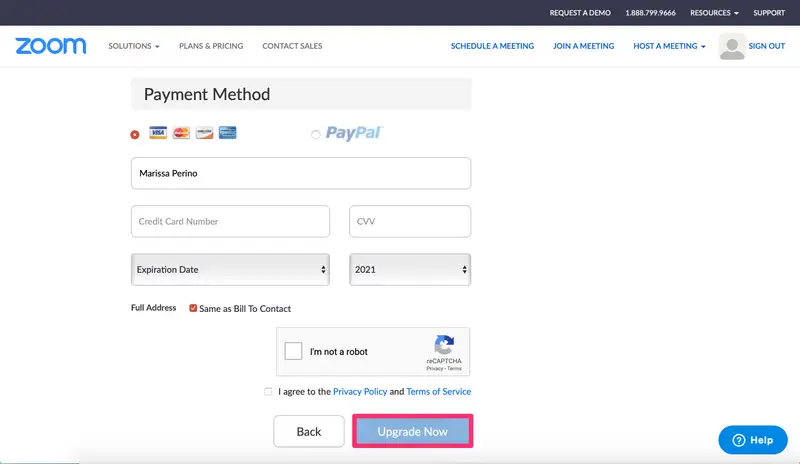
- Log in to zoom.us
- Click your profile icon → Account Management → Billing
- Select Billing Information
- Click Edit next to the payment section and add your card or select PayPal
How to Pay for Zoom by Country
Philippines (PHP)
Most local debit cards issued by banks like BDO, BPI, and Metrobank carry default blocks on USD subscriptions. GCash and Maya virtual Visa cards are hit-or-miss; some users report success, others report declines depending on the card tier and bank partnership.
What works:
- International Visa/Mastercard credit card (if your bank allows USD recurring charges)
- Virtual dollar card funded with PH, the most consistent option for Filipino freelancers and small business owners
Indonesia (IDR)
Indonesia is one of the higher-friction markets. Zoom’s billing defaults to USD; IDR is not supported by PayPal, and most local bank debit cards (BCA, Mandiri, BNI, BRI) are restricted for foreign recurring charges.
What works:
- International credit card if your bank has enabled overseas transactions
- Virtual dollar card funded with IDR, the most practical option given PayPal’s IDR gap
Pakistan (PKR)
Pakistan has some of the tightest cross-border payment restrictions in the region. In Zoom’s Community forums, Pakistani users report that the payment portal sometimes doesn’t even display a debit card option; only credit cards appear. JazzCash and Easypaisa are not accepted on Zoom.
What works:
- Credit card with international USD transactions enabled (Meezan Bank, HBL, UBL credit cards with prior bank activation)
- Virtual dollar card funded with PKR, bypasses the recurring payment restrictions that most Pakistani banks impose
India (INR)
India has relatively better Zoom payment support. Zoom offers INR billing for Indian accounts, and UPI is accepted. The complication is the “payment currency option is not available” error that appears after card changes or when the billing country configuration gets out of sync.
What works:
- INR credit card via Zoom’s India billing (set India as billing country)
- UPI: note this is non-recurring; you must manually approve each renewal
- Virtual dollar card (USD billing) is useful if INR billing errors persist
Malaysia (MYR)
Zoom doesn’t natively support MYR billing; charges default to USD. Most local debit cards from Maybank, CIMB, and Public Bank have restrictions on foreign recurring charges, even when the card is labeled for international use.
What works:
- International credit card with USD recurring enabled
- Virtual dollar card funded with MYR
For a full Malaysia-specific walkthrough, see: How to Pay for Zoom Subscription in Malaysia →
Bangladesh (BDT)
Direct Zoom billing in BDT is not available. Local bank cards are almost universally blocked for USD SaaS subscriptions. For most Bangladeshi users, the two realistic options are an authorized local reseller or a virtual dollar card.
What works:
- Authorized Zoom reseller in Bangladesh (such as Alpha Net), accepts BDT via local bank transfer
- Virtual dollar card funded with USDC or USDT
Singapore (SGD)
Singapore is one of the easiest markets for Zoom payments. Zoom supports SGD billing, local Visa and Mastercard cards generally work without issues, and PayPal is fully supported. Most Singapore-based professionals can pay directly without any workarounds.
What works:
- Local SGD Visa/Mastercard credit or debit card
- PayPal
- Virtual dollar card funded with SGD (optional, for those who prefer USD billing)
China (Mainland)
Mainland China operates under a separate domestic Zoom arrangement. The standard zoom.us subscription system does not apply. Users in China must purchase through authorized domestic partners, and the service runs on a different infrastructure to comply with local regulations. WeChat Pay and Alipay are accepted through partner portals.
Contact Zoom China (zoom.com.cn) or reach out to an authorized Chinese partner to purchase a subscription.
Hong Kong
Hong Kong operates on standard international billing, HKD or USD. Local Visa and Mastercard credit cards work without the friction seen in other Asian markets. PayPal is fully supported.
What works:
- Local credit card (HKD or USD billing)
- PayPal
Step-by-Step: Paying for Zoom with a Virtual Dollar Card
A virtual dollar card is a USD-denominated Visa card you can generate from an app, no bank visit, no calling customer service. You fund it with your local currency, and it works on Zoom exactly like a standard international Visa card.
The entire process, from downloading the app to completing your Zoom payment, takes under 15 minutes.
Step 1: Download the EverTry App
Get the EverTry app from the App Store or Google Play. Create your account with your email address.
Step 2: Complete Identity Verification
Verify your identity using a valid government-issued ID. This is a regulatory requirement and takes a few minutes.
Step 3: Fund Your Wallet
Add funds using your local currency or crypto:
- PHP (Philippines)
- IDR (Indonesia)
- PKR (Pakistan)
- MYR (Malaysia)
- SGD (Singapore)
- USDC or USDT
Step 4: Generate Your Virtual Dollar Card
Select your card type and activate it from your wallet balance. Your USD virtual card details card number, expiry, and CVV are available immediately.
Step 5: Add the Card to Zoom Billing
- Go to zoom.us → Account Management → Billing → Billing Information
- Click Edit on the payment method
- Enter your EverTry card details as you would any Visa card
- Save
Step 6: Complete Your Subscription
Select your Zoom plan and complete the purchase. The card processes as a standard USD Visa transaction.
How Recurring Billing Works
EverTry virtual cards support recurring payments. Your Zoom subscription will auto-renew without any manual action. As long as your EverTry wallet has sufficient balance before your renewal date, the charge processes automatically, with no re-entering of details and no manual approvals.
The same card works for other tools you likely already use: Google Workspace, Canva Pro, Meta Ads, LinkedIn Premium, Shopify, Adobe Creative Cloud, and any other USD-billed SaaS product.
When to Use an Authorized Zoom Reseller
What Is a Zoom Authorized Reseller?
Zoom’s authorized resellers are local companies that have a formal partnership with Zoom to sell licenses in their country. They handle the cross-border billing on your behalf and let you pay in local currency.
When a Reseller Makes More Sense Than a Card
- You’re in Bangladesh, and local bank cards are entirely blocked for international payments
- Your company needs a local-currency invoice for accounting or tax compliance
- You’re purchasing Zoom for an enterprise team and want a formal procurement process
- You’re in mainland China, where zoom.us billing doesn’t apply
Countries Where Resellers Are Most Useful
Bangladesh, mainland China, and large enterprise purchases across any Asian market are the primary use cases. For individual and small team subscriptions, a virtual dollar card is faster and doesn’t require coordinating with a third party.
How to Find a Verified Zoom Partner
Zoom maintains an official partner directory. Go to https://partner.zoom.com/, filter by your country, and look for resellers with “Zoom Marketplace” or “Zoom Authorized Reseller” designation. Avoid unofficial resellers selling Zoom licenses on social media or messaging apps; only purchase through Zoom’s verified directory.
Common Zoom Payment Errors and Fixes
My Card Is Declined on Zoom
Cause: Your bank is blocking the USD transaction or the recurring charge.
Fix: Call your bank and ask them to enable “international USD recurring transactions” on your card. If that’s not possible, use a virtual dollar card; it’s designed specifically for this type of transaction.
Zoom Says “Payment Currency Option Is Not Available”
Cause: Your Zoom account’s billing country configuration doesn’t match what Zoom expects for your region, or Zoom’s currency options are limited in your market.
Fix: Contact Zoom Billing support via chat at support.zoom.com and ask them to review your billing country setting. Alternatively, use a virtual dollar card; it bypasses the country-currency mapping issue entirely.
Zoom Won’t Accept My Debit Card
Cause: Zoom’s payment processor treats debit cards from certain countries differently from credit cards. Some markets show no debit card option at all.
Fix: Use a credit card if you have one, or use a virtual dollar card (which is a Visa card that processes as a credit transaction regardless of how you funded it).
PayPal Is Missing From My Checkout Page
Cause: PayPal isn’t available in your country, or your Zoom account’s billing country is set to a region where PayPal isn’t supported (including Indonesia).
Fix: Use a card instead. If cards are also failing, use a virtual dollar card.
My Subscription Renewal Failed
Cause: Your card expired, your bank blocked the renewal charge, or your account balance was insufficient. Fix: Log in to zoom.us → Billing → Billing Information → update your payment method before the next billing date. If you’re using a virtual dollar card, make sure your wallet has sufficient balance before the renewal date.
Frequently Asked Questions
Is Zoom available in Asia?
Yes. Zoom is available in nearly all Asian countries. The exception is mainland China, where zoom.us is restricted, and users must access Zoom through a VPN or via authorized partners.
What payment methods does Zoom accept?
Zoom accepts Visa, Mastercard, American Express, Discover, and JCB credit cards; debit cards (subject to regional restrictions); PayPal (where supported); Apple Pay and Google Pay (in select markets); UPI in India; and bank transfers for large accounts.
Why does Zoom keep declining my card?
The most common reasons are: your bank blocks international USD transactions by default; your bank doesn’t allow recurring cross-border subscription charges; or your card’s daily foreign currency limit has been reached. The fix is usually either calling your bank to enable international USD recurring payments or switching to a virtual dollar card.
How do I make a payment for a Zoom subscription?
Log in at zoom.us → click your profile → Account Management → Billing → Billing Information → Edit → add your payment method. Select your plan under the Billing section and complete the checkout.
How do I pay for Zoom in Hong Kong?
Hong Kong users can pay directly with a local Visa or Mastercard credit card. PayPal is also fully supported. Hong Kong is one of the lower-friction markets in Asia for Zoom billing.
How can I access Zoom in China?
Mainland China users must use Zoom’s domestic Chinese service, which operates separately from zoom.us under a partnership with CNNVR. Visit zoom.com.cn or contact an authorized Chinese Zoom partner to purchase a plan. WeChat Pay and Alipay are accepted through these channels.
What does China use instead of Zoom?
The dominant video conferencing platforms within mainland China are Tencent Meeting (腾讯会议) and DingTalk (钉钉), Alibaba’s enterprise communications platform. Both are widely used for business and education.
What countries restrict Zoom?
Zoom has historically been restricted or subject to throttling in Iran, North Korea, and Cuba. Mainland China restricts the international zoom.us service. The majority of Asian countries have full, unrestricted access to Zoom.
This article is for informational purposes only. EverTry is not affiliated with, endorsed by, or sponsored by Zoom, PayPal, Visa, Mastercard, Apple, Google, or any other brands mentioned. All trademarks, logos, and brand names are the property of their respective owners. Payment availability, pricing, and platform policies may change without notice. Users are responsible for verifying current requirements and complying with applicable laws, regulations, and service terms.
Can I use PayPal to pay for Zoom in Indonesia?
PayPal does not support Indonesian Rupiah (IDR) as a currency, which means it is generally not available as a payment option for Zoom accounts in Indonesia. A virtual dollar card funded with IDR is the most practical alternative.
Do virtual dollar cards work for Zoom auto-renewal?
Yes. Virtual dollar cards from providers like EverTry support recurring billing. Your Zoom subscription will renew automatically as long as your wallet has sufficient balance — no manual re-entry required.
Paying for Zoom from Asia becomes straightforward once you know which method works for your country. For most users running into card declines, a virtual dollar card solves the problem without any bank coordination — you fund it in your local currency and use it exactly like a standard Visa card anywhere Zoom accepts payment.
Get your EverTry virtual dollar card and complete your Zoom payment today →
All product names, logos, and brands mentioned in this article are the property of their respective owners. Zoom, PayPal, Apple Pay, Google Pay, Visa, and Mastercard are used for identification purposes only.
Matt Aluya is the founder of EverTry. A software engineer focused on virtual card issuance and stablecoin settlement for cross-border payments in emerging markets. LinkedIn · matt.aluya@evertry.co