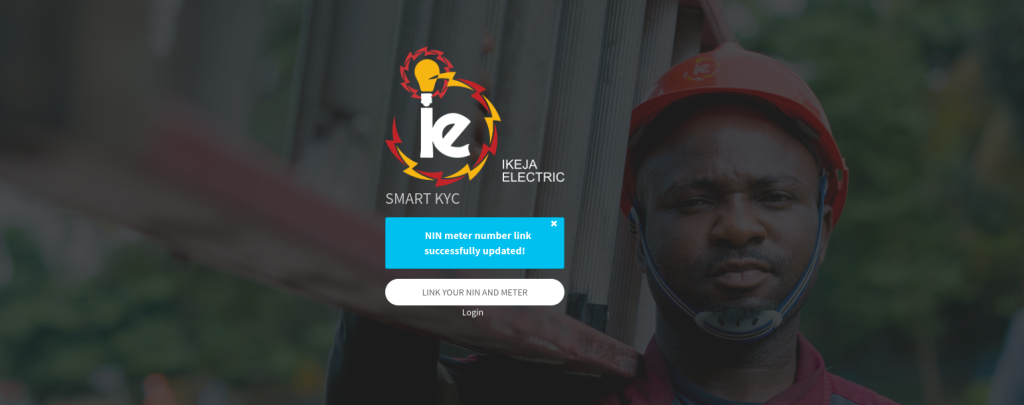
To link your NIN to your prepaid meter, visit your electricity provider’s SmartKYC portal, enter your NIN and meter number, verify with the code sent to your email, and click Submit. The entire process takes under 5 minutes and can be done from your phone without visiting any office.
Linking your NIN is now a permanent requirement for all prepaid meter users in Nigeria. Without it, your meter will reject electricity tokens, meaning you won’t be able to recharge your meter at all.
What You’ll Need Before You Start
Have these ready before opening the portal. Missing any one of them will stall you mid-process.
- Your 11-digit NIN (dial
*346#to retrieve it if needed) - The phone number registered with NIMC for your NIN
- Your current phone number (can be the same or different)
- Your prepaid meter number: 11 digits, printed on the meter faceplate. Can’t find it? Key in
000on the meter keypad and it will display on screen. - Access to the email address you’ll use to register on the portal
- A working internet connection (or see the USSD method below)
Pro tip: Open your email inbox in a separate tab before you start. You’ll need to copy a 6-digit verification code during the process, and the code typically expires in a few minutes.
How to Link Your NIN to Your Prepaid Meter, Step by Step
The process is the same across most electricity providers, with slight differences in the portal URL. Use the section for your DisCo below.
Ikeja Electric (IKEDC), Lagos
Ikeja Electric serves most of Lagos State. Their SmartKYC portal is the most used in Nigeria.
Portal: smartkyc.ikejaelectric.com
Steps:
- Go to the portal and click “Sign Up” to create a profile using your email address.
- Check your email for a welcome message containing your default login password.
- Log in with your email and the default password. You’ll be prompted to set a new password.
- Once logged in, click “Link Your NIN and Meter.”
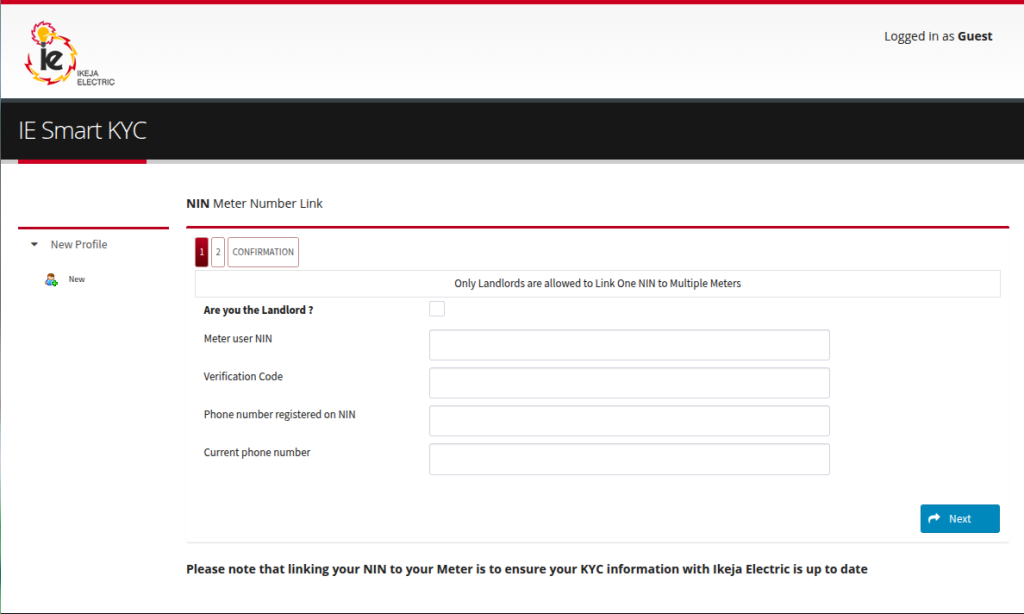
- Select your role: If you are a tenant, make sure the “Are you the landlord?” box is NOT ticked. Tenants must enter their own NIN, not their landlord’s.
- Enter your NIN, your NIN-registered phone number, and your current phone number.
- Review the NIN biodata the system pulls up: your name, date of birth, and address. If it’s correct, click Confirm.
- Enter your 11-digit meter number.
- Check your email for a 6-digit verification code and enter it on the page.
- Click Submit.
A confirmation message will appear. Your NIN is now linked.
Eko Electricity (EKEDC), Lagos Island & Surroundings
EKEDC covers Lagos Island, Ikoyi, Victoria Island, Lekki, and parts of Ogun State.
Portal: www.ekedp.com, look for the NIN/KYC update section on the homepage.
Steps: The process closely mirrors Ikeja Electric’s steps above:
- Register/log in on the EKEDC portal
- Navigate to “NIN & Meter Linking”
- Enter your NIN, registered phone number, and meter number
- Verify with the code sent to your email
- Submit
If EKEDC’s online portal is unavailable, visit the nearest EKEDC service centre with your NIN slip and meter number.
Abuja Electricity (AEDC), FCT & Surroundings
AEDC serves the Federal Capital Territory, Niger, Kogi, and Nassarawa states.
Portal: www.abujaelectricity.com, navigate to Customer Portal > KYC Update.
Steps:
- Log in or register on the AEDC customer portal
- Select “Update KYC / Link NIN”
- Enter your NIN, meter number, and contact details
- Complete the email verification step
- Submit
Ibadan Electricity (IBEDC), Oyo, Ogun, Osun, Kwara {#ibedc}
Portal: www.ibedc.com, look for the NIN linking option in the customer section.
If their online portal is not accepting submissions, IBEDC also handles NIN linking at any of their zonal offices with a valid ID and your NIN slip.
Enugu Electricity (EEDC), South-East States
EEDC covers Enugu, Anambra, Imo, Abia, and Ebonyi states.
Portal: www.enugudisco.com
Navigate to the customer portal and select the NIN/meter registration option. The steps mirror the Ikeja Electric flow.
Port Harcourt Electricity (PHED), South-South States {#phed}
PHED serves Rivers, Bayelsa, Cross River, and Akwa Ibom states.
Portal: www.phed.com.ng
PHED customers can also walk into any PHED business unit with their NIN, meter number, and a valid ID to complete the process in person.
How to Link Your NIN Without Internet (USSD Method)
If you don’t have a stable internet connection, Ikeja Electric offers a USSD option.
For Ikeja Electric customers:
- Dial
*7024#on the phone number registered to your NIN - Follow the on-screen prompts
- Select Token Retrieval when prompted
Note: The
*7024#code is primarily for retrieving Key Change Tokens (KCT) after your NIN has already been linked online. For first-time NIN linking, the SmartKYC portal is still required. If you have no internet access at all, visit any Ikeja Electric service centre, the process takes about 10 minutes at a counter.
What to Do After Linking Your NIN
Linking your NIN is only step one. To restore full token functionality and complete the STS meter upgrade, you need to generate and load a Key Change Token (KCT).
What Is a Key Change Token (KCT)?
A KCT is a special 40-digit upgrade code issued by your electricity provider after you link your NIN. It updates your meter’s internal software from the old STS (Standard Transfer Specification) platform to the new one. Without loading the KCT, your meter will still reject regular electricity tokens.
Think of it as a one-time firmware update for your meter; you only do it once.
How to Generate Your KCT
For Ikeja Electric:
- Go to the Ikeja Electric KCT portal or the Kuda Energy Help Center
- Enter your 11-digit meter number
- Your unique 40-digit KCT code (two 20-digit sets) will be displayed
Alternative USSD:
- Dial
*7024#→ select Token Retrieval - Your KCT will be sent via SMS
How to Load the KCT on Your Meter
You will receive three tokens in total. Load them in this exact order:
| Token | What It Does | Action |
|---|---|---|
| KCT 1 (20 digits) | Wipes old meter settings | Enter digits, press Enter |
| KCT 2 (20 digits) | Upgrades meter to new STS | Enter digits, press Enter |
| Energy Token (20 digits) | Loads your purchased units | Enter digits, press Enter |
⚠️ Order matters. Do not enter KCT 2 before KCT 1. Do not enter the energy token before both KCTs. The meter will reject tokens entered out of sequence.
How to Buy Electricity Tokens After Upgrading
Once your KCT is loaded, your meter works normally. You can buy tokens through:
- USSD: Dial
*226#On any network → follow prompts to purchase and receive your token via SMS - Online: VTPass, Bills.ng, your bank’s app, or your DisCo’s official website
- In person: Any licensed vending point or DisCo office
Using *226# step by step:
- Dial
*226# - Select your electricity provider
- Enter your meter number
- Enter the amount
- Complete payment
- Receive your 20-digit token via SMS
- Enter the token on your meter keypad
Common Problems and How to Fix Them
“NIN Meter Number Link Already Exists”
What it means: Your NIN has already been successfully linked to this meter. You don’t need to link again.
What to do: Skip the linking step and go straight to generating your KCT. If you can still not load tokens, the issue is with the KCT step, not the NIN link.
Verification Code Not Received
- Check your spam/junk folder first
- Confirm you entered the correct email address during registration
- Click “Resend Code” if the option is available
- Try a different browser or clear your browser cache
- If none of the above works, create a new portal account with a different email address
“Error Encountered” During Submission
This usually means a mismatch between your phone number and NIMC records. Your NIN-registered phone number must be exactly the number you enter on the portal.
Fix: Dial *346# to see which number is associated with your NIN. Use that number on the portal.
NIN Biodata Is Incorrect
Do not proceed with incorrect biodata. If your name, date of birth, or address is wrong, your NIN registration has an error.
Fix: Visit the nearest NIMC enrolment centre with your original documents to correct your NIN data. After the correction is confirmed, return to the portal.
Meter Number Not Recognised
- Double-check that you are entering the 11-digit meter number, not the 13-digit account number
- Dial 000. On your meter keypad, display the number on the screen
- Try entering the number without spaces
- If it’s still not recognised, contact your DisCo’s customer care line. The meter may not yet be registered in their system
Token Rejected After Linking (“REJECT” on meter screen)
This usually means the KCT has not been loaded yet or was entered in the wrong order.
Fix:
- Confirm your NIN is linked (you should have received a confirmation email)
- Generate your KCT from the portal
- Enter KCT 1 first, then KCT 2, then your energy token
- If the meter still shows REJECT, the KCT may have been issued for a different meter number — contact your DisCo
KCT Not Working
- Ensure you entered KCT 1 before KCT 2
- Check for typos, each set is 20 digits; a single wrong digit causes rejection
- KCTs are meter-specific. If you recently got a meter replacement, you’ll need a new KCT for the new meter
- Contact your DisCo’s support line with your meter number for a new KCT to be re-issued
Portal Not Opening
- Try a different browser (Chrome or Firefox recommended)
- Clear browser cache and cookies
- Disable VPN if you’re using one
- Try on mobile data instead of Wi-Fi
- If the portal is down entirely, wait and retry. DisCo portals occasionally experience downtime during high-traffic periods. You can also visit the nearest service centre.
Frequently Asked Questions
How do I connect my NIN to my prepaid meter? Visit your electricity provider’s SmartKYC portal, register with your email, and follow the NIN linking steps. The full process takes under 5 minutes. See the step-by-step guide above for your specific DisCo.
How do I activate my prepaid meter online? After linking your NIN, go to your DisCo’s KCT portal, enter your meter number, and generate your Key Change Token. Load the two 20-digit KCT codes on your meter in order (KCT 1 first, then KCT 2), then load your energy token. Your meter is now activated.
What is the code for the NIN link? There is no single USSD code to link your NIN; this must be done through your DisCo’s online portal. For Ikeja Electric, the portal is at smartkyc.ikejaelectric.com. After linking, you can use *7024# to retrieve your KCT tokens.
How do I use *226# to buy prepaid? Dial *226#, Select your electricity provider, enter your meter number and amount, complete the payment, and enter the 20-digit token you receive via SMS on your meter keypad.
Can I link my NIN to more than one meter? Tenants can only link their NIN to one meter. Landlords with multiple meters can use their NIN across all meters they own.
Can a tenant use a landlord’s NIN? No. Tenants must use their own NIN. On the portal, make sure the “Are you the landlord?” box is unticked and enter your personal NIN details.
Is linking NIN to a prepaid meter free? Yes, the NIN linking process is completely free. Your DisCo is required by NERC to provide this service at no cost.
How long does the linking process take? Under 5 minutes on a working internet connection, assuming your NIN biodata is correct and you receive the verification code promptly.
What happens if I don’t link my NIN? Your meter will reject all electricity tokens, including new purchases. You will not be able to recharge until your NIN is linked and your KCT is loaded.
Is NIN linking compulsory? Yes. The Nigerian Electricity Regulatory Commission (NERC) mandated NIN linking for all prepaid meter users as part of the STS/TID Rollover upgrade. It is not optional.
Summary
Here’s the complete process in a single glance:
| Step | What to Do |
|---|---|
| 1 | Go to your DisCo’s SmartKYC portal |
| 2 | Register with your email and log in |
| 3 | Click “Link NIN and Meter” |
| 4 | Enter NIN, phone numbers, and meter number |
| 5 | Verify with the email code and submit |
| 6 | Generate your KCT from the portal |
| 7 | Load KCT 1 → KCT 2 → Energy Token on your meter |
| 8 | Buy tokens normally going forward |
The process is free, takes under 10 minutes end-to-end, and only needs to be done once. If you run into any issues, the troubleshooting section above covers every common error.
This article is provided for informational purposes only and is based on publicly available information at the time of publication. EverTry is not affiliated with, endorsed by, or sponsored by any electricity distribution company (DisCo), NIMC, NERC, or any third-party brands mentioned. All trademarks, service marks, and brand names belong to their respective owners. Users are responsible for verifying requirements, procedures, and portal information with the relevant service provider before taking action.
Matt Aluya is the founder of EverTry. A software engineer focused on virtual card issuance and stablecoin settlement for cross-border payments in emerging markets. LinkedIn · matt.aluya@evertry.co