
You can pay for GitHub Copilot in Africa with a card or PayPal, where GitHub offers them for your account. If your local card fails, a USD virtual card is a great option. But check first if you can get Copilot Free or Copilot Student. Both cost nothing.
Let’s go through it step by step.
Can you pay for GitHub Copilot in Africa?
Yes, in most cases. GitHub has no special Africa plan. You pick a plan, then pay with a method GitHub accepts. You can see the full list on GitHub’s official Copilot plans page.
Africa is not one market, though. Card rules change by bank and by country. A card with money on it can still fail on a monthly charge from abroad. That is why so many people get stuck.
This guide covers how to pay for GitHub Copilot in Africa, what it costs, and what to do when a payment fails.
GitHub Copilot in Africa at a glance
| Question | Short answer |
|---|---|
| Can you pay from Africa? | Yes, with a method GitHub accepts |
| Cheapest paid plan | Copilot Pro, $10 a month |
| Free plan | Copilot Free |
| Free for students | Copilot Student, if you qualify |
| Payment methods | Card or PayPal, where offered |
| If a local card fails | A USD virtual card |
| Billing | Monthly price plus AI Credits |
How much does GitHub Copilot cost in 2026?
Here are the current individual plans:
| Plan | Price | Best for |
|---|---|---|
| Copilot Free | $0 | Trying Copilot |
| Copilot Student | Free | Verified students |
| Copilot Pro | $10 a month | Most developers |
| Copilot Pro+ | $39 a month | Heavy users |
| Copilot Max | $100 a month | Very heavy users |
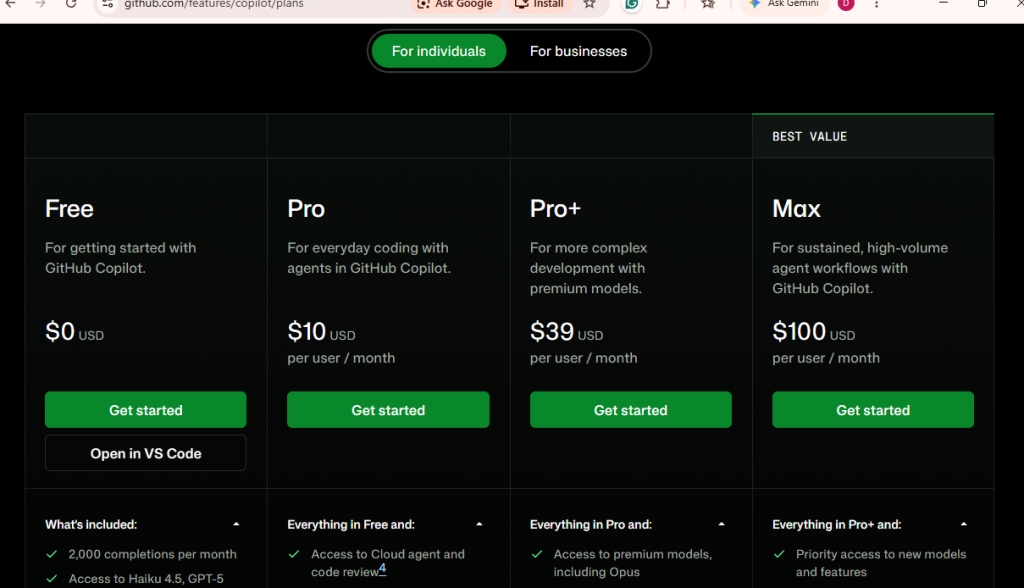
Check that sign-ups are open for the plan you want. Availability can change.
Two things matter here. The plan price is what you pay each month. AI Credits are the usage that comes with the plan. Extra usage can cost more.
What changed with GitHub Copilot billing in 2026?
On June 1, 2026, GitHub moved Copilot to usage-based billing. Here is what that means for you:
- Copilot now uses AI Credits. One credit equals one cent.
- Paid plans include a monthly credit allowance.
- After that, you can set a budget for extra use. It is billed at the end of the month.
- Plan prices did not change.
This matters if you pay with a virtual card. Funding only the plan price may not cover every charge. Keep a little extra on the card.
Is GitHub Copilot free for students?
Yes, for verified students. Copilot Student is free if you meet GitHub’s rules. You usually prove it through GitHub Education.
Check this before you pay. It could save you money. If you qualify, you don’t need a virtual card at all.
What payment methods does GitHub accept?
For paid plans, GitHub takes major credit and debit cards. PayPal may also work, depending on your account.
What about crypto? GitHub does not list a direct crypto checkout. If you hold USDT, you must turn it into a supported payment method first. Check GitHub’s current docs before you try.
Here is how the common options compare:
| Method | Main catch |
|---|---|
| Local bank card | Banks may block foreign or monthly charges |
| USD virtual card | Card type and billing details must be accepted |
| PayPal | Depends on your account and country |
| USD (domiciliary) account | You need access to dollar banking |
| Friend or family abroad | You rely on another person |
No method is best for everyone. Pick the one that fits your life.
Why is my card declined on GitHub Copilot?
A card with money on it can still be declined. These are common causes:
| What you see | One possible cause | What to check |
|---|---|---|
| “Card was declined” | Your bank said no | Online and international payments |
| Card has funds but fails | A billing check failed | Balance and card status |
| Virtual card rejected | Card type not accepted | Whether the card is prepaid |
| Billing details rejected | Address mismatch | Match your details exactly |
| Payment fails at renewal | Card empty or expired | Balance and expiry date |
Many failed tries in a row can also lock you out for a while. So stop and check before you try again.
What to check before you try another card
- Is the card on for online payments from abroad?
- Does it allow monthly charges?
- Is it a prepaid card?
- Does the billing address match?
- Is there enough balance?
- Have you hit a spending limit?
How to pay for GitHub Copilot in Africa with a USD virtual card
A virtual card is a digital card. It works like this:
Your money goes in as naira, cedis, shillings or stablecoin. It becomes a USD balance on the card. Then you enter the card details on GitHub.
Why can this help? Your local funding stays separate from the foreign charge. And GitHub sees a USD card. It may work when a local card does not.
I can’t promise it will work every time. Card rules differ, and GitHub makes the final call. EverTry is a great option for getting a USD virtual card.
How to Pay for GitHub Copilot with EverTry (Step-by-Step)
Ready to finally get GitHub Copilot working? Here’s exactly what you need to do:
Step 1: Create and Verify Your EverTry Account
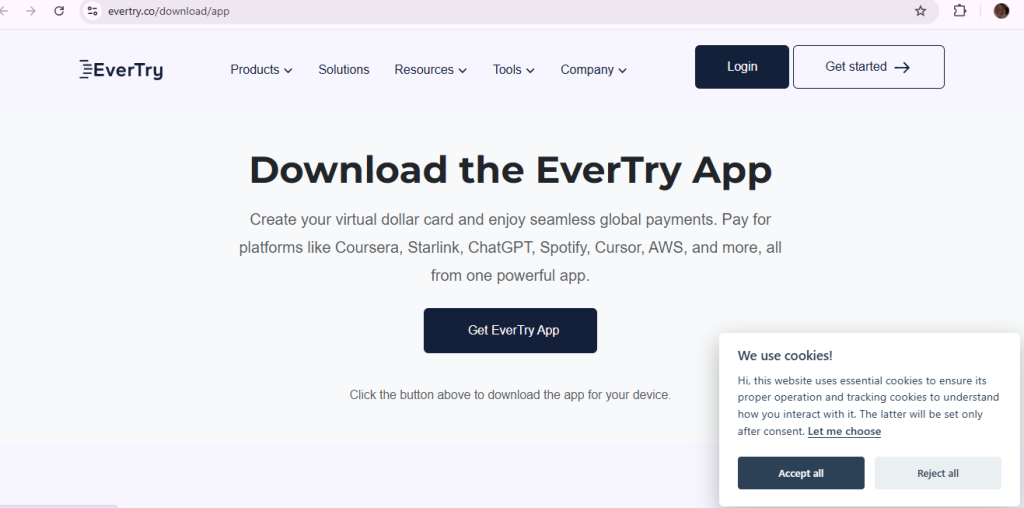
Head to EverTry or download the app and sign up with your email. The process takes about 2 minutes. You’ll get a verification email; click that link to activate your account.
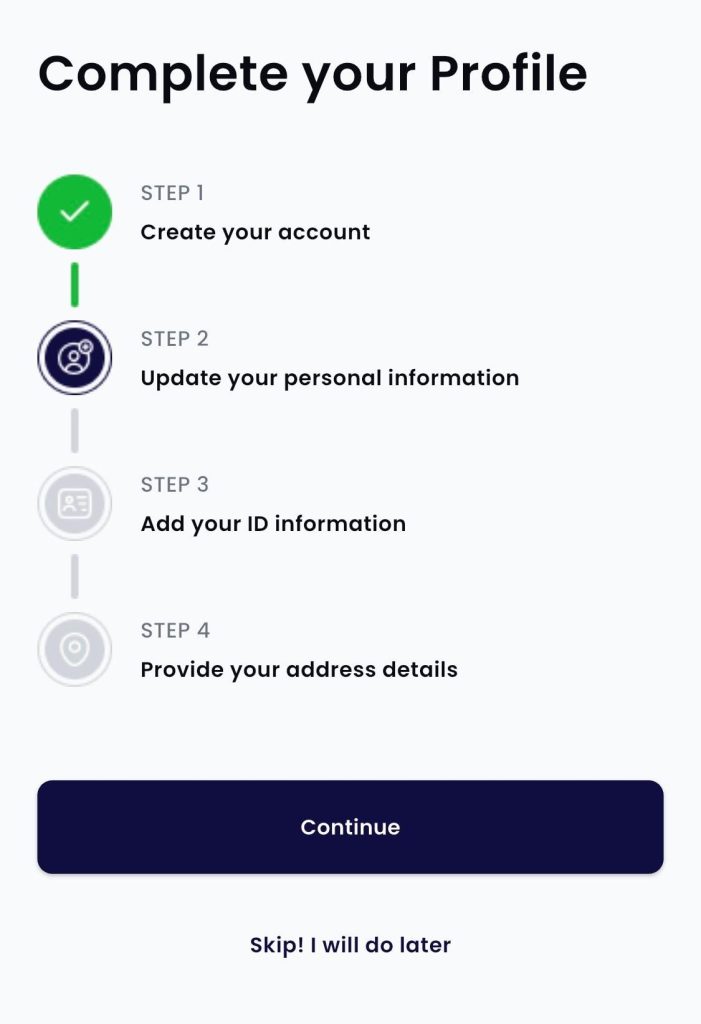
Step 2: Complete KYC for Full Access
Upload a photo of your ID (driver’s license, national ID, or international passport works fine). This verification usually processes within a few hours. It’s required for creating virtual cards, but it’s a one-time thing.
Step 3: Fund Your EverTry Wallet
This is where EverTry shines. You can add money using:
- Bank transfer in naira, cedi, or other local currencies
- USDT, USDC, or BTC if you prefer crypto
- Mobile money in supported countries
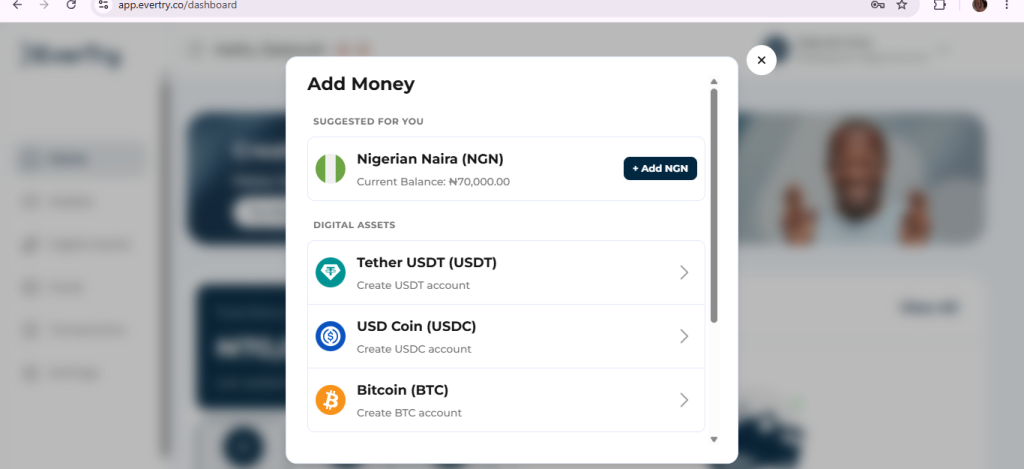
No need to hunt for dollars or visit a bureau de change. Fund with whatever’s convenient for you.
Step 4: Create a Virtual Dollar Card
Once your wallet has funds, create your virtual dollar card. Choose how much to allocate to it (GitHub Copilot needs $10 monthly, but you might want to add extra for other subscriptions). Your card details appear instantly.
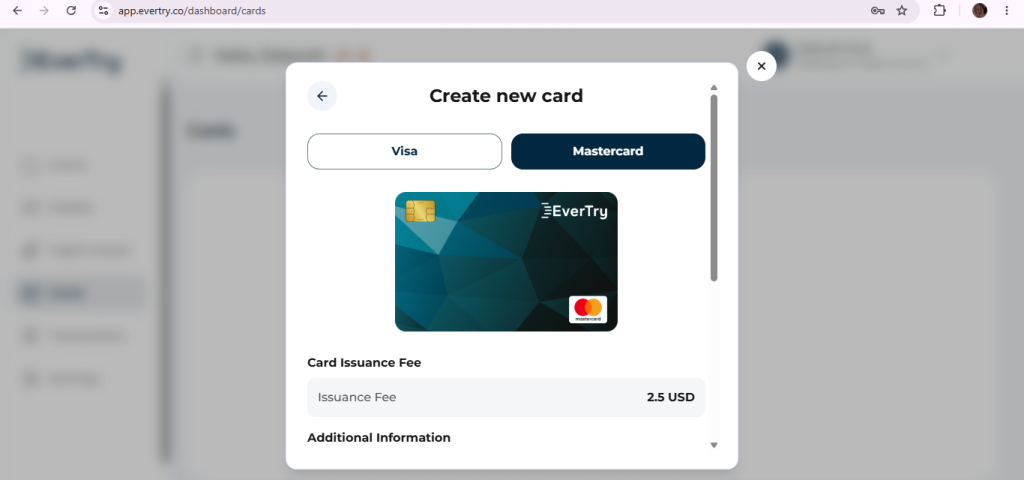
Step 5: Add the Card to GitHub Billing Settings
Log in to GitHub, go to your billing settings, and add your new EverTry virtual card. Use the card number, expiry date, and CVV exactly as shown in your EverTry dashboard.
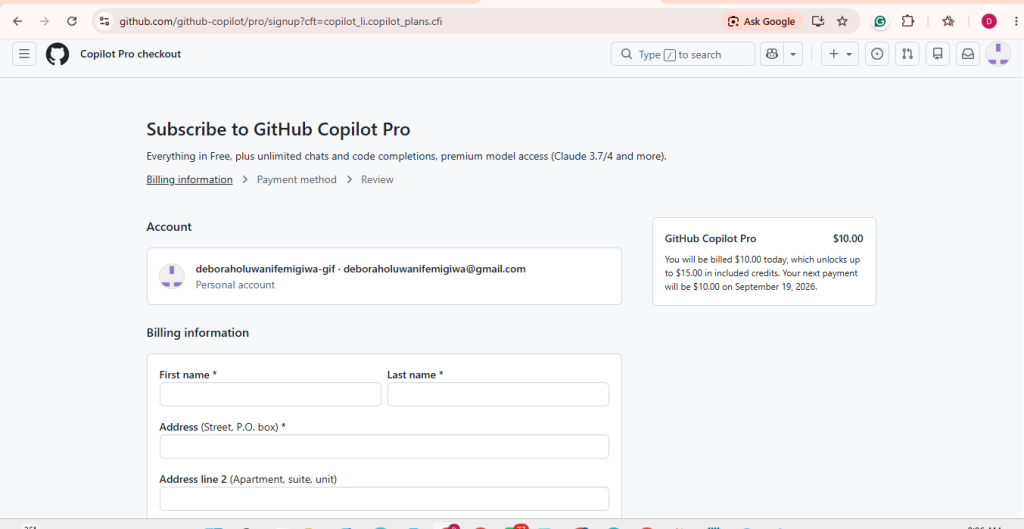
Step 6: Start Your GitHub Copilot Subscription Successfully
Select GitHub Copilot Individual ($10/month) and complete the payment. This time, it works. No declined messages, no error screens, just a successful subscription.
You’ll get your GitHub Copilot access immediately, and the recurring billing will work seamlessly every month.
How much should you fund your card before paying?
Plan for more than the headline price. Fees, exchange costs and extra use can add up.
Rates change. Check the current rate before you fund your card.
Why EverTry Works When Bank Cards Don’t
EverTry virtual cards succeed where traditional African bank cards fail because they’re designed differently:
Not tied to your local bank’s restrictions: Your bank’s foreign exchange policies don’t affect your virtual card. EverTry handles the currency conversion transparently.
Built for recurring international billing: While your local card treats recurring foreign charges as suspicious, EverTry cards expect them. That’s literally what they’re designed for.
You control funding and limits: Set spending limits, pause the card if needed, or add funds exactly when you want to. No surprise declines because you’re always in control.
Multiple funding options: Whether you prefer bank transfers, crypto, or mobile money, you can keep your card funded using whatever works best for you.
Available 24/7: No waiting for bank approvals or business hours. Create cards and manage subscriptions anytime, from anywhere.
What happens when your Copilot AI Credits run out?
Your plan comes with a monthly credit allowance. When it runs out, you have two choices. You can wait for next month. Or you can set a budget for extra use.
If you set a budget, GitHub bills you at the end of the month. Your card must still be valid and funded then.
So a card that works for the first payment is not enough. It must work next month too. Not everyone will pay extra. But it helps to be ready.
Frequently Asked Questions
Can I pay for GitHub Copilot from Nigeria?
Yes, if GitHub accepts your payment method. If your bank card fails, a USD virtual card may work. Check Free and Student first.
Can I pay for GitHub Copilot from Kenya?
Yes, with a payment method that GitHub accepts. If a local card fails, try a USD virtual card.
Is GitHub Copilot free in Africa?
There is a Free plan, and it costs $0. Verified students can also get Copilot Student for free.
How much is GitHub Copilot Pro?
Copilot Pro costs $10 a month. It includes a monthly AI Credits allowance. Extra use can cost more.
Why is my GitHub Copilot payment declined?
Your bank may block the charge. The card type, billing address or balance can also be the cause. Check each one.
Does GitHub accept PayPal for Copilot?
It may, depending on your account and country. Look in your billing settings to see.
Can I pay for GitHub Copilot with USDT?
Not directly, as far as GitHub’s docs show. You would need to fund a supported card first. Check the latest docs.
Can I use a prepaid or virtual card?
Sometimes. It depends on the card type. If one is rejected, try another type or PayPal.
How much should I put on my virtual card?
More than the plan price. Add room for fees, exchange costs and extra use.
Will Copilot renew by itself?
Paid plans bill each month. Keep your card valid and funded. Update it in billing if it fails.
Final Thoughts: Focus on Building, Not Billing Issues
You didn’t become a developer to wrestle with payment processors. You’re here to build products, solve problems, and create value. GitHub Copilot can genuinely accelerate your work, but only if you can access it.
Payment barriers shouldn’t dictate which tools you can use. Whether it’s GitHub Copilot, Notion Pro, or any other subscription that makes you more productive, there’s always a smarter way to handle international payments.
EverTry exists because African developers, creators, and entrepreneurs deserve access to the same tools driving innovation everywhere else. Your location shouldn’t limit your potential.
Stop letting failed card payments slow down your workflow. Download EverTry and pay for GitHub Copilot today.
EverTry is not affiliated with, endorsed by, or sponsored by GitHub or any other third-party platform mentioned in this article. Prices, payment methods, availability, and fees may change without notice. This article is for informational purposes only and does not guarantee successful payments or subscriptions. Always confirm current terms and pricing with the relevant platform and review EverTry’s current fees and terms before making a payment.
Deborah Giwa is a Marketing Associate at EverTry, where she works on content and growth initiatives focused on helping users navigate international payments. She is passionate about simplifying access to global financial tools for people in emerging markets through clear, practical, and user-focused content.