If you’ve tried to pay for Heroku in Nigeria, you’ve probably seen this:
- “Your card was declined”
- “Payment authorization failed”
- “Unable to add payment method”
It’s frustrating—especially when you have money in your account.
Here’s the truth:
The problem is not your money. It’s your payment method.
This guide breaks down:
- Why Heroku rejects Nigerian cards
- What payment methods actually work
- The easiest way to pay without stress
Why Heroku Declines Nigerian Cards
Short answer:
Most Nigerian debit cards don’t meet Heroku’s billing requirements.
Full explanation (this is what most articles miss):
1. International transaction restrictions
Many Nigerian banks block or limit:
- USD payments
- Recurring billing
- Developer platforms
Even if your card works on some sites, Heroku may still reject it.
2. Billing address mismatch (AVS issue)
Heroku uses Address Verification System (AVS).
If:
- Your card is issued in Nigeria
- But billing expects a match with international formats
The payment fails instantly.
3. Unsupported card types (prepaid cards)
Heroku prefers:
- Credit cards
- Reliable international debit cards
Many prepaid or local cards:
- Fail authorization
- Get flagged as high-risk
4. Currency mismatch (NGN vs USD)
Heroku charges in USD.
If your card:
- Is restricted to naira
- Or has FX limitations
The transaction gets declined.
5. Fraud detection systems
Heroku (and its payment processor) flags:
- Unusual locations
- Inconsistent billing data
Nigerian cards are often caught in this filter.
What Payment Methods Does Heroku Accept?
Here’s a clear breakdown:
| Payment Method | Works on Heroku? | Notes |
|---|---|---|
| Nigerian debit card | ❌ | Frequently declined |
| Credit card (international) | ✅ | Best success rate |
| Dollar virtual card | ✅ | Reliable alternative |
| PayPal | ❌ | Not supported |
Bottom line: You need a payment method that supports international USD billing.
How Heroku Billing Actually Works (Important)
Most people miss this—and it leads to confusion.
Heroku does NOT work like Netflix.
Here’s how it works:
- Usage-based billing
You pay for what you use (dynos, add-ons, etc.) - Monthly billing cycle
Charges accumulate and are billed at the end of the month - Prorated pricing
You’re charged based on how long resources run
Example:
If you run a dyno for half a month, you only pay for that duration.
How Much Does Heroku Cost in Nigeria?
Typical pricing:
- Basic dyno: ~$7/month
- Standard dyno: ~$25/month
For Nigerian users:
- $7 ≈ ₦10,000 – ₦12,000 (depending on FX rates)
- $25 ≈ ₦35,000+
This is why a reliable USD payment method is critical.
The Best Way to Pay for Heroku in Nigeria
Now that you understand the problem, here’s the solution.
Use a Dollar Virtual Card
A dollar virtual card:
- Works with international platforms
- Supports USD billing
- Bypasses local bank restrictions
This is currently the most reliable method for Nigerian developers.
Why It Works
- No naira limitations
- Compatible with global billing systems
- Accepted by platforms like Heroku
Step-by-Step: How to Pay for Heroku in Nigeria
Here’s the simplest approach:
Step 1: Create your EverTry account
Download the app, sign up and verify your account.
Step 2: Fund your wallet
You can fund using:
- Naira
- USDT/USDC
Step 3: Create a dollar virtual card
Generate your card instantly.
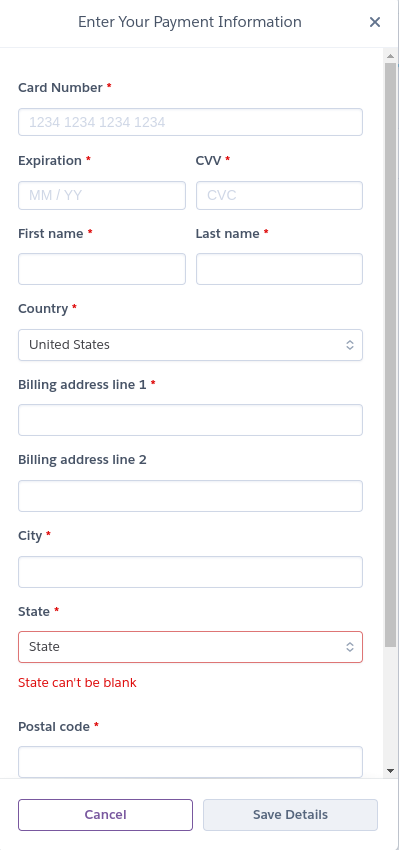
Step 4: Add it to Heroku
- Go to Billing in your Heroku dashboard
- Click Add Payment Method
- Enter your virtual card details
Step 5: Start using Heroku
Once added, billing works automatically.
No more failed payments.
Why Developers in Nigeria Prefer This Method
- Works consistently
- No random declines
- Supports subscriptions and usage billing
Common Heroku Payment Errors (And How to Fix Them)
Even with the right card, issues can still happen. Here’s how to handle them.
“Card Declined” Error
Why it happens:
- Your bank blocks international payments
- Card doesn’t support recurring billing
- Currency restriction (NGN only)
Fix:
- Switch to a dollar virtual card
- Ensure your card supports USD transactions
“Payment Authorization Failed”
Why it happens:
- Billing details don’t match
- Card flagged by fraud systems
- Insufficient authorization support
Fix:
- Double-check billing address
- Use a globally accepted card
“Billing Address Mismatch”
Why it happens:
Heroku uses strict verification.
If your:
- Address format is inconsistent
- Country doesn’t match card origin
The payment fails.
Fix:
- Use accurate billing details
- Match your card’s expected format
“Insufficient Funds” (Even When You Have Money)
Why it happens:
- FX conversion fails
- Temporary authorization holds
- Bank-side restrictions
Fix:
- Fund your card in USD
- Avoid naira-only cards
Best Payment Method for Developers in Nigeria
Not all users are the same. Here’s what works best:
Freelancers
- Need reliable recurring payments
- Best option: Dollar virtual card
SaaS founders
- Require stable billing for apps
- Best option: Dollar virtual card
Students & learners
- Need low-cost access
- Best option: Pre-funded virtual card
The pattern is clear:
Global billing requires global-compatible cards.
Alternatives to Heroku (If You’re Exploring Better Options)
If Heroku isn’t working for you, whether due to pricing, payment issues, or flexibility, you’re not stuck. Several solid platforms offer similar (and in some cases better) developer experiences.
But here’s the key thing most articles won’t tell you:
Switching platforms doesn’t automatically solve payment problems.
Most global cloud providers still require international billing support.
That said, here are the best Heroku alternatives, broken down in a way that actually helps you decide.
Best Heroku Alternatives Compared
| Platform | Best For | Starting Price | Key Advantage |
|---|---|---|---|
| Render | All-around replacement | ~$7/month | Built-in private networking & SSD infrastructure |
| Railway | Speed & prototyping | Usage-based | Zero-config deployments with Nixpacks |
| Fly.io | Global performance | Usage-based | Runs apps at the edge (low latency worldwide) |
| Northflank | Microservices & BYOC | Usage-based | Deploy to your own cloud accounts |
| Coolify | Full control / self-hosting | Free (software) | No vendor lock-in, complete infrastructure control |
Quick Breakdown: Which One Should You Choose?
Go with Render if you want a true Heroku replacement
- Similar developer experience
- Simple deployment flow
- Predictable pricing
Best for: Developers who want something familiar but more modern.
Choose Railway if you want speed
- Push-to-deploy simplicity
- Minimal setup
- Great for MVPs
Best for: Hackathons, side projects, rapid testing.
Use Fly.io for global apps
- Deploy apps close to users worldwide
- Excellent performance for international audiences
Best for: Apps with users across different continents.
Pick Northflank for advanced setups
- Supports microservices architecture
- Works with your own cloud (AWS, etc.)
Best for: Teams and scaling startups.
Try Coolify if you want full control
- Open-source
- No platform dependency
- Run on your own server
Best for: Developers who want zero vendor lock-in.
Important: Payment Reality for Nigerian Users
Here’s the truth:
All these platforms still require international payment methods.
So even if you switch from Heroku to:
- Render
- Railway
- Fly.io
You may still face:
- Card declines
- Billing failures
- FX restrictions
What Actually Solves the Problem
It’s not just about choosing a platform.
It’s about using a payment method that:
- Supports USD billing
- Works globally
- Passes international authorization checks
That’s why most Nigerian developers rely on virtual dollar cards regardless of the platform.
Bottom Line
- Heroku alternatives exist, and some are even better
- But payment issues don’t disappear when you switch platforms
- The real fix is using the right billing method
If you’re choosing based on ease + reliability:
Start with Render or Railway
Combine it with a working international payment method
That’s the setup that actually works in Nigeria.
Frequently Asked Questions
Can I use a Nigerian debit card on Heroku?
No. Most Nigerian debit cards are declined due to international transaction limits and billing incompatibility.
Why is my card declined on Heroku?
Common reasons include:
- Bank restrictions
- Billing address mismatch
- Unsupported card type
Does Heroku accept prepaid cards?
In most cases, no. Many prepaid cards fail authorization or are flagged by payment systems.
Can I pay for Heroku with PayPal?
No. Heroku does not support PayPal as a payment method.
How much does Heroku cost per month?
- Basic usage starts around $7/month
- Costs increase based on usage (dynos, add-ons)
What is the best way to pay for Heroku in Nigeria?
Using a virtual dollar card is the most reliable and widely accepted method.
Final Thoughts
Paying for Heroku in Nigeria isn’t really about money.
It’s about using the right payment infrastructure.
Once you switch to a globally accepted method:
- Payments go through
- Billing becomes seamless
- You can focus on building—not troubleshooting payments
Ready to Stop Failed Payments?
If you want a simple way to pay for Heroku without stress:
- Create your account
- Fund your wallet
- Generate your dollar virtual card
- Add it to Heroku
That’s it.
No failed payments. No interruptions.
Download the EverTry app:
- Android: https://play.google.com/store/apps/details?id=com.evertry.app
- iOS: https://apps.apple.com/app/id6746093728
This article is for informational purposes only. We do not represent or have any affiliation with Heroku or any of the third-party services mentioned. Pricing, features, and payment availability may change at any time and can vary by region and financial institution. Users are advised to verify all information directly with the respective service providers before making any financial decisions.
Matt Aluya is the founder of EverTry. A software engineer focused on virtual card issuance and stablecoin settlement for cross-border payments in emerging markets. LinkedIn · matt.aluya@evertry.co