
Yes, you can pay for Cursor from Uganda. Cursor accepts international Visa and Mastercard through its Stripe checkout; no PayPal, no mobile money directly. If your Ugandan bank card keeps getting declined, that’s usually the card’s international-payment settings, not Cursor blocking your country. The fix is a USD card funded from Uganda that presents as a normal Visa or Mastercard at checkout.
Here’s everything you need: current pricing, why cards fail, and the exact steps to get paid up.
Quick answer
| Payment method | Works on Cursor? | Notes |
|---|---|---|
| Visa (international) | ✅ | Standard checkout path |
| Mastercard (international) | ✅ | Standard checkout path |
| USD virtual card funded from UGX | ✅ | Presents as a normal card |
| Mobile money (MTN, Airtel) directly | ❌ | Not a Stripe option, can fund a card instead |
| PayPal | ❌ | Not supported by Cursor |
| Apple Pay / Google Pay | ❌ | Not enabled in Cursor’s checkout |
| Cryptocurrency (direct) | ❌ | No wallet or coin payments accepted |
| UGX billing | ❌ | Cursor charges in USD only |
Cursor pricing in Uganda
Cursor bills entirely in USD, so what you pay in UGX moves with the exchange rate. At the current mid-market rate (roughly 1 USD ≈ 3,730 UGX, early August 2026), here’s what each plan works out to. Your card issuer’s own rate will differ slightly; banks and card providers rarely use the exact mid-market number.
| Plan | Monthly price | Approx. UGX |
|---|---|---|
| Free | $0 | UGX 0 |
| Pro | $20/month | ≈ UGX 74,600 |
| Pro+ | $60/month | ≈ UGX 223,800 |
| Ultra | $200/month | ≈ UGX 746,000 |
| Teams | $40/seat/month | ≈ UGX 149,200 per seat |
Enterprise plans are billed by invoice through Cursor’s sales team rather than by card.
What payment methods does Cursor actually accept?
Cursor’s billing runs entirely through Stripe. At checkout, you enter a card number, expiry date, and CVV, and the charge posts in USD.
- Visa and Mastercard: both credit and debit, as long as the issuing bank allows international, card-not-present transactions. This last part is where most Ugandan declines happen.
- Recurring billing: Cursor auto-renews monthly (or annually, if you choose that cycle) against the same card until you cancel. A card that clears once but can’t hold a recurring authorization will fail to renew, even if the first payment went through.
- No PayPal, no Apple Pay, no Google Pay, no direct crypto. These are frequently requested on Cursor’s community forum but aren’t live as of mid-2026.
Why do Cursor payments fail in Uganda?
A “declined” message almost always traces back to one of these:
- Your bank blocks international online payments. Many Ugandan debit and credit cards ship with international, card-not-present transactions switched off by default.
- The card can’t hold a recurring authorization. Some cards clear a single charge but reject Stripe’s monthly auto-renewal attempt.
- Insufficient USD headroom. Cursor charges the exact plan price plus, sometimes, your card’s own FX margin; leave a small buffer above the sticker price.
- Billing address mismatch. If the address on file doesn’t match the details on your card, Stripe can flag the transaction.
- 3D Secure authentication didn’t complete. Some banks require a one-time-passcode step that times out or gets missed.
- The card has expired or was reissued. A new card number after a bank’s card refresh silently breaks the old recurring charge.
- Temporary fraud hold. Banks sometimes flag a first-time international SaaS charge and block it pending confirmation.
A decline doesn’t mean Cursor rejected your account, it almost always means the transaction was stopped before it reached Cursor at all, either by your bank or by Stripe’s own fraud checks.
The reliable fix: a USD card funded from Uganda
If your bank card isn’t cooperating, the workaround developers use is a virtual USD card, funded in Uganda, but presenting as a standard international Visa or Mastercard once you enter it at Cursor’s checkout.
How it works:
- Open a virtual USD card through a provider active in Uganda.
- Fund it: most providers let you top up from a Ugandan bank account or MTN Mobile Money / Airtel Money, converting UGX to USD inside the app. This is the only role mobile money plays here: it funds the card; it doesn’t pay Cursor directly.
- Copy the card number, expiry, and CVV from the provider’s app.
- Enter those details on Cursor’s billing page exactly like any other card.
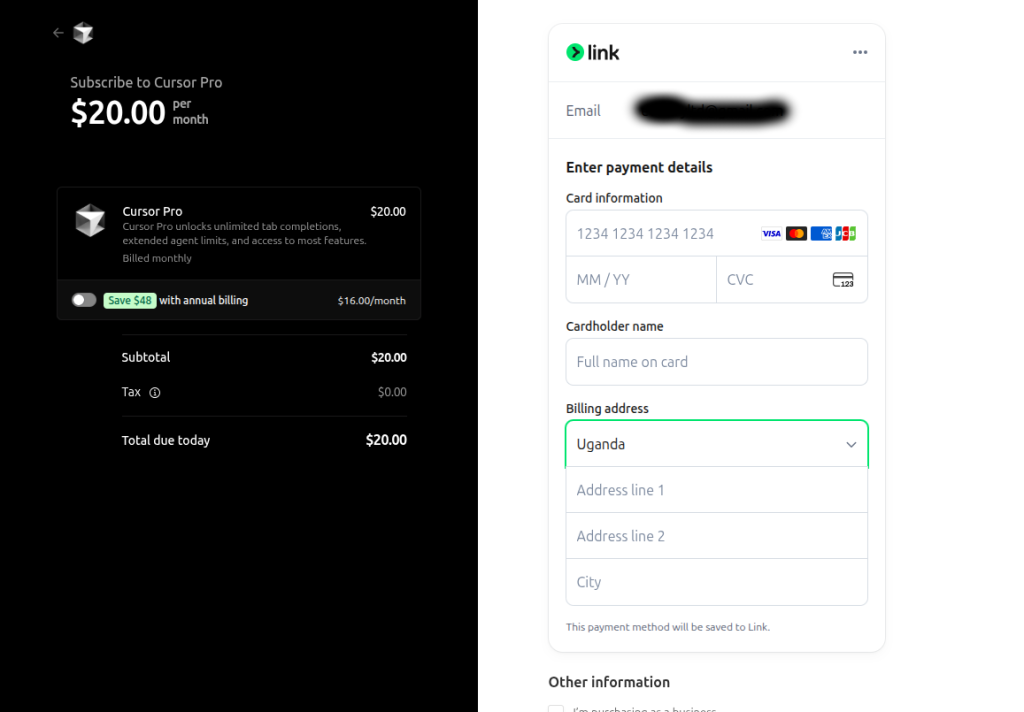
Before you pay, it’s worth checking: the card has enough balance plus a small buffer, the billing address matches what’s on file with the card, recurring payments are enabled on the card if the provider requires that toggle, and the card details are typed correctly.
Step-by-step: paying for Cursor in Uganda
- Create a Cursor account at cursor.com and sign in.
- Choose your plan: Pro, Pro+, Ultra, or a Teams seat.
- Open your virtual USD card in your provider’s app if you don’t already have one.
- Fund it from your bank account or mobile money, converting to USD.
- Copy the card details: number, expiry, CVV.
- Go to Cursor’s billing/settings page and select “Add payment method.”
- Enter the card details and a matching billing address.
- Confirm the payment. Complete any 3D Secure prompt your card provider sends.
- Verify the subscription is active on your Cursor account page.
Common Cursor payment errors and fixes
| Error | Likely cause | What to do |
|---|---|---|
| Card declined | Bank blocks international CNP payments | Ask your bank to enable it, or use a USD virtual card |
| Authentication failed | 3D Secure step timed out | Retry and complete the passcode prompt promptly |
| Insufficient funds | USD balance too low for charge + margin | Top up with a few dollars of buffer |
| Payment failed (generic) | Stripe-side issue or flagged card range | Wait a few minutes and retry, or switch cards |
| Billing address error | Address on file doesn’t match the card | Update your billing details to match exactly |
| Subscription renewal failed | Card expired or reissued | Add the new card details before the next billing date |
Can you pay for Cursor with mobile money?
Not directly. Cursor’s checkout only takes card details; there’s no MTN Mobile Money or Airtel Money option on the billing page itself. What mobile money can do is fund a virtual USD card, which you then use at checkout like any other Visa or Mastercard. It’s a two-step path, not a direct one.
Can you pay for Cursor in UGX?
No. Every Cursor plan is billed in USD, regardless of where you’re subscribing from. Your card or card provider handles the UGX-to-USD conversion on their end; Cursor itself never sees or charges shillings.
Is a virtual USD card a good option for paying for Cursor?
For readers without a card that clears international recurring payments, a virtual USD card is a reasonable route: you fund it from a Ugandan bank account or mobile money, and it behaves like an ordinary Visa or Mastercard at Cursor’s checkout. EverTry is one provider that issues this kind of card with UGX funding for African users; the setup mirrors the general steps above, and it’s worth comparing fees and funding options against whatever else is available to you before choosing one.
Cursor vs. other AI coding tools
| Tool | Monthly price (entry tier) | Accepts Visa/Mastercard |
|---|---|---|
| Cursor | $20 (Pro) | ✅ |
| GitHub Copilot | $10 (Individual) | ✅ |
| Claude Code | Usage-based | ✅ |
| Windsurf | $15 (Pro) | ✅ |
(Note to “Cursor” as a crypto token: some search results confuse Cursor the AI code editor with an unrelated cryptocurrency also called “Cursor.” This guide covers the coding tool from Anysphere, the one you use inside your editor, not a crypto asset.
FAQ
Can I pay for Cursor in Uganda? Yes, with an international Visa or Mastercard, or a USD virtual card funded from Uganda if your bank card is declined.
How much is Cursor in Uganda? Pro is $20/month (≈ UGX 74,600 at current rates), Pro+ is $60/month, Ultra is $200/month, and Teams is $40 per seat per month. Your card’s own exchange rate may vary slightly.
Can I use PayPal for Cursor? No. Cursor’s checkout only accepts card payments through Stripe.
Does Cursor accept Visa cards? Yes, as long as the card supports international, card-not-present transactions.
Does Cursor accept Mastercard? Yes, under the same conditions as Visa.
Can I pay using mobile money? Not directly, but MTN Mobile Money and Airtel Money can fund a virtual USD card that you then use at checkout.
Can I pay in Ugandan Shillings? No. All Cursor charges are in USD.
Why was my payment declined? Most often, a bank restriction on international payments, an address mismatch, insufficient balance, or a failed 3D Secure step. See the troubleshooting table above.
Does Cursor charge every month? Yes, on whatever billing cycle you select (monthly or annual) until you cancel.
Can I cancel my Cursor subscription anytime? Yes, from your account’s billing settings, cancellation takes effect at the end of the current billing period.
Can students in Uganda subscribe to Cursor? Students pay the same plans as any other user; there’s no Uganda-specific student pricing published by Cursor as of this writing.
Is Cursor available in Uganda? Yes, there’s no regional restriction on signing up or using Cursor from Uganda. The friction is payment-related, not access-related.
Related guides
- How to Pay for Cursor in Africa
- How to Pay for GitHub Copilot in Uganda
- How to Pay for Claude AI in Uganda
- Best Virtual Dollar Cards in Uganda
Key takeaways
- Cursor works fine from Uganda; the friction is payment, not access.
- It bills in USD through Stripe, via Visa or Mastercard only.
- Most declines come from a bank’s international-payment settings, not Cursor.
- A USD virtual card funded from UGX or mobile money is the standard workaround when a local bank card won’t clear.
Pricing and exchange rates in this article were accurate as of the last-updated date above and may have changed since; confirm current figures on Cursor’s official pricing page before subscribing. This article is not affiliated with, endorsed by, or sponsored by Cursor or Anysphere.
Matt Aluya is the founder of EverTry. A software engineer focused on virtual card issuance and stablecoin settlement for cross-border payments in emerging markets. LinkedIn · matt.aluya@evertry.co