
Nigerians can pay for OpenRouter in two reliable ways: a virtual dollar card funded in naira, or USDC sent directly through OpenRouter’s crypto checkout. A regular naira debit card usually fails because OpenRouter bills in US dollars and most Nigerian bank cards aren’t cleared for international USD charges. The minimum top-up is $5, card payments carry a 5.5% fee (with an $0.80 minimum), and crypto payments carry a 5.0% fee. This guide walks through both methods, why declines happen, and what they actually cost.
Can You Pay for OpenRouter from Nigeria?
Yes, OpenRouter works from Nigeria. There’s no country block. The catch is the payment method, not the platform itself.
OpenRouter accepts:
- International credit and debit cards (Visa, Mastercard)
- Virtual dollar cards
- USDC (cryptocurrency)
- AliPay (not relevant for most Nigerian users)
A standard Nigerian naira card technically falls into the “card” category above. Still, in practice it often doesn’t clear, because the charge OpenRouter sends is denominated in US dollars and most naira cards aren’t set up to settle foreign-currency transactions.
Why many Nigerian users experience payment failures
This isn’t unique to OpenRouter; it’s the same pattern Nigerian developers run into on OpenAI’s API, Azure, and most Stripe-billed platforms. A few things are usually happening at once:
- International transactions may be restricted on the card, either by default or after a bank-imposed limit.
- The charge is in USD, and the card is denominated in naira, a currency mismatch that gets rejected before your bank even reviews it.
- Stripe (OpenRouter’s card processor) does its own verification, and naira-issued BINs (the first digits of the card number) are flagged more often than dollar-denominated cards.
- FX limits: even where international payments are technically enabled, quarterly or monthly dollar caps can be too low, or already used up.
None of this means anything is wrong with you or your account. It’s a card-currency problem, and it has a straightforward fix.
Why Is Your Nigerian Card Declined on OpenRouter?
If you’ve already tried and failed, here’s what’s most likely going on.
Your card doesn’t support international payments
Many Nigerian debit cards ship with international payments switched off by default. Some banks let you enable this in-app; many don’t offer it at all on naira-only cards.
Your bank blocks USD transactions
Even with international payments enabled, some cards are naira-only at the settlement level; they simply can’t process a dollar-denominated charge.
The card doesn’t support online recurring payments
OpenRouter isn’t a subscription, but auto top-up works like one; it recharges your saved card automatically. Cards that don’t support recurring/CIT (card-initiated transaction) billing can fail here even if a one-off charge would have worked.
Insufficient balance after fees
OpenRouter charges your top-up amount plus its fee. If you fund a card with exactly $5, a $5 top-up attempt can fail because the actual charge (with the fee) is slightly higher than what’s available.
Billing information mismatch
If the billing address you enter doesn’t match the card’s issuing details, Stripe’s address verification can decline the transaction, a common, fixable error.
Temporary fraud prevention
Multiple failed attempts in a short window can trigger automatic fraud holds on both the card issuer’s side and Stripe’s side. Repeated retries make this worse, not better.
Callout Troubleshooting: If your payment keeps failing, it doesn’t necessarily mean your card is bad. Many Nigerian debit cards simply aren’t enabled for international USD transactions, the fix is usually a different card type, not a different bank.
Payment Method 1: Use a Virtual Dollar Card
For most Nigerian users, this is the simplest path, because it’s just a normal card entry on OpenRouter’s checkout, no crypto wallet, no network selection.
What is a virtual dollar card?
A digital card, issued in USD, that you fund with naira through a fintech app. You get a card number, expiry date, and CVV; no physical card required, and it’s built specifically to clear on international, dollar-billed platforms.
Why it works with OpenRouter
Because it’s dollar-denominated at the card level, OpenRouter’s Stripe checkout sees an ordinary USD Visa or Mastercard, not a naira card, so the currency-mismatch problem that causes most declines doesn’t apply.
Requirements before you start
- A funded Nigerian bank account or wallet
- A verified account with your virtual card provider
- At least $6–$7 loaded on the card (to comfortably cover the $5 minimum top-up plus fees)
Step 1: Create a virtual dollar card
Sign up with a fintech provider that issues virtual dollar cards; for example, EverTry, which funds a USD virtual card directly from naira, USDT, USDC, or BTC. Complete verification and generate your card.
Step 2: Fund the card
Convert naira to a USD balance on the card. Fund slightly above what you plan to spend, so the fee doesn’t leave you short.
Step 3: Log in to OpenRouter
Go to openrouter.ai and sign in, or create an account if you don’t have one yet.
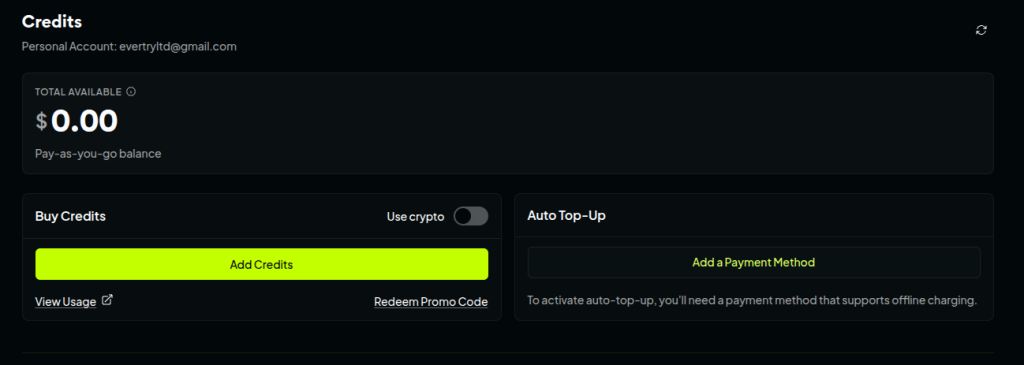
Step 4: Add credits
Open the Credits page, click Add Credits, and choose an amount ($5 minimum, up to $25,000 per transaction).
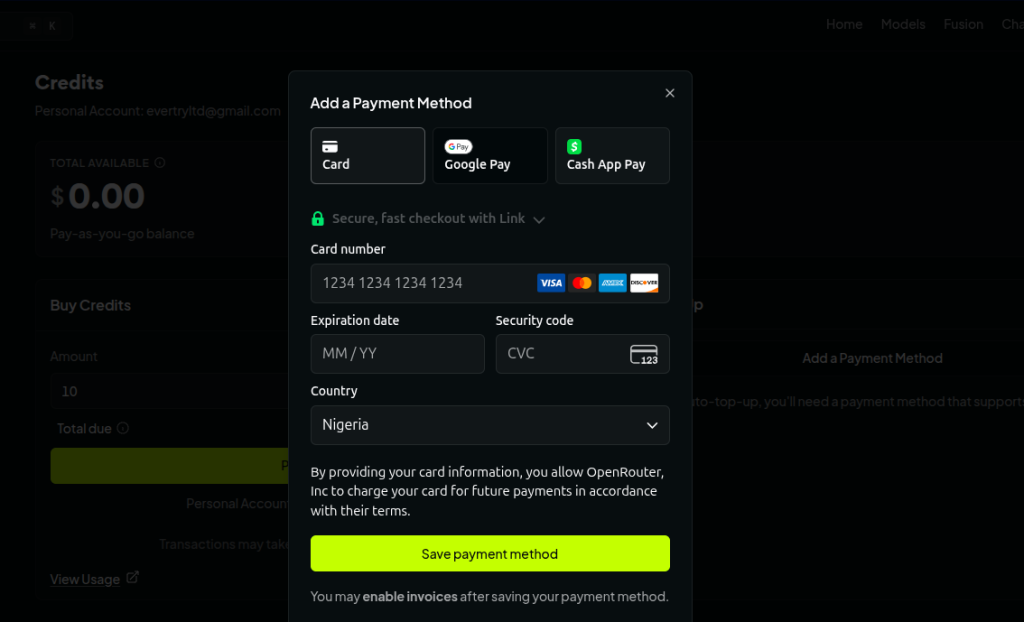
Step 5: Complete payment
Select card as the payment method, enter your virtual card details, and confirm. Credits typically post within a few minutes.
What happens after payment?
Your balance updates on the Credits page. If it doesn’t appear within an hour, check your email for a Stripe receipt; no receipt usually means the card was declined rather than charged.
Payment Method 2: Pay with USDC
This suits developers who already hold crypto and are comfortable with wallet transfers. It’s also the cheaper of the two methods.
Supported crypto
OpenRouter accepts USDC only for direct crypto payments, not Bitcoin, SOL, USDT, or other assets. If you hold a different token, you’d need to convert to USDC first.
How crypto payments work
You select the crypto option at checkout, confirm the network OpenRouter’s payment page is settling on, and send USDC from your wallet. The payment is processed and credits post once the transaction confirms on-chain.
Step-by-step walkthrough
- Sign in at openrouter.ai and open the Credits page.
- Choose the crypto payment option.
- Enter the credit amount you want ($5 minimum).
- Confirm the network shown on the checkout page before sending anything.
- Send USDC from your wallet.
- Wait for confirmation; credits usually post within 10–15 minutes.
Common crypto mistakes
- Wrong network: sending USDC on a chain the checkout isn’t settling on is the single most common cause of a “payment not received” error, and there’s no way to recover funds sent to the wrong chain.
- Wrong wallet/asset: sending USDT or another stablecoin instead of USDC won’t be recognized.
- Non-refundable payments: unlike card purchases, crypto top-ups on OpenRouter cannot be refunded, even for unused credits.
- Waiting for confirmations: don’t resend if a transaction hasn’t confirmed yet; give it time before assuming it failed.
Warning: Crypto payments are non-refundable. Double-check the network before sending, a wrong-chain transaction generally can’t be reversed.
Virtual Dollar Card vs Crypto, Which Should You Choose?
| Feature | Virtual Dollar Card | USDC |
|---|---|---|
| Ease of use | Simple card entry, familiar checkout flow | Requires a crypto wallet and network awareness |
| Speed | Usually minutes | Minutes, but depends on chain confirmation |
| Refund eligibility | Unused credits refundable within 24 hours | Not refundable |
| Fees | 5.5%, $0.80 minimum | 5.0%, no minimum |
| Best for beginners | Yes | No |
| Best for developers already holding crypto | Works, but pricier per naira converted | Yes, lowest fee, no card needed |
If this is your first time buying OpenRouter credits, a virtual dollar card is the more forgiving option, with no chain-selection risk, and unused credits are refundable. If you already hold USDC and are comfortable with wallet transfers, crypto is marginally cheaper and skips the card-decline risk entirely.
How Much Does It Cost to Pay for OpenRouter?
Figures below are OpenRouter’s published fees as of August 2026.
Minimum top-up
$5 per transaction, with a $25,000 maximum.
Card payment fees
5.5% of the purchase amount, with an $0.80 minimum fee. This minimum is the detail most guides skip; it means small top-ups cost proportionally more than the headline 5.5% rate.
Crypto fees
A flat 5.0% on USDC purchases, with no minimum, so the stated rate applies even on a $5 top-up.
Why small top-ups cost more
Because the $0.80 card-fee floor doesn’t scale down, a $5 top-up effectively pays 16% in fees, not 5.5%. The rate only settles to the true 5.5% once your top-up passes roughly $14–15.
| Top-up | Card Fee | Effective Rate |
|---|---|---|
| $5 | $0.80 | 16.0% |
| $10 | $0.80 | 8.0% |
| $20 | $1.10 | 5.5% |
| $50 | $2.75 | 5.5% |
| $100 | $5.50 | 5.5% |
Pro Tip: Top up more than the $5 minimum where you can. A $20 top-up already brings the effective card fee down to the standard 5.5%, a $5 top-up alone doesn’t.
Did You Know? OpenRouter credits can expire after one year if left unused, so it’s worth topping up in amounts you’ll actually spend within that window rather than in the smallest possible increments.
Common OpenRouter Payment Problems (and How to Fix Them)
Payment declined
Confirm international payments are enabled on your card, or switch to a virtual dollar card. Try a different card before assuming the issue is with OpenRouter.
Card charged but credits not added
Wait up to an hour; Stripe integration delays are common. If credits still haven’t appeared, contact OpenRouter support with your account email, transaction date, and amount.
Payment stuck
For crypto, allow 10–15 minutes for confirmation before troubleshooting further.
Crypto not credited
Double-check you sent USDC on the correct network. If the transaction confirmed on-chain but credits never posted, reach out to OpenRouter support directly; this generally isn’t something a card-side fix can solve.
Payment keeps failing
Repeated rapid retries can trigger a temporary fraud hold. Stop, wait, and try again later rather than repeating the same failed attempt.
Wrong billing address
Make sure the billing address entered at checkout matches the address associated with your card or virtual card provider.
Still can’t pay?
If nothing above resolves it, OpenRouter’s support team (reachable by email) can review the specific decline reason on their end.
Best Way to Pay for OpenRouter in Nigeria
Given everything above, the most reliable setup for a Nigerian user is a dollar-denominated virtual card you can fund quickly from naira, without needing to hold or manage crypto.
What matters most in a payment solution for this use case:
- USD-denominated funding, so the currency mismatch that causes most declines never comes up
- Fast naira-to-dollar conversion, so you’re not waiting days to top up
- Support for online, USD-billed platforms specifically, not just physical-card use
- Security and reliability, since this card will likely be reused for other subscriptions and tools
EverTry is one option built around exactly this: a virtual dollar card funded via naira, USDT, USDC, or BTC, usable on OpenRouter and similar USD-billed platforms without the recurring-decline issues that come with a standard naira card.
Frequently Asked Questions
What payment methods does OpenRouter support? International credit/debit cards, AliPay, and USDC. Nigerian naira cards often fail due to currency mismatch, so a virtual dollar card is the more reliable card-based option.
What is the minimum payment for OpenRouter? $5 per transaction, up to a maximum of $25,000.
Can I use my Nigerian debit card? You can try, but naira cards frequently fail because OpenRouter bills in USD. A virtual dollar card avoids this issue.
Can I pay OpenRouter with crypto? Yes, USDC only, at a 5.0% fee, with no minimum. Other cryptocurrencies aren’t accepted directly.
Does OpenRouter support Google Pay? No. OpenRouter currently accepts cards, AliPay, and USDC, not Google Pay or PayPal.
Is OpenRouter legal in Nigeria? Yes. There’s no restriction on using OpenRouter from Nigeria; the barrier is payment method, not access.
How does OpenRouter charge users? OpenRouter uses a prepaid credit system, not a subscription model. You buy credits, and usage is deducted per token as you use models through the API or chat interface.
What happens if my payment fails? No credits are added and, in most cases, no charge goes through. Check for a Stripe receipt email; no receipt usually confirms the card was declined rather than charged.
Are OpenRouter credits refundable? Card-purchased credits are refundable within 24 hours if unused. Crypto purchases are not refundable at any point.
Can I use OpenRouter for free? New accounts get a small free allowance, and free-tier models are available at 50 requests/day without credits, rising to 1,000 requests/day once you’ve purchased at least $10 in credits.
Final Thoughts
Most OpenRouter payment failures from Nigeria come down to one thing: a naira card trying to settle a dollar charge. Once you switch to a dollar-denominated funding method, a virtual dollar card or USDC, the declines that trip up first-time buyers largely disappear.
If you’re just getting started, a virtual dollar card is the more forgiving choice: familiar checkout, refundable unused credits, and no wallet or network to manage. If you already hold USDC, OpenRouter’s crypto checkout is marginally cheaper and works just as well.
Either way, top up in an amount larger than the $5 minimum where you can; it brings your effective fee down to OpenRouter’s standard rate instead of the inflated rate small top-ups carry.
Sources: OpenRouter Documentation, OpenRouter Pricing, OpenRouter Support, OpenRouter FAQ (openrouter.ai/docs/faq), accurate as of August 2026.
This guide is for informational purposes only and is not financial or investment advice. Pricing, fees, and payment methods mentioned above (including OpenRouter’s top-up minimums, card and crypto fees) reflect published figures as of August 2026 and are subject to change without notice; always confirm current rates on openrouter.ai before completing a purchase. EverTry is not affiliated with, endorsed by, or sponsored by OpenRouter; it is mentioned here as one available option for Nigerian users seeking a USD-denominated virtual card. Card decline reasons can vary by bank and issuer, and EverTry cannot guarantee that any specific card or payment method will be accepted by a third-party platform.
Matt Aluya is the founder of EverTry. A software engineer focused on virtual card issuance and stablecoin settlement for cross-border payments in emerging markets. LinkedIn · matt.aluya@evertry.co