
To buy GitHub Copilot Pro in India, sign in to GitHub, go to Settings → Billing & Plans, choose a Copilot plan, and pay with a supported international Visa, Mastercard, or PayPal account. If your Indian card is declined, it’s usually because the card isn’t enabled for recurring international payments, a different problem than a one-time charge failing, and one that a virtual dollar card built for subscriptions can solve. It’s also worth checking that GitHub is currently accepting new sign-ups for your preferred plan, since availability has shifted more than once during 2026.
This guide walks through both problems: getting past GitHub’s own sign-up limits, and getting past your card.
Is GitHub Copilot Currently Available to Buy?
Before troubleshooting payment, check this first: a chunk of “why can’t I buy Copilot” confusion has nothing to do with India or cards at all.
GitHub paused new individual sign-ups (Pro, Pro+, Student) in April 2026, then rebuilt its billing system around usage-based AI Credits in June 2026. Sign-ups for individual plans started reopening gradually from mid-June, plan by plan, meaning your specific plan may already be open, or may still be catching up.
Why Some Users Think GitHub Copilot Was Shut Down
The pause caused real confusion in GitHub’s community forums, with some users assuming Copilot itself was being discontinued. It wasn’t; this was a temporary sign-up limitation during a billing system change, not a product shutdown. Copilot has continued running for existing subscribers throughout.
How to Check Whether Your Preferred Plan Is Available
Go to github.com/features/copilot/plans while signed in. If a plan is open for new sign-ups, you’ll see an active “Upgrade” or “Subscribe” button. If it’s still limited, GitHub’s own guidance is simply to check back; there’s no separate application process or waitlist to join.
GitHub Copilot Plans Explained
| Plan | Monthly price | Best for |
|---|---|---|
| Free | $0 | Trying Copilot, light personal use |
| Pro | $10 | Individual developers |
| Pro+ | $39 | Power users leaning on chat and agent mode |
| Max | $100 | Heavy, sustained agentic coding work |
| Business | $19/seat | Teams needing admin controls |
| Enterprise | $39/seat | Large organizations with SSO/compliance needs |
(Verify current pricing and availability at github.com/features/copilot/plans, plan sign-up status has changed multiple times in 2026.)
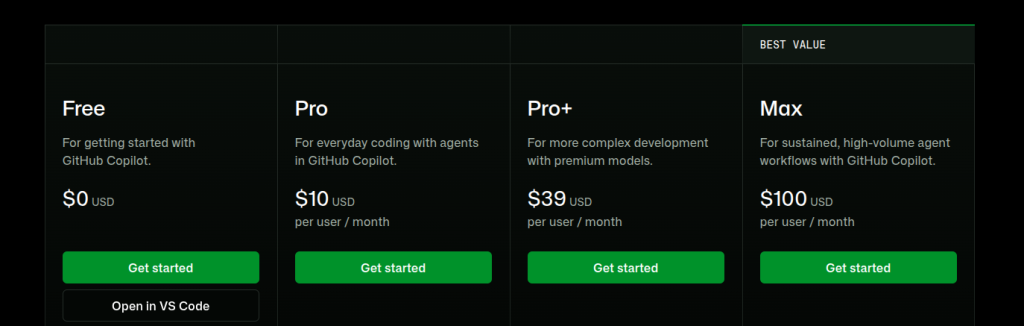
GitHub Copilot Free
A genuinely usable entry point with a monthly cap on completions and chat use, good for trying Copilot before committing to a paid plan.
GitHub Copilot Pro
The standard individual paid tier. Unlimited code completions, plus a monthly AI Credits allowance for chat and agent-mode work. The default choice for most solo developers.
GitHub Copilot Pro+
Adds a larger AI Credits allowance and access to additional premium models, aimed at developers who lean heavily on chat and agent mode rather than just autocomplete.
GitHub Copilot Max
Built for sustained, high-volume agentic work, running Copilot as an automated coding agent for extended periods. Overkill for most individual developers; worth it specifically if you’re running agent workflows for hours a day.
GitHub Copilot Business
Per-seat pricing for teams, with organization-level admin controls and pooled usage.
GitHub Copilot Enterprise
Adds SSO, IP indemnity, and enterprise-grade security controls on top of Business, at a higher per-seat price.
GitHub Copilot Pricing in India
Copilot bills in US dollars, regardless of where you’re subscribing from; there’s no separate INR price list.
Monthly vs Annual Pricing
Paying annually is typically cheaper than twelve monthly charges; for Pro, for example, the annual rate works out to roughly 17% less than paying month to month. Annual billing also means fewer recurring-charge attempts overall, which incidentally reduces how often a shaky card gets tested.
Does GitHub Charge GST in India?
Indian subscriptions are generally subject to 18% GST. GST-registered businesses can typically reclaim this as input credit; individual consultants and freelancers with a personal GSTIN may be able to add it at checkout. Confirm the exact current treatment in your GitHub billing settings, since tax handling details can change.
Foreign Exchange Charges You Should Expect
Even when an Indian card successfully pays a USD charge, expect your bank to add a foreign transaction/conversion markup, commonly in the range of a few percent on top of the mid-market exchange rate. This is separate from whether the payment succeeds at all; it’s simply the cost of paying a dollar-denominated bill from a rupee-denominated card. Worth factoring in when comparing payment methods, not just whether they work.
What Are GitHub AI Credits?
Since June 2026, Copilot bills premium usage through AI Credits instead of the older “premium request” system. Each paid plan includes a monthly credit allowance roughly matching its subscription price (1 credit ≈ $0.01), and usage beyond that draws down the pool or bills as overage, depending on your settings.
Code completions and Next Edit Suggestions remain free and unmetered on every paid plan; credits are only consumed by Chat, Agent Mode, Copilot CLI, cloud agents, and premium-model calls.
Which Models Consume AI Credits?
Standard code completions don’t touch your credit balance at all. Chat conversations, agentic multi-file edits, and any interaction using a premium model draw from your monthly allowance; heavier or more frequent chat/agent use burns through credits faster.
How to Monitor AI Credit Usage
Your remaining balance is visible in Settings → Billing & Plans → Copilot. GitHub will prompt you to upgrade if you’re consistently approaching your limit; upgrading only charges the price difference between plans.
Why Do Indian Cards Fail on GitHub Copilot?
This is the section worth reading carefully: “the card just doesn’t work” undersells what’s actually happening.
One-Time Payments vs Recurring Payments
A card that successfully makes a single online purchase doesn’t automatically support what a subscription needs. Recurring billing requires the card to authorize the merchant for repeated, automatic charges, a distinct capability from a one-off transaction, and one that international-focused cards handle more consistently than standard domestic debit cards.
Why Debit Cards Fail More Often
Indian debit cards are often provisioned primarily for domestic and one-time international use. International credit cards, and cards specifically built for recurring subscriptions, tend to have a smoother track record with merchants like GitHub that bill automatically every month.
Common GitHub Payment Error Messages
- Card declined: the issuing bank rejected the charge outright.
- Authentication failed: the card’s authentication step didn’t complete successfully.
- Payment couldn’t be processed: a general processing failure, often tied to currency or recurring-payment support.
- Recurring payment declined: the card processed fine once but isn’t set up to accept automatic repeat charges.
If you see any of these, the fix usually isn’t retrying the same card repeatedly; it’s switching to a payment method built for recurring international billing.
Every Way to Pay for GitHub Copilot in India
Option 1: International Credit Card
Pros: the most direct route; works well if your card is genuinely enabled for international recurring billing. Cons: many Indian debit cards, and even some credit cards, aren’t provisioned for this by default. Requirements: confirm with your bank that international and recurring payments are both enabled; they’re separate settings.
Option 2: PayPal
How it works: link a supported card or account to PayPal and select it at GitHub checkout.
Limitations: you still need a card behind PayPal that can fund the recurring charge, so this doesn’t fully bypass the underlying card problem; it just adds a layer.
Option 3: GitHub Mobile App & Google Play Billing
Some developers on GitHub’s community forums report successfully subscribing through the GitHub Android app, where payment routes through Google Play billing, which does support UPI.
Results vary: other users in the same discussions report the option doesn’t appear for their account, and it’s not a method GitHub documents as officially supported. If you try this, verify it works for your account before relying on it for a plan you need active continuously.
Option 4: Virtual Dollar Card
A virtual dollar card is a digitally issued Visa or Mastercard denominated in USD, built specifically for international and recurring online billing, the exact combination GitHub’s payment page needs.
EverTry is one provider offering this: create a card, fund it with supported stablecoins, and add it to GitHub like any other card. It’s one option among several here, not the only route, but it’s built to solve precisely the recurring-international gap that trips up standard Indian cards.
| Payment method | Recurring billing | International by default | Ease |
|---|---|---|---|
| International credit card | Depends on issuer | Depends on issuer | Easy if already enabled |
| PayPal | Depends on linked card | Yes | Moderate |
| GitHub Mobile App (UPI via Google Play) | Unofficial, unconfirmed | N/A (INR) | Inconsistent |
| Virtual dollar card | Yes | Yes | Easy |
Step-by-Step: How to Subscribe to GitHub Copilot Pro
- Log in to GitHub at github.com.
- Open Billing & Plans: click your profile icon (top right) → Settings → Billing and plans.
- Choose your plan: select Copilot Pro, or another available plan, and click Upgrade.
- Add your payment method: enter your card details or select PayPal.
- Complete payment: authorize the charge.
- Activate Copilot in your IDE using the same GitHub account.
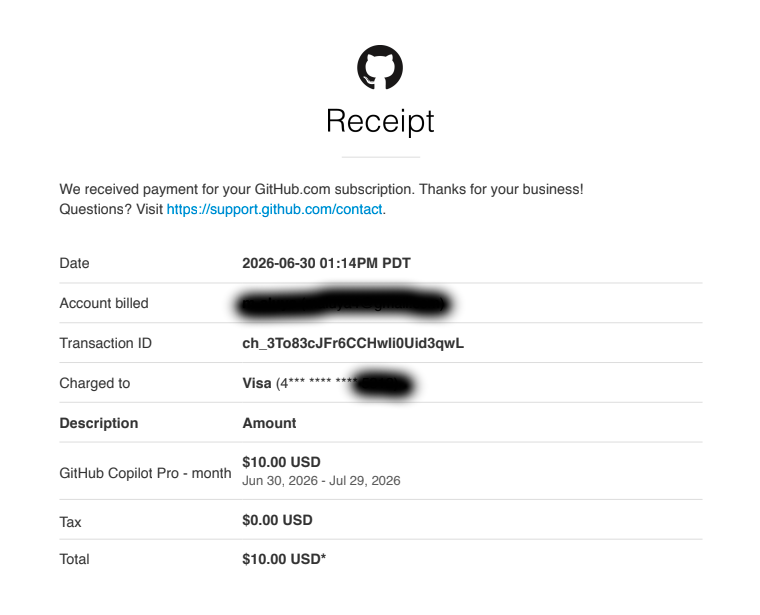
One quirk worth knowing: some users report being unable to purchase Pro+ directly; you may need to subscribe to Pro first, then upgrade from within your billing settings. Check your account’s current flow, as this has changed alongside the 2026 billing updates.
How to Activate GitHub Copilot in Your IDE
Once subscribed, install the Copilot extension and sign in with the same GitHub account:
- VS Code: install “GitHub Copilot” from the Extensions marketplace, then sign in via the prompt.
- JetBrains (IntelliJ, PyCharm, etc.): install the GitHub Copilot plugin from the JetBrains Marketplace.
- Visual Studio: available via the Visual Studio Installer under individual components.
- Neovim: install via the official GitHub Copilot Neovim plugin and authenticate through
:Copilot setup.
What to Do If GitHub Copilot Payment Keeps Failing
- Check subscription availability: confirm your plan is actually open for sign-ups right now (see the first section).
- Confirm international payments are enabled on your card via your banking app or by calling customer care.
- Confirm recurring payments specifically are enabled: this is a separate toggle from general international access on many Indian cards.
- Try PayPal as an alternative route if your card supports it.
- Try a virtual dollar card: since it’s built for exactly this combination, it sidesteps steps 2 and 3 entirely. EverTry is one option here.
- Contact GitHub Support if payment still fails after confirming your card should work; there may be an account-side issue unrelated to the card.
Can You Buy GitHub Copilot Without a Credit Card?
Yes, in a few ways: PayPal (if funded by a debit card or bank account), a virtual dollar debit card, or inconsistently, the GitHub Mobile App’s Google Play billing route. A traditional credit card isn’t strictly required.
Can You Pay Using UPI?
Not directly through GitHub’s own billing; GitHub’s documented payment methods are international cards and PayPal, and UPI isn’t among them. The Google Play billing workaround (Option 3 above) is the closest thing to a UPI route, but it’s unofficial and inconsistent rather than a supported payment path.
Can Students Get GitHub Copilot for Free?
Yes. Verified students can get GitHub Copilot at no cost through the GitHub Student Developer Pack, which typically requires verification with a school-issued email or valid student ID. This is the only legitimate free route to Copilot Pro-level access; offers of discounted or shared Copilot subscriptions sold outside GitHub’s official channels generally violate GitHub’s terms of service and are worth avoiding.
Is GitHub Copilot Worth Buying?
For most working developers, yes, inline completions that match your typing speed, in-editor chat, and agent mode for multi-file changes add up to real time saved on boilerplate, tests, and refactoring. Students and freelancers get particular value from the free Student Pack tier or the $10 Pro plan. Whether Pro+ or Max is worth the jump depends entirely on how much you use chat and agent mode versus straightforward autocomplete; light users rarely need to go past Pro.
GitHub Copilot vs ChatGPT vs Cursor AI
| Feature | GitHub Copilot | Cursor | ChatGPT |
|---|---|---|---|
| IDE integration | Native, deep | Native (own editor) | Via plugins/extensions |
| Code completion | Strong, unmetered on paid plans | Strong | Limited outside chat |
| Best for | In-editor coding across any IDE | AI-native coding workflow | General-purpose reasoning + code |
| Pricing entry point | Free / $10 | Paid tiers vary | Free / paid tiers vary |
Each tool suits a different workflow; Copilot’s strength is working inside whichever IDE you already use, rather than requiring a switch.
Frequently Asked Questions
How much is GitHub Copilot Pro in India? $10/month or $100/year, billed in USD, plus applicable GST and any foreign transaction fee your card issuer charges.
Can I buy GitHub Copilot using UPI? Not directly through GitHub’s own checkout. Some users report success via the GitHub Mobile App’s Google Play billing route, but it’s unofficial and inconsistent.
Why can’t I buy GitHub Copilot? Two separate possibilities: your specific plan may still be limited following GitHub’s 2026 sign-up changes (check availability first), or your card is failing on GitHub’s recurring international billing requirement.
Why was GitHub Copilot unavailable? GitHub temporarily paused new individual sign-ups in April 2026 during a billing system overhaul, then reopened plans gradually from June 2026 onward. The product itself was never discontinued.
Does GitHub accept Indian debit cards? Some do, if explicitly enabled for international recurring payments, but many Indian debit cards aren’t provisioned this way by default, which is the most common cause of failed Copilot payments.
Does GitHub accept PayPal? Yes, as one of its two officially documented payment methods alongside international cards.
Can I buy GitHub Copilot without a credit card? Yes, PayPal or a virtual debit-style dollar card both work without a traditional credit card.
Can students use GitHub Copilot for free? Yes, through the GitHub Student Developer Pack, with student verification required.
What is GitHub Copilot Max? The highest individual tier, built for heavy, sustained agentic coding work, at $100/month.
How do AI Credits work? Each paid plan includes a monthly USD-equivalent credit allowance for Chat, Agent Mode, and premium-model use; code completions stay free and unmetered.
Why does my payment keep failing? Most often because the card can process a single charge but isn’t enabled for automatic recurring international billing, a distinct setting from general international payments.
Which payment method works best? It depends on what you already have. If your card is confirmed enabled for recurring international payments, use it directly. If not, a virtual dollar card built for recurring billing avoids the guesswork.
Final Thoughts
Buying GitHub Copilot Pro from India comes down to two separate checks: confirm GitHub is currently accepting sign-ups for the plan you want, then make sure your payment method can handle a recurring international USD charge, not just a one-time one. Most declines trace back to that second, narrower requirement.
If your regular card doesn’t support recurring international subscriptions, a virtual dollar card such as EverTry can be a practical alternative for paying GitHub Copilot and other global developer tools that bill the same way.
Ready to pay for GitHub Copilot without payment headaches? Create an EverTry virtual dollar card and use it for GitHub Copilot, Cursor AI, ChatGPT Plus, Claude Pro, Netlify, Vercel, AWS, DigitalOcean, and hundreds of other international subscriptions that require recurring payments.
Pricing, plan availability, and billing details verified July 2026. GitHub’s plans and sign-up availability have changed multiple times this year; confirm the current status at github.com/features/copilot/plans before subscribing.
This guide is for general information only and isn’t financial or legal advice. EverTry is not affiliated with or endorsed by GitHub, Inc. or Microsoft Corporation; GitHub, GitHub Copilot, and related marks belong to their respective owners. Pricing, plan availability, and billing mechanics described here were accurate as of July 2026 and have changed multiple times this year; confirm current details at github.com/features/copilot/plans before subscribing. Payment success depends on your card issuer’s policies and GitHub’s own processing; EverTry has no control over either. The GitHub Mobile App/UPI payment route mentioned in this guide is based on unofficial community reports, not documented GitHub support, and results may vary. Use of digital assets such as USDT or USDC may be subject to regulations in your jurisdiction.
Matt Aluya is the founder of EverTry. A software engineer focused on virtual card issuance and stablecoin settlement for cross-border payments in emerging markets. LinkedIn · matt.aluya@evertry.co