If you’re trying to pay for Vultr and your card keeps failing, you’re not alone.
This guide shows you:
- What Vultr actually charges for
- The simplest way to pay (even if your card fails)
- Why payments get declined (especially outside the US/Europe)
Just what works.
What Is Vultr and How Billing Works
Vultr is a cloud platform. You use it to deploy servers, host apps, run databases, and scale infrastructure.
What You’re Actually Paying For
You’re billed based on usage:
- Compute (servers / instances)
- Storage (block storage, backups)
- Bandwidth (data transfer)
- Add-ons (snapshots, load balancers)
You don’t “subscribe” in the traditional sense. You pay for what you use.
Pay-As-You-Go vs Prepaid Credit
This is where most confusion starts.
Pay-As-You-Go
- You’re billed based on hourly usage
- Charges accumulate over time
- Payment is taken automatically
Prepaid Credit
- You fund your account first
- Vultr deducts from your balance
- No active services if the balance hits zero
In practice, most users fund their accounts upfront to avoid interruptions.
Billing Cycle: Hourly vs Monthly
Vultr uses hourly billing, but with monthly caps.
- Servers are billed hourly
- Each resource has a monthly maximum
- You never pay more than the monthly price
This gives flexibility (spin up → delete anytime)
Accepted Payment Methods
Vultr supports:
- Credit / Debit cards
- PayPal
- Bitcoin (important limitation below)
- AliPay
- Wire Transfer
Important: Bitcoin Limitation
You cannot directly start with Bitcoin.
You must:
- Add a card or PayPal first
- Then deposit Bitcoin
This is where many users get stuck.
Wire Transfer (Important Edge Case)
Wire transfer works, but comes with friction:
- You must include a memo:
- Invoice number OR
- Your Vultr account email
- Missing memo = payment may be returned
- Delays are common
If your payment is late:
- You must open a support ticket
- Extensions are not guaranteed
Wire is not ideal unless you’re moving large amounts.
Vultr Free Tier Program (What Most People Miss)
This is one of the most misunderstood parts of Vultr.
What Is the Free Tier?
Vultr offers limited free compute resources to selected users.
The goal:
- Help developers test ideas
- Support early-stage projects
- Encourage cloud adoption globally
It’s not open access, it’s controlled.
Who Is Eligible?
To even be considered, your account must have:
- A valid, non-prepaid credit card
- Two-factor authentication enabled
No exceptions here.
TL;DR: The Simplest Way to Pay for Vultr
If Your Card Works
- Add your card to billing
- Fund your account
- Deploy your server
- Enable auto-billing
If Your Card Fails (This Is Most People)
- Use a virtual dollar card
- Fund it in USD
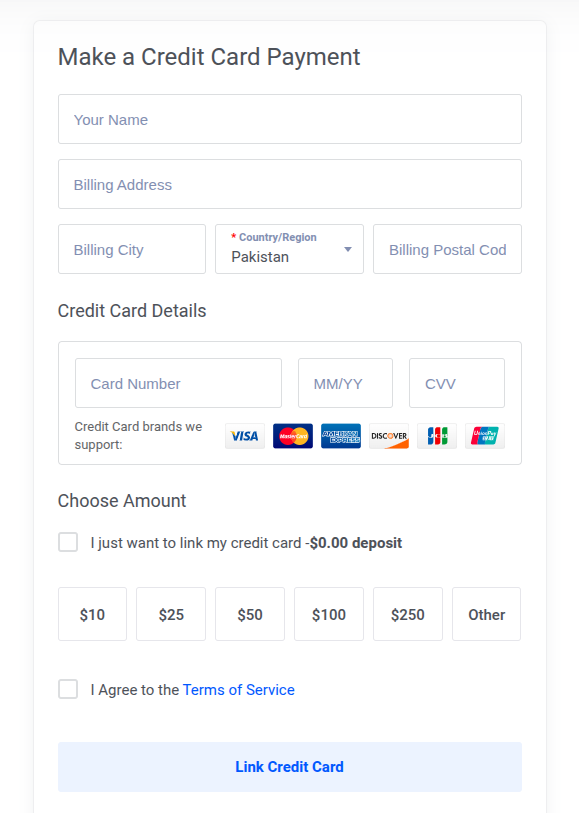
- Add it to Vultr
- Run a small test charge
This bypasses:
- FX restrictions
- International payment blocks
- Local bank limitations
Why Payments Fail on Vultr (Especially Outside the West)
This is the real problem.
Not “how to pay”, but why it doesn’t work.
1. FX Restrictions (Biggest Issue)
Many banks (especially in Africa and parts of Asia):
- Block international transactions
- Limit monthly dollar spend
- Disable online payments by default
Real scenario:
You have money in your account → but your bank declines the payment.
2. Card Not Enabled for International Use
Some debit cards:
- Only work locally
- Require manual activation
If this isn’t enabled, Vultr declines instantly.
3. 3D Secure (OTP) Failures
Vultr requires authentication.
Problems happen when:
- OTP doesn’t arrive
- Bank gateway fails
- Session times out
Result: silent failure or decline
4. Billing Address Mismatch
If your card details don’t match:
- Wrong ZIP/postcode
- Different country format
Payment gets flagged or rejected
5. Insufficient USD Value (Hidden Issue)
Even if you have local currency:
- Exchange rate fluctuations matter
- Fees reduce usable balance
👉 Example:
KES 10,000 ≠ $10 at checkout
What This Means (Quick Reality Check)
If you’re in:
- Madagascar
- Kenya
- Egypt
- Nigeria
- Pakistan
- India
- Ghana
- Malawi
- Bangladesh
Your local debit card will likely fail at some point.
Not always. But often enough to be a problem.
Paying for Vultr, What Actually Works
Now that you understand why payments fail, let’s break down every payment method on Vultr, with real-world reliability, not theory.
Payment Methods Explained (With Real Tradeoffs)
This is the part most guides get wrong.
They list options, but don’t tell you which ones actually work in your country.
Let’s fix that.
1. Debit / Credit Cards
Works globally? → Depends on your bank
Speed: Instant
Failure risk: High (outside US/Europe)
Best for: Users with internationally enabled cards
What Works
- Visa / Mastercard with international payments enabled
What Fails (Common Reality)
- Local debit cards (especially in Africa/Asia)
- Cards with FX limits
- Cards blocked for online transactions
If your card works, this is the simplest option.
If it fails once, don’t keep retrying; switch strategy.
2. Virtual Dollar Cards (Most Reliable Option)
Works globally? → Yes
Speed: Instant
Failure risk: Low
Best for: Anyone in restricted regions
Why This Works
Virtual dollar cards:
- Are funded in USD
- Bypass local currency conversion issues
- Are enabled for international payments by default
This eliminates:
- FX restrictions
- Bank-level international blocks
- Currency mismatch errors
3. PayPal
Works globally? → Limited in some countries
Speed: Instant
Failure risk: Medium
Best for: Users in supported regions
The Catch
- Not all countries support full PayPal functionality
- Linking cards can still fail
- Withdrawals/refunds can be tricky
Works well if your PayPal is fully verified
Useless if PayPal is restricted in your country
4. Bitcoin (Crypto)
Works globally? → Conditional
Speed: Medium (depends on network)
Failure risk: Medium
Best for: Crypto-native users
Critical Limitation
You cannot start with Bitcoin.
You must:
- Add a card or PayPal first
- Then deposit Bitcoin
This defeats the purpose for many users
5. AliPay
Works globally? → Mostly China-focused
Speed: Fast
Failure risk: Low (within supported region)
Best for: Users in China
Not relevant for most global users.
6. Wire Transfer
Works globally? → Yes
Speed: Slow (1–5 days)
Failure risk: Low (if done correctly)
Best for: Large payments/businesses
Important Rules
- You must include a memo:
- Invoice number OR
- Your account email
- If you miss this:
→ Payment may be returned - If the billing deadline is close:
→ You must contact support for the extension
This is reliable, but not practical for quick usage.
So, What’s the Best Method?
Here’s the honest answer:
- If your local card works → use it
- If it fails → virtual dollar card is your best bet
- If you’re advanced → crypto or wire (with limitations)
Everything else is situational.
Step-by-Step: Pay for Vultr Using a Virtual Dollar Card
This is the method most people end up using, especially in regions where local cards fail.
No hype. Just the exact flow.
Step 1: Create a Virtual Dollar Card Account
Choose a provider that:
- Supports USD funding
- Works internationally
- Has stable transaction success rates
You’re looking for reliability, not just availability.
Step 2: Fund Your Wallet (In USD)
- Convert your local currency → USD
- Fund your wallet
Make sure you fund slightly above your expected charge
(to cover fees + FX differences)
Step 3: Generate Your Virtual Card
You’ll get:
- Card number
- Expiry date
- CVV
Works exactly like a regular Visa/Mastercard online.
Step 4: Add Card to Vultr Billing
Go to:
- Billing → Payment Methods
Add your card details.
Use a valid billing address (don’t leave this sloppy)
Step 5: Run a Small Test Charge
Before deploying anything heavy:
- Fund a small amount
- Let Vultr attempt a charge
This confirms everything is working.
Step 6: Deploy Normally
Once successful:
- Spin up servers
- Enable auto-billing or keep balance topped up
Alternative Methods (Advanced Users)
If you don’t want to use cards, here’s what’s left.
Paying with Bitcoin (Proper Flow)
- Add card or PayPal
- Fund account (initially)
- Switch to Bitcoin deposits
Without step 1, this won’t work.
Paying via Wire Transfer
Use this only if:
- You’re funding a large balance
- You don’t need instant activation
Steps:
- Initiate a transfer from your bank
- Add a correct memo
- Wait for confirmation
- Contact support if the delay affects billing
Expect friction; this is not beginner-friendly.
Automating Vultr Payments (Underrated but Important)
Most people ignore this until their server goes down.
Enable Auto Top-Up
This ensures:
- Your balance never hits zero
- Services don’t get suspended
Avoid Service Downtime
If your balance runs out:
- Servers can stop
- Data loss risk increases
Always maintain a buffer.
Set Budget Awareness
Even though Vultr doesn’t force budgets:
- Track your usage
- Monitor active instances
- Delete unused resources
This prevents “surprise bills.”
Paying for Vultr From Your Country (What Actually Works)
Let’s get specific.
Because “Vultr accepts cards” is useless advice if your card keeps failing.
Here’s what users actually experience across the Global South when paying for Vultr.
Can You Pay for Vultr from Ghana?
Short answer: Yes, with limitations.
What works:
- Virtual dollar cards
- Some international bank cards
What fails:
- Local debit cards (inconsistent)
Same pattern: success depends on access to FX.
Can You Pay for Vultr from Nigeria?
Short answer: Yes, but most local cards fail.
What works:
- Virtual dollar cards → Most reliable
- PayPal (fully verified) → Sometimes
What usually fails:
- Naira debit cards → Frequent declines
- Cards with FX limits
Reality: Nigerian banks often restrict international transactions.
Can You Pay for Vultr from India?
Short answer: Yes, but not always smoothly.
What works:
- International-enabled cards
- Virtual dollar cards
What fails:
- Cards blocked for recurring/international billing
RBI-related restrictions can cause issues.
Can You Pay for Vultr from Pakistan?
Short answer: Yes, but expect friction.
What works:
- Virtual dollar cards
- Some credit cards
What fails:
- Many local debit cards
Can You Pay for Vultr from Malawi?
Short answer: Yes, but options are limited.
What works:
- Virtual dollar cards
What fails:
- Most local banking cards
Can You Pay for Vultr from South Africa?
Short answer: Yes, easier than most regions.
What works:
- Credit cards
- PayPal
What fails:
- Some debit cards
Can You Pay for Vultr from Egypt?
Short answer: Yes — but restrictions exist.
What works:
- Virtual dollar cards
- Some bank cards
What fails:
- FX-restricted cards
Can You Pay for Vultr from Morocco?
Short answer: Yes, but limited.
What works:
- International-enabled cards
- Virtual dollar cards
What fails:
- Local cards without FX access
The Pattern (Across All Countries)
It’s the same story:
- If your card supports international USD payments → it works
- If not → it fails silently or gets declined
That’s why virtual dollar cards keep showing up as the fallback.
FAQs
Why is my card declined on Vultr?
Most declines happen because:
- Your bank blocks international payments
- Your card has FX limits
- 3D Secure authentication fails
- Your billing details don’t match
It’s usually your bank, not Vultr.
Does Vultr accept prepaid cards?
Yes, but with caveats.
- Some prepaid/virtual cards work
- Others get declined due to risk controls
For Free Tier eligibility, prepaid cards are not accepted.
Can I pay Vultr from Africa or Asia?
Yes.
But:
- Local cards often fail
- International-enabled cards or alternatives work better
This is a payment infrastructure issue, not a Vultr limitation.
Can I pay Vultr with Bitcoin?
Yes, but not directly.
You must:
- Add a card or PayPal
- Then fund with Bitcoin
This step is mandatory.
What is the easiest way to pay for Vultr?
- If your card works → use it
- If it fails → use a virtual dollar card
That’s the simplest, most reliable path.
Does Vultr support PayPal in all countries?
No.
- PayPal availability depends on your country
- Some regions have limited functionality
How do I avoid service interruption on Vultr?
- Enable auto top-up
- Keep a balance buffer
- Monitor usage regularly
Running out of funds can stop your servers.
Final Take (What Actually Matters)
Paying for Vultr is simple if your payment method is supported.
That’s the real issue.
- Vultr itself works globally
- Payments don’t
So your strategy should be:
- Start with your local card
- If it fails → switch fast (don’t keep retrying)
- Use a method built for international payments
That’s it.
A More Reliable Way to Pay (If Your Card Keeps Failing)
If you’re stuck at checkout, the problem usually isn’t Vultr; it’s your card.
This is where virtual dollar cards come in.
Platforms like EverTry are built for this exact use case:
- Paying for global services
- Bypassing local bank restrictions
- Avoiding failed international transactions
Instead of fighting your bank, you’re using a card that’s already optimized for USD payments.
Get Started (Takes a Few Minutes)
If you want a smoother setup:
- Create your account
- Fund your wallet (in your local currency or USDT)
- Generate your virtual dollar card
- Add it to Vultr and run a test charge
Once it works, you’re done, no more failed payments.
Bottom Line
You don’t need to “figure out Vultr.”
You need a payment method that actually works globally.
Once you fix that, everything else is straightforward.
Download the EverTry App
Ready to fix your payments and get started faster?
Create your account, fund your wallet, and generate your virtual dollar card in minutes.
This article is for informational purposes only and does not constitute financial, legal, or investment advice. Payment availability, card acceptance, and platform policies for Vultr may change at any time without notice. Users are responsible for ensuring compliance with their local laws and the terms of any third-party services mentioned.
EverTry is not affiliated with Vultr or any other external platform referenced in this content. All product and service names are the property of their respective owners.
Matt Aluya is the founder of EverTry. A software engineer focused on virtual card issuance and stablecoin settlement for cross-border payments in emerging markets. LinkedIn · matt.aluya@evertry.co